1
2
3
4
5
6
7
8
9
10
11
12
13
14
15
16
17
18
19
20
21
22
23
24
25
26
27
28
29
30
31
32
33
34
35
36
37
38
39
40
41
42
43
44
45
46
47
48
49
50
51
52
53
54
55
56
57
58
59
60
61
62
63
64
65
66
67
68
69
70
71
72
73
74
75
76
77
78
79
80
81
82
83
84
85
86
87
88
89
90
91
92
93
94
95
96
97
98
99
100
101
102
103
104
105
106
107
108
109
110
111
112
113
114
115
116
117
118
119
120
121
122
123
124
125
126
127
128
129
130
131
132
133
134
135
136
137
138
139
140
141
142
143
144
145
146
147
148
149
150
151
152
153
154
155
156
157
158
159
160
161
162
163
164
165
166
167
168
169
170
171
172
173
174
175
176
177
178
179
180
181
182
183
184
185
186
187
188
189
190
191
192
193
194
195
196
197
198
199
200
201
202
203
204
205
206
207
208
209
210
211
212
213
214
215
216
217
218
219
220
221
222
223
224
225
226
227
228
229
230
231
232
233
234
235
236
237
238
239
240
241
242
243
244
245
246
247
248
|
---
title: 'Running a Minecraft server for "free"'
description: 'Stop wasting money on managed hosting services if you already have SSH access to some from of computing'
pubDate: 'Mar 28 2025'
---
For many, the first thing people think of when they access a new computational device is to see whether or not they can run DOOM on it. Being born in the 2000s,
the equivalent I think of is whether or not I can run a Minecraft server on it.
In case you aren't already familiar, running a Java Edition server is relatively simple. All you really need to do is install the Java Runtime and then run the
[server.jar](https://www.minecraft.net/en-us/download/server) provided by Mojang. Thanks in large to Notch's early decisions to write Minecraft in Java, the JVM
abstracts much of the cross-platform shenangians meaning that the server executable will run wherever the Java itself is capable of running.
The networking required is also fairly simple. At the bare minimum all Minecraft needs is a singular TCP port to allow for multiplayer functionality.
# Running within a constricted environment
Obviously under most conditions you'll likely have full root access to the machine as well as full admin access to the router. But what I want to show is that
in fact **neither of the 2 above are hard-set conditions for running a server.** Rather all you need is access to internet and the ability to run binary executables.
As an example, I will be using a computational environment that I myself have a user on but I do not control the router nor do I have root access (and let's just
assume that neither can I install user applications via the built-in package manager). This particular machine is running Ubuntu, while the ideas here are also
theoretically applicable to a Windows machine; I myself (and most other people) will find that working with Windows Server Edition is more trouble than its worth.
So let's set out a few of the restrictions and requirements for this particular setup.
1. Once again, no root access, no access to router, no access to the package manager
2. Other players other than yourself must be able to also join and play simultaneously
3. This computational environment only allows a process to run for 2 hours before `renice 19` (the lowest CPU scheduling priority pretty much only runs when CPU is idle)
4. We want to be nice. Meaning if there are no players, then there is no point in leaving the server running. However, it must still be available on demand
*Let's go through and tackle each of these points above...*
## 1. Getting the thing to run
This is relatively straight forward actually. Instead of relying on the package manager itself you can just grab a [pre-built binary of the JDK](jdk.java.net/21/)
which comes with the `java` binary itself. Grab the appropriate version according to which Minecraft update you'd like to run.
As for the server JAR itself, most people don't use the one provided by Mojang but rather elect for one that has been patched with various performance gains.
For me, I personally use [Purpur](https://purpurmc.org/) which is directly built on top of Paper
Once you have both of these, all you need to do is run the JAR.
```bash
PATH_TO_JAVA/java -Xmx1024M -Xms1024M -jar minecraft_server.VERSION.jar nogui
```
Now you have the server running, but there's no way to access it since its only listening from `localhost`. Luckily as a quick testing method, SSH provides some
level of tunneling that allows you to port forward through SSH
```bash
ssh -L 25565:localhost:25565 user@remote.ip
```
This will essentially route port 25565 to your local 25565. So once you SSH in using this command and run the server, you'll be able to play by connecting to `localhost:25565`
## 2. Allowing other players to join
This is great, but a Minecraft server for a single person is no better than just running a single-player world. Again, we don't have access to the router so we can't
exactly expose this port to the outside world even if we set the server to listen on `0.0.0.0`
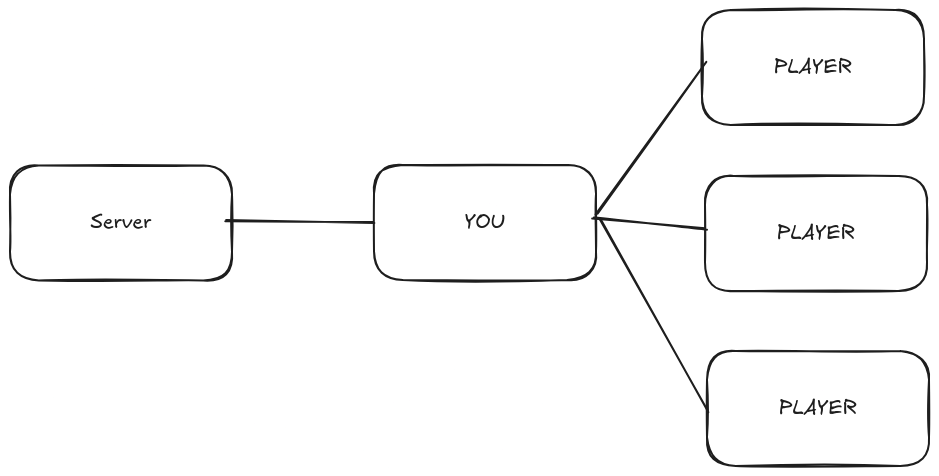
You could in theory port forward your local port or even share a VPN connection with everyone joining. But this creates a massive bottleneck which is the stability of the
connection between you and the server.
[](https://postimg.cc/JDSjQksM)
This isn't great if you don't have stable internet or have bandwidth limitations. Also its not particularly scalable since your home PC needs to be running at all times with
this SSH connection on to allow others to play.
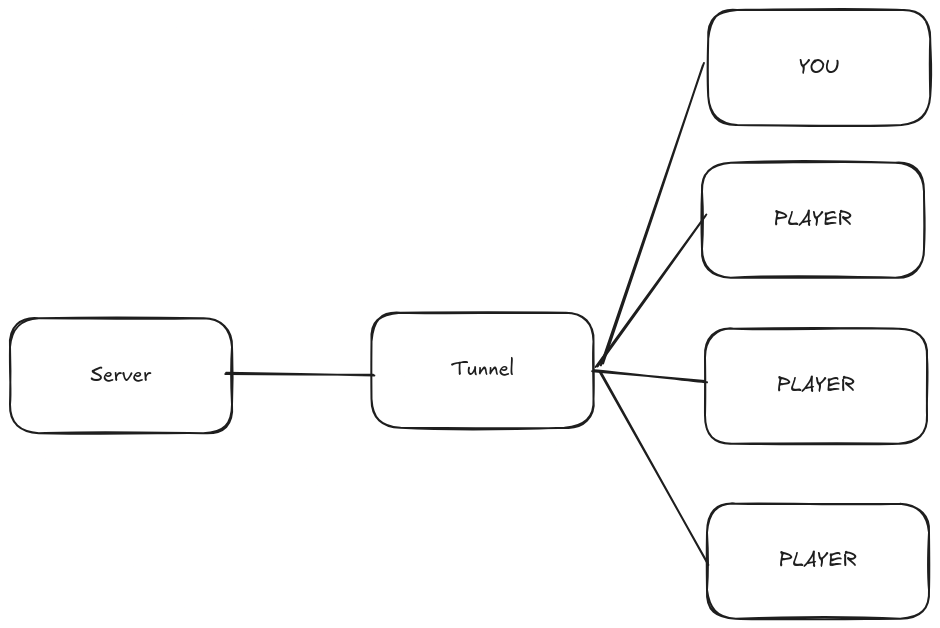
The solution is to route the game through a tunnel:
[](https://postimg.cc/RW0qN00R)
A tunneling service can be running 24/7 making the connection available around the clock. There is still the bottleneck between the server and the tunnel, but as
long as you pick a good tunneling service this shouldn't be much of an issue in terms of latency or bandwidth.
For this I highly recommend setting up [playit.gg](https://playit.gg/) which provides a very generous free tier for this sort of game hosting. Setup is also fairly
simple since its basically just 1 additional binary to run with your server.
Players connect to this tunnel which then forwards the traffic onto the `localhost:25565` on the server machine itself, meaning no need to access the router to port forward
## 3. Runtime Limitations
One of the unique requirements for my use case is that a process cannot be running for more than 2 hours or else it will degrade in terms of CPU priority.
Your first intuition may be to simply stop and restart the server and tunnel every 2 hours. Maybe even write a bash script to do just that. But the situation is actually not that simple.
We first must understand how UNIX/Linux spawns processes:
A **program** is a passive entity. It is merely the code that is stored on disk. We can think of this like a recipe written in a cookbook
A **process** is an *active* instance of a **program** that is currently running.
- It has its own memory, CPU state, file descriptors, etc.
- Multiple processes can be created from the same program
In the cooking analogy we can think of this as a kitchen where the recipe is being cooked
Processes don't just spawn from thin air, UNIX/Linux uses 2 syscalls `fork()` and `exec()` to create new processes.
- When `fork()` is called on a particular process, it creates an *exact duplicate* of itself. This new duplicate is called the child while the original is called the parent.
- The child inherits various things from the parent such as their process priority (nice value), environment variables, and open file descriptors
- When `exec()` is called. The program running within that process gets replaced by a different program. It still retains all of the additional metadata attached to that
particular process, but now its running some different code.
So then when you launch some program from `bash` on Linux, we can think of it at a high level as doing the following:
```
bash (Parent process)
└── fork()
└── child process (duplicate of bash)
└── exec("nvim")
└── child process becomes nvim
```
Essentially `fork() -> exec()`. You'll quickly notice that this creates a parent-child relationship for all processes in UNIX/Linux (with the exception of the init process).
This is just the high level idea, an OS course or something similar can teach you all the nitty gritty details.
### So what's the problem?
Well let's take this situation for example.
```
At time 0 (on initial SSH):
sshd (SSH Daemon Session for USER) [nice: 0]
└── bash (User Shell) [nice: 0]
```
When I SSH in to the server, the `sshd` process is forked then `exec()` is called spawning the shell itself. Then, running the server JAR does something similar where
the `bash` process is forked and then `exec()` replaces the forked-bash with `java`.
Nice-ness is a value we use to denote CPU priority (lower = higher priority). Let's assume that all processes start with a nice value of 0, indicating the highest CPU priority, and that when a process
runs for 120 time units it gets `renice 19`-ed (meaning the nice value gets set to 19).
Now let's assume that for whatever reason at time 30 I decide to run the server
```
At time 30 (Running server application)
sshd (SSH Daemon Session for USER) [nice: 0]
└── bash (User Shell) [nice: 0]
└── java -jar app.jar (Java Application) [nice: 0]
```
OK fine, that's all good. But let's progress time a bit more...
```
At time 120 (Running server application)
sshd (SSH Daemon Session for USER) [nice: 19]
└── bash (User Shell) [nice: 19]
└── java -jar app.jar (Java Application) [nice: 0]
```
Uh oh, that bash process and ssh process has been running for more the 120 time units. Luckily `renice` is not recursive by default so our server is still unaffected by the
lowered CPU priority.
```
At time 150 (Running server application)
sshd (SSH Daemon Session for USER) [nice: 19]
└── bash (User Shell) [nice: 19]
└── java -jar app.jar (Java Application) [nice: 19]
```
Alright so we'll need to restart the server right? Let's terminate our bash and java processes then re-fork them.
```
At time 151 (Running server application)
sshd (SSH Daemon Session for USER) [nice: 19]
└── bash (NEW User Shell) [nice: 19]
└── java -jar app.jar (NEW Java Application) [nice: 19]
```
OH NO! Because the child-processes inherited the nice value it means that even though we technically stopped and re-started both the server and bash, due to the ssh session
spanning longer than 120 time units, all processes forked from it also take on the penalized nice value!
So as you can see, simply stopping and restarting like that isn't a viable solution
### The Solution = Re-SSH
The solution to this problem is simple, we just need to close our SSH session every time we gain the penalty. For me that's 2 hours, so every 2 hours I need to stop and re-start
the server. Doing this manually would be quite laborious so this is a good job for some random old laptop or even a Raspberry Pi to trigger.
```bash
while true; do
echo "[$(date)] Starting SSH session..."
ssh "$USER@$HOST" << 'EOF'
echo "SSH session started. Will auto-exit in 2 hours."
<run server stuff here> &
sleep 7200 # 2 hours
echo "Time's up. Goodbye."
exit
EOF
echo "[$(date)] Session ended. Reconnecting in 5 seconds..."
sleep 5
done
```
This will ensure that a new `sshd` process is being forked from the `sshd master daemon` (which almost certainly has no issues with being nice-d since you want people to be able to ssh in),
avoiding the time constrain issue.
If you have access to 2 machines, you could theoretically bounce them back and forth to maintain infinite uptime, but as you'll soon see even the script above doesn't satisfy the 4th condition.
## Being nice, let's not waste CPU
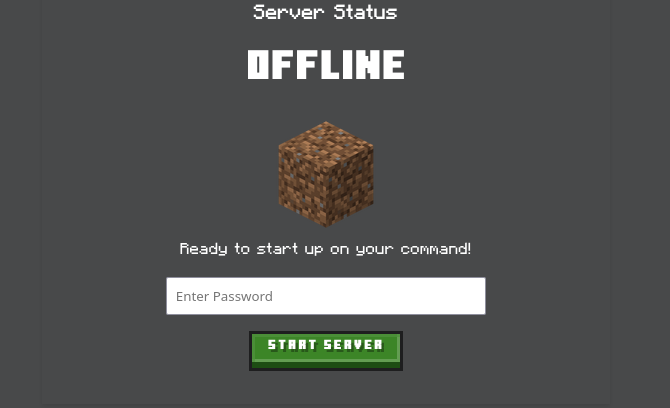
There's no point in keeping a server up if there's no players. So what if we were able to have some way to on-demand start and stop when someone wants to play.
The solution I've come up with is to run a small flask app which manages checking for players, as well as spawning the new sshd process as discussed in part 3.
[](https://postimg.cc/sBLbrTBz)
To start, the server. Users can navigate to the website and trigger the flask app to run a bash script that handles SSH-ing into the relevant machine.
```bash
# Example start.sh
#!/bin/bash
ssh -o StrictHostKeyChecking=no steve@chicken-jockey.com << 'EOF'
cd /home/yukais6/java-neural-net
tmux new-session -d -s server
tmux send-keys -t server'./tunnel &' C-m
tmux send-keys -t server 'jdk-21.0.5/bin/java -Xmx1024M -Xms1024M -jar server.jar nogui' C-m
exit
EOF
```
```bash
# Example stop.sh
ssh -o StrictHostKeyChecking=no steve@chicken-jockey.com << 'EOF'
tmux kill-session -t supervised-cluster
exit
EOF
```
We can run a second thread within the flask-app to check when the server should restart. (aka calling stop.sh then start.sh)
Using Minecraft's built in RCON API (you need to port forward the RCON port found in `server.properties` file), we can run commands from within Minecraft and parse
various information.
```python
def get_player_count(host, password, port):
with MCRcon(host, password, port=port) as mcr:
response = mcr.command("list")
print(response)
match = re.search(r"There are (\d+) of a max of \d+ players online", response)
if match:
return int(match.group(1))
else:
print("Error: Could not parse player count from response.")
return None
```
Similarly, we can also use this API to make announcements which is helpful for announcing when the server is about to restart:
```python
def announce_to_server(message: str, host: str, password:str,port: str):
with MCRcon(host, password, port) as mcr:
resp = mcr.command("say " + message)
return resp
```
With this we have solved the problem of "being nice". We only run the server on demand, while also managing the nice-ness value of the server accordingly.
---
So if you have access to some form of computing and are paying for Realms or managed hosting. Why not consider self-hosting.
|
