
diff options
| author | Pinapelz <yukais@pinapelz.com> | 2025-12-02 12:45:26 -0800 |
|---|---|---|
| committer | Pinapelz <yukais@pinapelz.com> | 2025-12-02 12:45:26 -0800 |
| commit | ab8aceab5053eedd4ecc0a90c3a1e8223db8a607 (patch) | |
| tree | 529c9ad0f97f9d22afe7cc8bcb8b45c9d7408e0f | |
| parent | 51771de00644d8ca3d99e112d655a49321c25a3c (diff) | |
codespell: lint spelling
| -rw-r--r-- | src/content/blog/discord-auto-reply.md | 8 | ||||
| -rw-r--r-- | src/content/blog/ffxiv-frontline-bonus.md | 4 | ||||
| -rw-r--r-- | src/content/blog/ffxiv-gil-making.mdx | 16 | ||||
| -rw-r--r-- | src/content/blog/ffxiv-gilded-araya.md | 6 | ||||
| -rw-r--r-- | src/content/blog/linux/2024-year-of-the-linux-desktop.md | 2 | ||||
| -rw-r--r-- | src/content/blog/linux/kvm/kvm-part1.md | 16 | ||||
| -rw-r--r-- | src/content/blog/mc-server-selfhost.md | 2 | ||||
| -rw-r--r-- | src/content/blog/patchwork-posts/patchwork-archive-1.md | 2 | ||||
| -rw-r--r-- | src/content/blog/patchwork-posts/patchwork-archive-4.md | 2 | ||||
| -rw-r--r-- | src/content/blog/recovering-interrupted-pacman-upgrade.md | 6 | ||||
| -rw-r--r-- | src/content/blog/repairing-windows-efi.md | 6 | ||||
| -rw-r--r-- | src/content/blog/umiguri.md | 6 | ||||
| -rw-r--r-- | src/content/blog/xqc-amd-seeds.md | 4 | ||||
| -rw-r--r-- | src/content/blog/youtube-live-timestamping.md | 8 | ||||
| -rw-r--r-- | src/content/blog/yunohost-docker-for-enduser.md | 6 |
15 files changed, 47 insertions, 47 deletions
diff --git a/src/content/blog/discord-auto-reply.md b/src/content/blog/discord-auto-reply.md index b2a192f..1d0a833 100644 --- a/src/content/blog/discord-auto-reply.md +++ b/src/content/blog/discord-auto-reply.md @@ -59,7 +59,7 @@ Authorization: DISCORD_AUTH_TOKEN {"content":"test"} ``` -Yep, thats all it takes to send a message. +Yep, that's all it takes to send a message. ## Bridging the Gap to Python Its great that we can send messages, but how do we receive them in Python such that we can trigger a POST request to reply. Turns out this actually gets a bit tricky. To get around this, I'll be using a custom Discord client known as [BetterDiscord](https://betterdiscord.app/) to do this. @@ -108,7 +108,7 @@ module.exports = meta => { }; }; ``` -I've opted to use a websocket server since it was the most striaghtforward given that Node modules are not possible in BetterDiscord. All we're doing here is listening for any messages we get and then sending them through to the websocket server. Lucky for us, the JSON version of these messages contain both the user ID and the channel ID already which is all the identification information we will need. +I've opted to use a websocket server since it was the most straightforward given that Node modules are not possible in BetterDiscord. All we're doing here is listening for any messages we get and then sending them through to the websocket server. Lucky for us, the JSON version of these messages contain both the user ID and the channel ID already which is all the identification information we will need. ## Integrating an LLM Now that we have thing up and running on the Discord end, let's connect to a LLM. @@ -217,7 +217,7 @@ class AutoReply: ``` ### Config -I'm using a JSON file to store configuration data pretaining to authentication and the websocket server. +I'm using a JSON file to store configuration data pertaining to authentication and the websocket server. ```json { "OPENAI_API_KEY": "", @@ -238,7 +238,7 @@ REPLY_TO = [ ] ``` -The BetterDiscord plugin broadcasts every message frome every DM and server channel to the websocket server. Here on the Python end we can specify which messages we want to reply to by adding additional entries to the `REPLY_TO` list. +The BetterDiscord plugin broadcasts every message from every DM and server channel to the websocket server. Here on the Python end we can specify which messages we want to reply to by adding additional entries to the `REPLY_TO` list. We add the USER_ID to identify who we want to reply to and along with which channel we want to reply to them in. Generally this will be the same channel that the message was sent in, but you can change it to whatever you want. diff --git a/src/content/blog/ffxiv-frontline-bonus.md b/src/content/blog/ffxiv-frontline-bonus.md index b446080..efcea45 100644 --- a/src/content/blog/ffxiv-frontline-bonus.md +++ b/src/content/blog/ffxiv-frontline-bonus.md @@ -23,7 +23,7 @@ The server may have this information stored somewhere, but its weird that this i I can't think of many good reasons for why the UI doesn't count these Extra Levels as apart of normal Series Levels either, since its practically impossible for any player to reach an unsigned integer overflow during the time of 1 Series Malmstone season. # Frontline Losing Streak Bonus -I'd like to document exactly how the Frontline PVP losing bonus works in Final Fantasy XIV. There's a vast amount of uncertainity online about how +I'd like to document exactly how the Frontline PVP losing bonus works in Final Fantasy XIV. There's a vast amount of uncertainty online about how rewards are handed out in Frontline. I believe that a vast majority of players don't even know such a bonus exists, the remaining people who know about the bonus aren't exactly able to explain it or chalk it up to seemingly random things (such as how long the PVP match takes). First, I'll share with you what is officially posted on the [Lodestone](https://na.finalfantasyxiv.com/lodestone/playguide/contentsguide/frontline/): @@ -44,7 +44,7 @@ var consecutiveThirds = 0 For the buff to begin, `consecutiveThirds` must equal `2`. -For everytime you place 3rd in a Frontline match, this counter will increase by `1`. Placing 2nd **DOES NOT** reset the counter, but placing 3rd **will reset the counter**. +For every time you place 3rd in a Frontline match, this counter will increase by `1`. Placing 2nd **DOES NOT** reset the counter, but placing 3rd **will reset the counter**. This means that when `consecutiveThirds = 1`, you can place 2nd n-times and not have this counter reset. diff --git a/src/content/blog/ffxiv-gil-making.mdx b/src/content/blog/ffxiv-gil-making.mdx index be34e7a..086c761 100644 --- a/src/content/blog/ffxiv-gil-making.mdx +++ b/src/content/blog/ffxiv-gil-making.mdx @@ -57,7 +57,7 @@ I'll try and order these methods from my least to most favorite methods and leav - [Honourable Mentions](#honourable-mentions) - [Retainer Ventures](#retainer-ventures) - [Island Sanctuary](#island-sanctuary) - - [Doman Enclave Gratuity](#doman-enclave-gratuity) + - [Domain Enclave Gratuity](#doman-enclave-gratuity) --- @@ -223,7 +223,7 @@ but some commonly exchanged items are... |----------|----------| | <FFXIVItemPrice client:load itemId={5530} itemName="Coke" /> | <FFXIVItemPrice client:load itemId={5501} itemName="Potash" itemImageUrl="https://xivapi.com/i/027000/027612_hr1.png" /> | -You can also try your luck by exchaning `20 000` seals for either a 3.0 or 4.0 `Materiel Coffer`. These drop random minions and +You can also try your luck by exchanging `20 000` seals for either a 3.0 or 4.0 `Materiel Coffer`. These drop random minions and mounts from that particular expansion. Don't get your hopes up so quick though. A very vast majority of the minions are basically worthless on the marketboard. @@ -534,7 +534,7 @@ buffs while in Eureka zones. <div style={{ textAlign: 'center' }}> <img style={{ maxHeight: '250px' }} src="https://i.postimg.cc/FFZ8Jjyq/Magia-Board-Normal.jpg" /> - <p>Magia Board. Numeber of magicites shown in the middle</p> + <p>Magia Board. Number of magicites shown in the middle</p> </div> To get the last 2 magicites for the board, you'll need to get rare materials from the last 2 Eureka zones, Pyros and Hydatos. @@ -586,7 +586,7 @@ don't serve much purpose otherwise. Copycat Cassie is spawned by killing "Ametrats", but can only spawn when the weather is "Blizzards". -- It usually doesn't spawn immedeately after the weather changes to Blizzards, so you'll probably have to help spawn it. Thankfully the mobs are right next to the arena. +- It usually doesn't spawn immediately after the weather changes to Blizzards, so you'll probably have to help spawn it. Thankfully the mobs are right next to the arena. - The earrings only drop with full credit completion (Gold rating) so join a party! @@ -699,7 +699,7 @@ There's 5 types of eyes, 4 of which you get from doing Bunnies. The prices vary # Hunts The following methods below require you to have ideally unlocked hunts in the latest expansion and be at the current level cap. -Hunts are world bosses that spawn in overworld zones. They are seperated into ranks: +Hunts are world bosses that spawn in overworld zones. They are separated into ranks: - B Rank: Respawns in about 5 seconds after being killed (2 per zone, with the exception of A Realm Reborn zones (1)) - A Rank: ARR zones respawn in 3.5-4.5 hours, all others respawn in 4-6 hours (2 per zone, with the exception of A Realm Reborn zones (1)) - S Rank: Respawns in a minimum of 2 days, and requires certain spawn condition to be met (1 per zone) @@ -761,7 +761,7 @@ Not only that but sometimes there will be multiple instances per zone, so if the Don't forget about Cross World and Cross Datacenter travel too! Once the train on your world is over you can keep going by attending trains on other worlds. -The price of materia fluctuates but will usually spike before a raid tier. My advice is to stockpile clusters, wait for a price spike, exchange for whats most valuable, and sell! +The price of materia fluctuates but will usually spike before a raid tier. My advice is to stockpile clusters, wait for a price spike, exchange for what's most valuable, and sell! **XII Materia Price. The best tier will be different if you're reading post Dawntrail** <FFXIVItemPrice client:load itemId={41772} itemName="Savage Aim Materia XII" itemImageUrl="https://www.garlandtools.org/files/icons/item/20298.png" /> @@ -879,8 +879,8 @@ These are small things that you can do to make some gil. They're short and simpl - Exchange your "Seafarer's Cowries" for rare dyes (highlighted in Green on the vendor menu) - You can also sell your Vegetal Vouchers on the marketboard! -## Doman Enclave Gratuity -- Complete Doman Enclave Restoration +## Domain Enclave Gratuity +- Complete Domain Enclave Restoration - Donating items will result in x2 amount of whatever you would've gotten selling to a regular NPC - However, this caps out at 40K weekly - Easy weekly task for a free 40K! diff --git a/src/content/blog/ffxiv-gilded-araya.md b/src/content/blog/ffxiv-gilded-araya.md index c7e1c6f..cbe01d6 100644 --- a/src/content/blog/ffxiv-gilded-araya.md +++ b/src/content/blog/ffxiv-gilded-araya.md @@ -10,7 +10,7 @@ Every once in a while I think back to Final Fantasy XIV's producer's [statement While there's usually always some controversy surrounding players using damage meters and triggers, interestingly this post was the one time where Yoshi-P (the producer of FFXIV) addressed the use of server emulation. <p align="center"> -<img src="https://files.catbox.moe/406tgu.png" alt="Server Emulation statemnt from Yoshi-P"/> +<img src="https://files.catbox.moe/406tgu.png" alt="Server Emulation statement from Yoshi-P"/> <br> Yoshi-P's statement on server emulation from the <a href=https://na.finalfantasyxiv.com/lodestone/topics/detail/36c4d699763603fadd2e61482b0c5d56cb2e4547>Lodestone post</a> </p> @@ -32,7 +32,7 @@ One good example of this dynamic is questing, when you go to accept a quest from 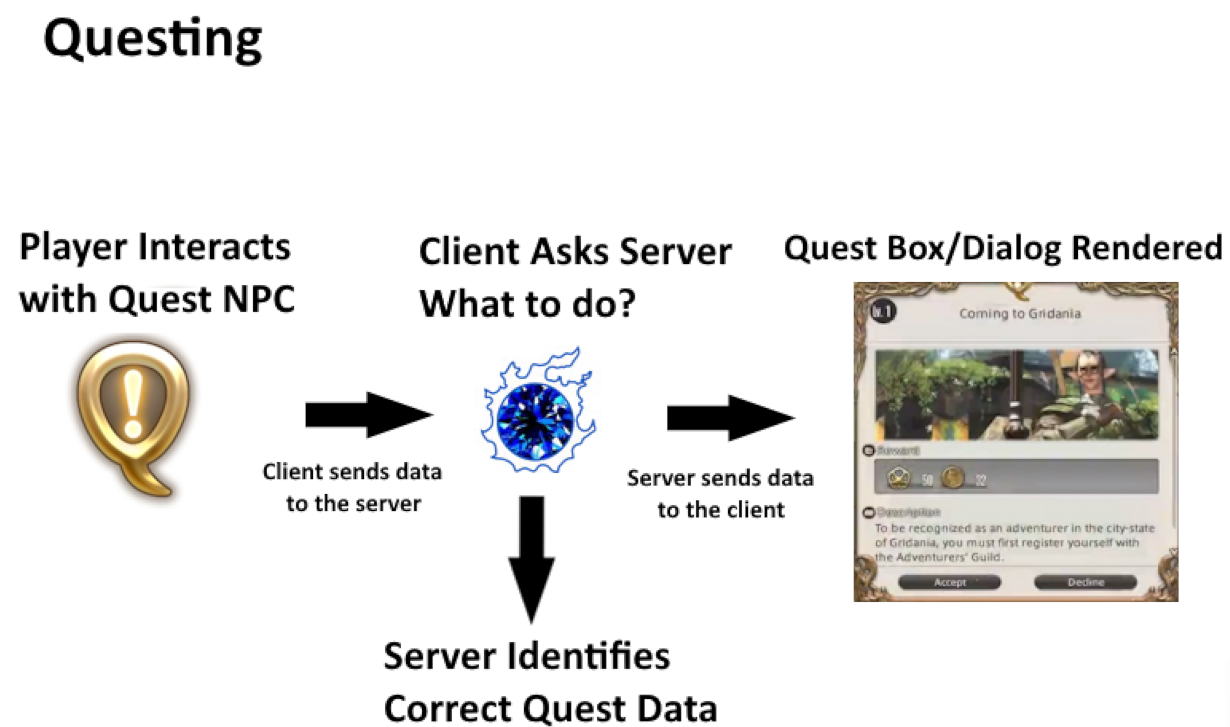 -All the data pretaining to quest text, textures, and interactions are stored on the client side. The only thing the server needs to handle is recording the state of the quest (accepted, completed, what step you're on, etc) and telling the client what actions should occur based on that state. +All the data pertaining to quest text, textures, and interactions are stored on the client side. The only thing the server needs to handle is recording the state of the quest (accepted, completed, what step you're on, etc) and telling the client what actions should occur based on that state. Let's tak a look at sidequest `SubSea007` (A Thousand Words) as an example. @@ -226,7 +226,7 @@ If all you wanted to do was walk around the world, interact with NPCs, /gpose, d Ok, I'm pretty sure my PC with a i7-9700K and 32GB of RAM does not cost tens of millions of yen. I think running Sapphire is doing a little more than just "pulling the client software and displaying model data". You're able to walk around the world and maps as if you were playing the game normally. You can interact with NPCs, dye your gear, etc. -While I definetly don't think my PC can handle 10 000+ players on at the same time, I'm pretty sure it can handle the 8 players required for a raid. Its not that the hardware can't handle it, its rather that the software isn't there yet. +While I definitely don't think my PC can handle 10 000+ players on at the same time, I'm pretty sure it can handle the 8 players required for a raid. Its not that the hardware can't handle it, its rather that the software isn't there yet. <p align="center"><img width=700 src="https://files.catbox.moe/ti2bog.png" /></p> diff --git a/src/content/blog/linux/2024-year-of-the-linux-desktop.md b/src/content/blog/linux/2024-year-of-the-linux-desktop.md index 42051bd..90b0f9d 100644 --- a/src/content/blog/linux/2024-year-of-the-linux-desktop.md +++ b/src/content/blog/linux/2024-year-of-the-linux-desktop.md @@ -27,7 +27,7 @@ A majority of applications these days are also just all running a glorified web # Gaming Gaming was also one of my major concerns when switching over. Maybe 2-3 years ago I would've been much more unwilling to switch, but these days gaming on Linux has taken off like a rocket ship thanks largely in part to Valve's adoption of Arch on the Steam Deck. -As of writing this, 76% of the top 1000 games on Steam have achieved Platnium or Gold status in terms of compatability according to [ProtonDB](https://www.protondb.com/). Pretty much all the games I want to play on Steam are working very well if not better than if I had run them on Windows. +As of writing this, 76% of the top 1000 games on Steam have achieved Platnium or Gold status in terms of compatibility according to [ProtonDB](https://www.protondb.com/). Pretty much all the games I want to play on Steam are working very well if not better than if I had run them on Windows. <img src="https://files.catbox.moe/6zqxhz.png"> diff --git a/src/content/blog/linux/kvm/kvm-part1.md b/src/content/blog/linux/kvm/kvm-part1.md index 93a222c..b9d76e3 100644 --- a/src/content/blog/linux/kvm/kvm-part1.md +++ b/src/content/blog/linux/kvm/kvm-part1.md @@ -12,25 +12,25 @@ But before all that, Below are some of the other options that you may want to co ## Virtual Machine A good but generally resource intensive option since you're technically emulating an entire system. I won't get into this option since setting up a VM using something like Virtualbox or VMware is pretty standard. -## Compatability Layers -At a high level, compatability layers will map the "syscalls" from binaries of some other system to the native ones. This means that programs compiled for a different operating system will run just fine (assuming that all required calls have been handled). This means that its much less resource intensive than running a VM, since its more of a "handle the syscalls as its needed" basis. +## Compatibility Layers +At a high level, compatibility layers will map the "syscalls" from binaries of some other system to the native ones. This means that programs compiled for a different operating system will run just fine (assuming that all required calls have been handled). This means that its much less resource intensive than running a VM, since its more of a "handle the syscalls as its needed" basis. -While compatability layers for Windows software, such as Wine, exist on Linux; these systems are far from being feature complete and often times do not replicate the experience perfectly. However, its always a good idea to check if your non-compatible software will run using this method since its probably both the easiest and the most convenient. +While compatibility layers for Windows software, such as Wine, exist on Linux; these systems are far from being feature complete and often times do not replicate the experience perfectly. However, its always a good idea to check if your non-compatible software will run using this method since its probably both the easiest and the most convenient. ## Dual Boot -Another option that many people opt for is to "dual boot", allocating room for 2 operating systems on the same machine. This will let you keep both operating systems seperate to an extent, while still maintaining a Windows system running on bare metal without any of the "funny business" above. +Another option that many people opt for is to "dual boot", allocating room for 2 operating systems on the same machine. This will let you keep both operating systems separate to an extent, while still maintaining a Windows system running on bare metal without any of the "funny business" above. If you need to deal with thing such as game anti-cheats that dive deeply into the kernel level, this is probably the ideal method since you're pretty much just running an ordinary Windows machine. -But paritioning and managing the storage for both Linux and Windows at the same time is quite annoying. Problems arise when trying to expand or shrink partitions. It can be a real pain to move partitions around to allow for expansion or shrinkage. Then on top of all that you run the risk of either system somehow destroying the boot process of the other (as commonly documented online). +But partitioning and managing the storage for both Linux and Windows at the same time is quite annoying. Problems arise when trying to expand or shrink partitions. It can be a real pain to move partitions around to allow for expansion or shrinkage. Then on top of all that you run the risk of either system somehow destroying the boot process of the other (as commonly documented online). To simply put it, you miss out on the flexibility of the other two options above. # Kernel-based Virtual Machine (KVM) -KVMs are a solution I've found that tackles pretty much all of the problems above. Since its a "type-1 hypervisor", all OS level components such as memory management or I/O is implemented as some Linux process. This means that all the resouces your Linux machine has will be made available to the VM and it'll be like you're running on bare-metal. This gets you performance that far surpasses a traditional type-2 VM, and it comes very close to what you would've gotten running on bare metal. +KVMs are a solution I've found that tackles pretty much all of the problems above. Since its a "type-1 hypervisor", all OS level components such as memory management or I/O is implemented as some Linux process. This means that all the resources your Linux machine has will be made available to the VM and it'll be like you're running on bare-metal. This gets you performance that far surpasses a traditional type-2 VM, and it comes very close to what you would've gotten running on bare metal. -Additionally, its flexible since you can store the VM's disk as a single qcow2 file (or allocate actual space on the SSD). Paritioning and resizing becomes much easier and you won't need to run the risk of accidentally wiping Windows' EFI partition. +Additionally, its flexible since you can store the VM's disk as a single qcow2 file (or allocate actual space on the SSD). Partitioning and resizing becomes much easier and you won't need to run the risk of accidentally wiping Windows' EFI partition. -Finally, it'll also get you the compatability that Wine lacks since you're running the actual OS. +Finally, it'll also get you the compatibility that Wine lacks since you're running the actual OS. diff --git a/src/content/blog/mc-server-selfhost.md b/src/content/blog/mc-server-selfhost.md index fff9a6a..bd7507e 100644 --- a/src/content/blog/mc-server-selfhost.md +++ b/src/content/blog/mc-server-selfhost.md @@ -68,7 +68,7 @@ The solution is to route the game through a tunnel: A tunneling service can be running 24/7 making the connection available around the clock. There is still the bottleneck between the server and the tunnel, but as long as you pick a good tunneling service this shouldn't be much of an issue in terms of latency or bandwidth. -For this I highly reccomend setting up [playit.gg](https://playit.gg/) which provides a very generous free tier for this sort of game hosting. Setup is also fairly +For this I highly recommend setting up [playit.gg](https://playit.gg/) which provides a very generous free tier for this sort of game hosting. Setup is also fairly simple since its basically just 1 additional binary to run with your server. Players connect to this tunnel which then forwards the traffic onto the `localhost:25565` on the server machine itself, meaning no need to access the router to port forward diff --git a/src/content/blog/patchwork-posts/patchwork-archive-1.md b/src/content/blog/patchwork-posts/patchwork-archive-1.md index 817784c..94dab7c 100644 --- a/src/content/blog/patchwork-posts/patchwork-archive-1.md +++ b/src/content/blog/patchwork-posts/patchwork-archive-1.md @@ -16,7 +16,7 @@ When a VTuber decides to end all their activities and social media presence, the ### They stop making content, so what? While the content for independent VTubers typically remain visible on YouTube even after they've chosen to graduate, corporate VTubers will typically have their content privated/deleted following their graduation. -Content corporate VTubers create typically belong to the company they are affiliated, and thus the company has the right to remove the content. However, this means that theoretically if a VTuber ends their career on bad terms with the company, the company could choose to remove all their branding and existence for the internet since they don't wish to be associated with them any more ([we saw this happen with Zaion LanZa and Nijisanji](https://twitter.com/NIJISANJI_World/status/1634147534795841536)). Even if they end on good terms, there's no explict guarantee that the content will remain up forever. +Content corporate VTubers create typically belong to the company they are affiliated, and thus the company has the right to remove the content. However, this means that theoretically if a VTuber ends their career on bad terms with the company, the company could choose to remove all their branding and existence for the internet since they don't wish to be associated with them any more ([we saw this happen with Zaion LanZa and Nijisanji](https://twitter.com/NIJISANJI_World/status/1634147534795841536)). Even if they end on good terms, there's no explicit guarantee that the content will remain up forever. Independent VTubers also sometimes get recruited by companies and may be required to hide content created by their old personalities to better take on their new personas. This is done to avoid any associations with the company and the past/personal life of their talents but also to protect doxxing. There's really no telling if content will return or not should they choose to part ways with the company. diff --git a/src/content/blog/patchwork-posts/patchwork-archive-4.md b/src/content/blog/patchwork-posts/patchwork-archive-4.md index b968a70..7b24586 100644 --- a/src/content/blog/patchwork-posts/patchwork-archive-4.md +++ b/src/content/blog/patchwork-posts/patchwork-archive-4.md @@ -127,7 +127,7 @@ except Exception as e: send_heartbeat("Offline") else: print("An error occurred. Sending offline heartbeat...") - send_heartbeat("Offline - An error occured " + str(e)) + send_heartbeat("Offline - An error occurred " + str(e)) ``` diff --git a/src/content/blog/recovering-interrupted-pacman-upgrade.md b/src/content/blog/recovering-interrupted-pacman-upgrade.md index 5c4975a..cdd02d3 100644 --- a/src/content/blog/recovering-interrupted-pacman-upgrade.md +++ b/src/content/blog/recovering-interrupted-pacman-upgrade.md @@ -8,7 +8,7 @@ For those unaware `pacman` is the package manager used on Arch/Arch based Linux Let's say in theory you run `pacman -Syu` to trigger a full-system upgrade. We get through the downloading phase fine as well as any necessary compilations, `pacman` removes the packages that are being upgraded from the system but our system crashes before everything is able to install. -Since our system crashed, `pacman` is unable to issue a rollback to restore the system to the previous state. When we power on the computer again we find a plethora of errors and perhaps we even find ourselve unable to boot into the desktop environment. This unfortunatly means you likely find yourself in a mess of corrupted/broken packages. +Since our system crashed, `pacman` is unable to issue a rollback to restore the system to the previous state. When we power on the computer again we find a plethora of errors and perhaps we even find ourselves unable to boot into the desktop environment. This unfortunately means you likely find yourself in a mess of corrupted/broken packages. Not all hope is lost, before you go backing up files and doing a clean re-install, its very likely you're able to recover your system through `chroot`. @@ -22,7 +22,7 @@ Lucky for us, since Linux distros can generally run off of a Live-USB environmen # Steps 1. Boot into Live USB environment and mount drives -Once you've booted into the Live-USB, I reccomend getting Ethernet hooked up. Sometimes there can be corrupted packages left in the `.cache`, so those need to be redownloaded. You can use WiFi, but sometimes there are issues with connecting via Live USB. +Once you've booted into the Live-USB, I recommend getting Ethernet hooked up. Sometimes there can be corrupted packages left in the `.cache`, so those need to be redownloaded. You can use WiFi, but sometimes there are issues with connecting via Live USB. Identify the drive/partition with your OS installed (where the root directory is) and mount it ```bash @@ -61,4 +61,4 @@ Be warned as `--overwrite` will replace any conflicting files. If you're worried At this point, you should have recovered your system. -Note: This post will be continuously updated
\ No newline at end of file +Note: This post will be continuously updated diff --git a/src/content/blog/repairing-windows-efi.md b/src/content/blog/repairing-windows-efi.md index 37219d5..515e721 100644 --- a/src/content/blog/repairing-windows-efi.md +++ b/src/content/blog/repairing-windows-efi.md @@ -1,15 +1,15 @@ --- title: 'Fix: Rebuild Windows EFI' -description: 'Rebuilding the Windows EFI partition, dual-boot with systemd-boot on a seperate drive' +description: 'Rebuilding the Windows EFI partition, dual-boot with systemd-boot on a separate drive' pubDate: 'May 5 2024' --- -If I had a dollar for every time that I somehow overwrote or deleted the Windows EFI boot partiton while toying with something on Linux I'd have $3 (which isn't a lot but having it happen 3 times already is pretty annoying). If you ask some enthusiasts, this is secretly a blessing in disguise since you're technically one step closer to escaping the grasp of Microsoft. However like many others who choose to dual-boot, I prefer to keep my Windows installation around in case I need it for some specific use case. +If I had a dollar for every time that I somehow overwrote or deleted the Windows EFI boot partition while toying with something on Linux I'd have $3 (which isn't a lot but having it happen 3 times already is pretty annoying). If you ask some enthusiasts, this is secretly a blessing in disguise since you're technically one step closer to escaping the grasp of Microsoft. However like many others who choose to dual-boot, I prefer to keep my Windows installation around in case I need it for some specific use case. I'm not the most well-versed when it comes to the whole Windows IT stuff, in fact I think most of my knowledge about how to even use the Windows shell has completely gone out the Window. This post serves as a quick guide for how to rebuild the EFI partition that contains the bootloader, as well as how to re-add the Windows to the systemd-boot menu. # Diagnosis -Depending on the order in which you installed Windows and Linux, the location of where your EFI partition actually is may differ. On my setup, I have Windows on my first drive and Linux on my second. My EFI partition with my current bootloader lives on my second drive which persumably also included my Windows 11 bootloader. +Depending on the order in which you installed Windows and Linux, the location of where your EFI partition actually is may differ. On my setup, I have Windows on my first drive and Linux on my second. My EFI partition with my current bootloader lives on my second drive which presumably also included my Windows 11 bootloader. So when I went and installed a different distro, this removed all my files associated about my previous install (since I basically reformatted everything), and among that of course was the Windows bootloader meaning I effectively had no way to boot back into Windows diff --git a/src/content/blog/umiguri.md b/src/content/blog/umiguri.md index 4ae8bc4..38579a7 100644 --- a/src/content/blog/umiguri.md +++ b/src/content/blog/umiguri.md @@ -86,7 +86,7 @@ Whatever your input method is, you'll need to get it mapped to keys on the keybo ### Using a TASOLLER/Yubideck or other CHUNITHM specific controller For CHUNITHM specific controllers, such as TASOLLERs, the best way to get them working with UMIGURI is to use a program called [slidershim](https://github.com/4yn/slidershim) -This will basically simplify all the annoying IO stuff that you'd neeed to do otherwise, it'll even handle making use of your LED lights on the controller itself. +This will basically simplify all the annoying IO stuff that you'd need to do otherwise, it'll even handle making use of your LED lights on the controller itself. The downside is these controllers typically cost a pretty penny. [Usually 300 USD or more](https://www.dj-dao.com/en/tasoller). There's always the option to build your own, but that's a whole other can of worms. @@ -178,7 +178,7 @@ data/ <file>.mp3 <file>.png ``` -The name of the outermost folder in `music` will be the genre name that appears in the game (basically a category). The other names don't really matter as long as your audio and jacket files are named correctly according to what it written in teh chart file. UMIGURI will automatically parse through all your charts during the game's startup. +The name of the outermost folder in `music` will be the genre name that appears in the game (basically a category). The other names don't really matter as long as your audio and jacket files are named correctly according to what it written in the chart file. UMIGURI will automatically parse through all your charts during the game's startup. ## Charting The tool for editing charts is called Margrete. You can grab it from the [same Download link as UMIGURI](https://umgr.inonote.jp/download). All the text however is in Japanese, so you'll need to rely on machine translations to get around it. @@ -197,7 +197,7 @@ Here are some additional customizations you can make. If you want more details, - Create a `.ucsl` file (UMIGURI Character Skill Language) and place it in `data/skills` - [Specifications](https://gist.github.com/inonote/d4f9a1ee84da849b5b8962db13d42220) - [Titles](https://umgr.inonote.jp/help/#/add-titles) - - Can be added in `data/titles/user.txt` or create a new file in the same folder for seperate title files + - Can be added in `data/titles/user.txt` or create a new file in the same folder for separate title files - One title per line in the following format `TitleID<TAB>TitleColor(0-5)<TAB>TitleText` - [Nameplates](https://umgr.inonote.jp/help/#/add-nameplates) - Involves creating a 576x228 image diff --git a/src/content/blog/xqc-amd-seeds.md b/src/content/blog/xqc-amd-seeds.md index 26d581a..2ef9191 100644 --- a/src/content/blog/xqc-amd-seeds.md +++ b/src/content/blog/xqc-amd-seeds.md @@ -6,7 +6,7 @@ pubDate: 'May 21 2025' For many years now the "juicer" (xQc) and the "homeless man" (Forsen) have been at arms at each other when it comes to who can achieve the faster time in random seed Minecraft speed running. As of writing this, the homeless man holds the record with an in-game time of 15min 28s. -The juicer has just recently gotten back into the runs, however in several of his recent streams he constantly complains of the game generating systematically bad seeds for speed running for him to a point where its become a "statistical anomaly". xQc has blamed this on his relatively-new PC's `AMD Ryzen 9 9950X3D` CPU having a bias and generating difficult to run seeds (such as constantly giving his Basalt biomes on Nether entires, buried treasure with a singular iron-ingot, and difficult to navigate structures) +The juicer has just recently gotten back into the runs, however in several of his recent streams he constantly complains of the game generating systematically bad seeds for speed running for him to a point where its become a "statistical anomaly". xQc has blamed this on his relatively-new PC's `AMD Ryzen 9 9950X3D` CPU having a bias and generating difficult to run seeds (such as constantly giving his Basalt biomes on Nether entries, buried treasure with a singular iron-ingot, and difficult to navigate structures) <iframe src="https://clips.twitch.tv/embed?clip=SolidRelentlessClipzCopyThis-HQTjvLr29cQRCK5A&parent=blog.pinapelz.com" frameborder="0" allowfullscreen="true" scrolling="no" height="378" width="620"></iframe> @@ -66,7 +66,7 @@ Luckily for us, this value has already been labelled. `func_242751_a` calls the # How does `Random` work -`java.util.Random` is apart of the Java Standard Library, as such there are very tight and strict specifications for how the logic works. This means that across nearly all versions of compliant Java Virtual Machines, we can expect the logic to work the same way to avoid breaking compatability. +`java.util.Random` is apart of the Java Standard Library, as such there are very tight and strict specifications for how the logic works. This means that across nearly all versions of compliant Java Virtual Machines, we can expect the logic to work the same way to avoid breaking compatibility. So looking through the source code for OpenJDK we see the following logic is used for the `nextLong` function. ```java diff --git a/src/content/blog/youtube-live-timestamping.md b/src/content/blog/youtube-live-timestamping.md index 8c29ca9..0edebb0 100644 --- a/src/content/blog/youtube-live-timestamping.md +++ b/src/content/blog/youtube-live-timestamping.md @@ -9,11 +9,11 @@ If you've ever watched the VOD of a YouTube livestream (especially within the VT While clips do solve this feature, the process for creating a clip is rather cluttered and slow as it requires viewers to stop watching the content to segment a portion of the stream. Not to mention the deletion of the VOD or the streamer turning this feature off would make the creation and preservation of clips difficult. -Timestamping is one solution in which involves viewers create a collection of "stamps" in the comment section of a video which refer to key moments such that viewers can find identifiying moments later. +Timestamping is one solution in which involves viewers create a collection of "stamps" in the comment section of a video which refer to key moments such that viewers can find identifying moments later. -Despite how prevelant the practice is, information regarding how timestampers operate is actually sparse (at least among the VTuber community). +Despite how prevalent the practice is, information regarding how timestampers operate is actually sparse (at least among the VTuber community). -No, wizardry isn't how timestamps for a 3 hour stream seemingly magically appear 1 minute after stream. I hope to at least document some information I know pretaining to how liv timestamps are generated (mainly within the VTuber community). +No, wizardry isn't how timestamps for a 3 hour stream seemingly magically appear 1 minute after stream. I hope to at least document some information I know pertaining to how liv timestamps are generated (mainly within the VTuber community). ## Live Timestamping I should first specify that this is "live timestamping". While you could wait until the stream has concluded and then manually write down key moments... @@ -73,7 +73,7 @@ However, I still find this solution in many ways clunky. ## An Alternative Using Javascript One day I stumbled upon a [Reddit post](https://www.reddit.com/r/VirtualYoutubers/comments/ifzqe7/i_made_a_live_timestamp_tool/) about a Javascript tool that can be used to live timestamp streams. -Whats interesting here is that calculating the timestamp of a video isn't actually limited to when the stream is finished, you can retrieve it at any point in time. +What's interesting here is that calculating the timestamp of a video isn't actually limited to when the stream is finished, you can retrieve it at any point in time. ```javascript var time = Math.max(0, Math.floor(document.querySelector("video").currentTime)); diff --git a/src/content/blog/yunohost-docker-for-enduser.md b/src/content/blog/yunohost-docker-for-enduser.md index 3e47a49..c078883 100644 --- a/src/content/blog/yunohost-docker-for-enduser.md +++ b/src/content/blog/yunohost-docker-for-enduser.md @@ -20,7 +20,7 @@ Even though the spirit of Yunohost is self-hosting the hardware, I've opted to d I think a lot of people would be looking into a setup similar to this. Even if you were to deploy on a Raspberry Pi (which slashes the entry cost and power consumption), you'd still be looking into having the require technical knowledge to set up/maintain the system and also deal with ISP sheanigans. Plus not having to deal with hardware means you can scale up/down as needed. ## YNH Packages -Having a look at the [extensive list of available packages](https://github.com/YunoHost-Apps), I was actually pleasently surprised with how simple they are. For most of Yunohost's applications, its just a matter of running a bash script that installs the dependencies and changes the necessary config files to get the application up and running. +Having a look at the [extensive list of available packages](https://github.com/YunoHost-Apps), I was actually pleasantly surprised with how simple they are. For most of Yunohost's applications, its just a matter of running a bash script that installs the dependencies and changes the necessary config files to get the application up and running. In fact, after adding the necessary DNS records, it was pretty much just one click through the web interface to install whatever applicated I wanted. 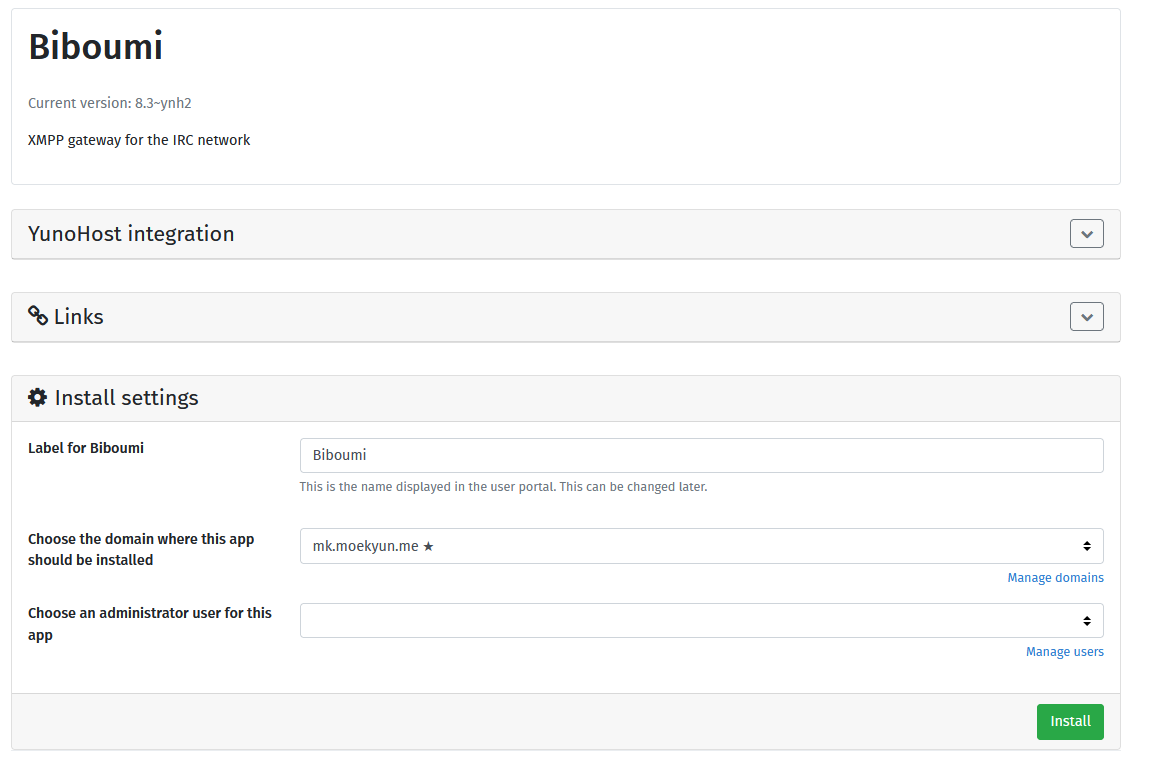 @@ -57,9 +57,9 @@ Obviously software evolves over time, and one of the major concerns I had (and s This is currently primarily a community driven effort, with each package given its own Github repo. There's no guarantee that a package will be updated, and even if it is, there's no guarantee that it will be updated in a timely manner. Of course, you can always do it yourself, but is that really something that the average end-user would be able to do? -When a package gets abandoned, then what do we do? Yunohost offers no way for the end-user to change the repo attached to an installed application, so if the package is abandoned then the end-user will be stuck there indefinetly until manual intervention. +When a package gets abandoned, then what do we do? Yunohost offers no way for the end-user to change the repo attached to an installed application, so if the package is abandoned then the end-user will be stuck there indefinitely until manual intervention. -I've already actually had an issue with this. The Misskey package is still running version 12 while the latest verison is 13. This means that I'm missing out on some of the latest features. Fortunatly I don't think that the Misskey package is completely abandoned as it still ranked quite high on the integration scale Yunohost has for its packages, but regardless it's still a bit of a pain. +I've already actually had an issue with this. The Misskey package is still running version 12 while the latest version is 13. This means that I'm missing out on some of the latest features. Fortunately I don't think that the Misskey package is completely abandoned as it still ranked quite high on the integration scale Yunohost has for its packages, but regardless it's still a bit of a pain. ~~(if you'd like to check it out its over at [https://mk.moekyun.me](https:/mk.moekyun.me)~~ |