blob: 8aadc00a7511812513d3980e11590f1eab7be985 (
plain) (
blame)
1
2
3
4
5
6
7
8
9
10
11
12
13
14
15
16
17
18
19
20
21
22
23
24
25
26
27
28
29
30
31
32
33
34
35
36
37
38
39
40
41
42
43
44
45
46
47
48
49
50
51
52
53
54
55
56
57
58
59
60
61
62
63
64
65
66
67
68
69
70
71
72
73
74
75
76
77
78
79
80
81
82
83
84
85
86
87
88
89
90
91
92
93
94
95
96
97
98
99
100
101
102
103
104
105
106
107
108
109
110
111
112
113
114
115
116
117
118
119
120
121
122
123
124
125
126
127
128
129
130
131
132
133
134
135
136
137
138
139
140
141
142
143
144
145
146
147
148
149
150
151
152
153
154
155
156
157
158
159
160
161
162
163
164
165
166
167
168
169
170
171
172
173
174
175
176
177
178
179
180
181
182
183
184
185
186
187
188
189
190
191
192
193
194
195
196
197
198
199
200
201
202
203
204
205
206
207
208
209
210
211
212
213
214
215
216
217
218
219
220
221
222
223
224
225
226
227
228
229
230
231
|
[](../../README.md)
[](./README.ro.md)
[](./README.ru.md)
[](./README.ua.md)
[](./README.de.md)
[](./README.fr.md)
<h3 align="center">
<img align="center" width="80%" src=https://github.com/user-attachments/assets/bc18bd4d-944b-4d5f-a119-7578fa38f9b4 />
</h3>
<p align="center">
<img src="https://raw.githubusercontent.com/LinuxBeginnings/Hyprland-Dots/main/assets/latte.png" width="400" />
</p>
<div align="center">
<br>
<a href="#-コピー--インストール--アップデート手順-"><kbd> <br> Installation <br> </kbd></a>  
<a href="https://www.youtube.com/playlist?list=PLDtGd5Fw5_GjXCznR0BzCJJDIQSZJRbxx"><kbd> <br> Youtube <br> </kbd></a>  
<a href="https://github.com/LinuxBeginnings/Hyprland-Dots/wiki"><kbd> <br> Wiki <br> </kbd></a>  
<a href="https://github.com/LinuxBeginnings/Hyprland-Dots/discussions"><kbd> <br> Discussions <br> </kbd></a>  
<a href="https://github.com/LinuxBeginnings/Hyprland-Dots/wiki/Keybinds"><kbd> <br> Keybinds <br> </kbd></a>  
<a href="https://discord.gg/kool-tech-world"><kbd> <br> Discord <br> </kbd></a>
</div><br>
<div align="center">
   <a href="https://discord.gg/kool-tech-world"> <img src="https://img.shields.io/discord/1151869464405606400?style=for-the-badge&logo=discord&color=cba6f7&link=https%3A%2F%2Fdiscord.gg%kool-tech-world"> </a>
<br/>
</div>
<h3 align="center">
<img src="https://github.com/LinuxBeginnings/Telegram-Animated-Emojis/blob/main/Activity/Sparkles.webp" alt="Sparkles" width="38" height="38" />
KooL's Hyprland Dotfiles Showcase
<img src="https://github.com/LinuxBeginnings/Telegram-Animated-Emojis/blob/main/Activity/Sparkles.webp" alt="Sparkles" width="38" height="38" />
</h3>
<div align="center">
https://github.com/user-attachments/assets/49bc12b2-abaf-45de-a21c-67aacd9bb872
</div>
### 📹 動画による説明
- ページの下部へ
### 🎞️ AGS概要デモ
- 概要が気になる場合は、こちらにAGS概要の短いデモがあります [Youtube リンク](https://youtu.be/zY5SLNPBJTs)
</details>
---
[](https://git.io/typing-svg)
### 🚩 🏁 自動化された Distro-Hyprland のインストールスクリプトのクローンと起動 🇵🇭
> [注意!]
> FISH SHELLを使用している場合、この関数を使わないでください。代わりにDistro-Hyprlandをクローンしinstall.shを実行してください。
- 重要:これを動作させるには、`curl` パッケージが必要です。
```bash
sh <(curl -L https://raw.githubusercontent.com/LinuxBeginnings/Hyprland-Dots/main/Distro-Hyprland.sh)
```
- 上記のコマンドを使用して、Distro-Hyprland のインストールスクリプトを自動的にクローンできます。
- インストールスクリプトをクローンし、`install.sh` を実行します😎
### 👁️🗨️ 私の Hyprland のインストールスクリプト 👁️🗨️
- 選択したディストロ向けの自動化された Hyprland スクリプトです。これらの設定をインストールするオプションを選択した場合、対応する dotfiles を取得します。
- [Arch-Linux](https://github.com/LinuxBeginnings/Arch-Hyprland)
- [OpenSUSE(Tumbleweed)](https://github.com/LinuxBeginnings/OpenSuse-Hyprland)
- [Fedora-Linux](https://github.com/LinuxBeginnings/Fedora-Hyprland)
- [Debian-Linux (Trixie & SID)](https://github.com/LinuxBeginnings/Debian-Hyprland)
- [NixOS](https://github.com/LinuxBeginnings/NixOS-Hyprland)
- [Ubuntu 24.04 LTS](https://github.com/LinuxBeginnings/Ubuntu-Hyprland/tree/24.04)
- [Ubuntu 24.10](https://github.com/LinuxBeginnings/Ubuntu-Hyprland/tree/24.10)
- [Ubuntu 25.04 - (ALPHA STAGE)](https://github.com/LinuxBeginnings/Ubuntu-Hyprland/tree/25.04)
---
### 🪧 注意 🪧
- このリポジトリにはパッケージは含まれておらず、インストールもされません。含まれているのは、あらかじめ設定された Hyprland の設定ファイルや dotfiles のみです。
- 必要なパッケージについてはインストールスクリプトを参照してください。ただし、少なくとも Hyprland のパッケージは必須です 😏😏😏
- このリポジトリは、上記の Distro-Hyprland インストールスクリプトによって、プリセットの dotfiles をダウンロードするオプションを選択した場合に取得されます。
### 👀 スクリーンショット 👀
- すべてのスクリーンショットはここにまとめられています。 [スクリーンショット](https://github.com/LinuxBeginnings/screenshots/tree/main/Hyprland-ScreenShots)
### 📦 変更点
- 変更を簡単に追跡できるよう、[変更ログ](https://github.com/LinuxBeginnings/Hyprland-Dots/wiki/Changelogs) 変更が注目に値する場合はスクリーンショットも含めます!
> [注意!]
> デフォルトでは、Kools Dots はスケーリングなしの 2K (1440p) ディスプレイ向けに調整・設定されています。
### 💥 コピー / インストール / アップデート手順 💥
- [`ここに詳細を記載しています`](https://github.com/LinuxBeginnings/Hyprland-Dots/wiki/Install_&_Update)
> [注意!]
> 自動コピーのスクリプトである "copy.sh" は、コピー対象のディレクトリをバックアップします。しかし、スクリプトがバックアップに失敗する可能性もあるため、手動でバックアップを取るのも良い考えです!
- このリポジトリを git でクローンし、ディレクトリを移動して、実行可能にした後、スクリプトを実行してください。
> Master ブランチからダウンロードする場合
```bash
git clone --depth=1 https://github.com/LinuxBeginnings/Hyprland-Dots.git
cd Hyprland-Dots
```
> 開発ブランチ(Development)からダウンロードする場合(開発およびテスト用)
```bash
git clone --depth=1 https://github.com/LinuxBeginnings/Hyprland-Dots.git -b development
cd Hyprland-Dots
```
- プリセット dotfiles の自動コピー/インストール(更新推奨)
```bash
chmod +x copy.sh
./copy.sh
```
- リリース版(Stable)からコピー/インストール(メインより 1 バージョン古い点に注意)
```bash
chmod +x release.sh
./release.sh
```
- UPGRADE.sh の関数について
> [重要!]
> これを動作させるには rsync が必要です。
> この機能を使用する前に、KooL's Hyprland が既に動作している必要があります。
```bash
chmod +x upgrade.sh
./upgrade.sh
```
## ❗❗❗ DEBIAN および UBUNTU ユーザーへの注意!
- KooL Hyprland の dotfiles 更新に関するメッセージが大量に届いています。 [`WIKI`](https://github.com/LinuxBeginnings/Hyprland-Dots/wiki/Install_&_Update)に大きく注意書きを記載しました。
#### ⚠️⚠️⚠️ スクリプトによって作成されたバックアップについての注意
> [超重要!]
> copy.sh、release.sh、そして upgrade.sh もバックアップを作成します!
> $HOME/.config の内容を手動で確認してください。
> 不要なバックアップは手動で削除してください。
#### 🛎️ 壁紙に関するちょっとした注意
- デフォルトでは、ダークとライト各 1 枚+3 枚の壁紙のみがコピーされます。追加の壁紙をダウンロードするオプションが提供されます。追加の壁紙は[`THIS`](https://github.com/LinuxBeginnings/Wallpaper-Bank/tree/main/wallpapers) リンクからプレビュー/確認できます。
#### ⚠️⚠️⚠️これらの dotfiles をコピー / インストールした後の必須事項
- SUPER + W を押して壁紙を設定してください。これにより、Waybar、Kitty(TTY)、Rofi のテーマ用に Wallust を初期化できます。ただし、copy.sh または release.sh を使用した場合は、初期壁紙がプリセットされているため、この手順は不要です。
- NVIDIA の所有者へ。`~/.config/hypr/UserConfigs/ENVariables.conf`を編集してください(強く推奨)。
* NVIDIA の所有者とユーザーへ。 インsトール後に [`THIS`](https://github.com/LinuxBeginnings/Hyprland-Dots/wiki/Notes_to_remember#--for-nvidia-gpu-users)を確認してください。
- 既に独自のキー設定やモニター設定を行っている場合は、ログアウトや再起動前に作成されたバックアップからコピーしてください。(推奨)
#### 📖 既知の問題と可能な解決策
- こちらのページを確認してください: [FAQ](https://github.com/LinuxBeginnings/Hyprland-Dots/wiki/FAQ) & [UNSOLVED ISSUES](https://github.com/LinuxBeginnings/Hyprland-Dots/wiki/Known_Issues)
#### 🙋 質問対応 ⁉️
- FAQ! はい、これらの dotfiles は他のディストロでも使用できます!ただし、適切なパッケージを事前にインストールしてください!安心できるなら、私も Gentoo で同じ設定を使っています :)
- クイックヒント! Waybar モジュールの HINT! をクリックしてください。 (Waybar のデフォルトレイアウトおよび Simple-L [TOP] レイアウトでのみ利用可能)。キーバインドの `SUPER H`でも起動できます。
- さらに質問がありますか? こちらをクリックして [WIKI](https://github.com/LinuxBeginnings/Hyprland-Dots/wiki/)を参照してください。
- 旧設定が欲しい場合, すべて "Archive" リポジトリにまとめています。詳しくは[HERE](https://github.com/LinuxBeginnings/Hyprland-Dots-releases-Archive)をご覧ください。
#### ⌨ キーバインド
- キーバインドの説明はこちら: [`CLICK`](https://github.com/LinuxBeginnings/Hyprland-Dots/wiki/Keybinds)
#### 🙏 スペシャルリクエスト
- dotfilesや設定の改善がある場合改善のためのPRをぜひ送ってください!私も皆さんと同じように学んでいるので、改善は大歓迎です!
- Waybar のスタイル(新しいパネルスタイルは微調整が必要)→ ご協力をお願いできますか?🙏
#### 🤷♂️ TO DO!
- [ ] dotfiles の微調整 - 🚧 常に改善中
- ~~[ ] Starship に切り替えるかも?(ただし、oh-my-zsh に比べてテーマが少ない)~~ → 今のところ予定なし
#### 🔮 Discord サーバー
- ぜひ [Discord](https://discord.com/invite/kool-tech-world)に参加してください!
### 💖 サポート
- GitHub のリポジトリにスターを付けてもらえると嬉しいです 🌟
- YouTube チャンネル登録もよろしく!→ [YouTube](https://www.youtube.com/@Ja.KooLit)
- コーヒーや BTC でサポートも歓迎 😊
[](https://ko-fi.com/jakoolit)
または
[](https://www.buymeacoffee.com/LinuxBeginnings)
また、BTC での寄付も可能です
> 1N3MeV2dsX6gQB42HXU6MF2hAix1mqjo8i

## 🫰 スターありがとう 🩷
[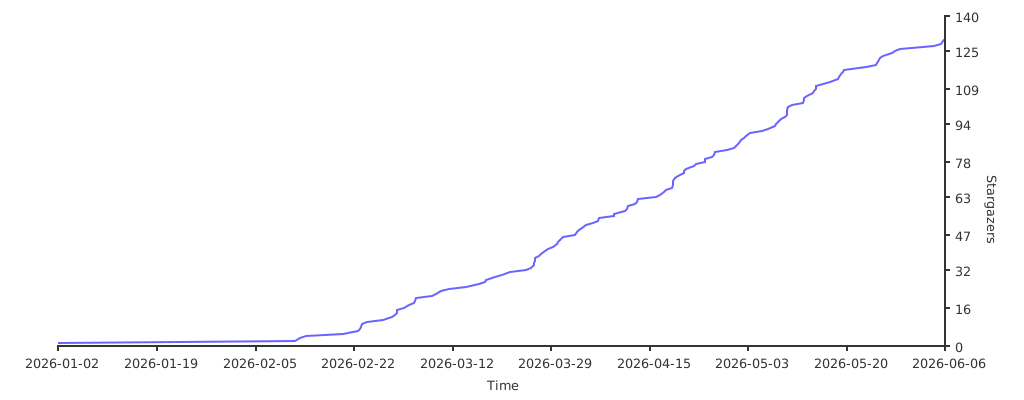](https://starchart.cc/LinuxBeginnings/Hyprland-Dots)
|
