
diff options
| -rw-r--r-- | README.de.md | 230 | ||||
| -rw-r--r-- | README.jp.md | 228 | ||||
| -rw-r--r-- | i18n/README.de.md | 3 | ||||
| -rw-r--r-- | i18n/README.jp.md | 3 | ||||
| -rw-r--r-- | i18n/README.ro.md | 12 | ||||
| -rw-r--r-- | i18n/README.ru.md | 3 | ||||
| -rw-r--r-- | i18n/README.uk.md | 5 |
7 files changed, 11 insertions, 473 deletions
diff --git a/README.de.md b/README.de.md deleted file mode 100644 index eed9def2..00000000 --- a/README.de.md +++ /dev/null @@ -1,230 +0,0 @@ -[](https://github.com/JaKooLit/Hyprland-Dots/blob/main/README.md) -[](https://github.com/JaKooLit/Hyprland-Dots/blob/main/README.jp.md) - -<h3 align="center"> -<img align="center" width="80%" src=https://github.com/user-attachments/assets/bc18bd4d-944b-4d5f-a119-7578fa38f9b4 /> -</h3> - -<p align="center"> - <img src="https://raw.githubusercontent.com/JaKooLit/Hyprland-Dots/main/assets/latte.png" width="400" /> -</p> - -<div align="center"> -<br> - <a href="#installation"><kbd> <br> Installation <br> </kbd></a>   - <a href="https://www.youtube.com/playlist?list=PLDtGd5Fw5_GjXCznR0BzCJJDIQSZJRbxx"><kbd> <br> Youtube <br> </kbd></a>   - <a href="https://github.com/JaKooLit/Hyprland-Dots/wiki"><kbd> <br> Wiki <br> </kbd></a>   - <a href="https://github.com/JaKooLit/Hyprland-Dots/discussions"><kbd> <br> Discussions <br> </kbd></a>   - <a href="https://github.com/JaKooLit/Hyprland-Dots/wiki/Keybinds"><kbd> <br> Keybinds <br> </kbd></a>   - <a href="https://github.com/JaKooLit/Hyprland-Dots/wiki/FAQ"><kbd> <br> FAQ <br> </kbd></a>   - <a href="https://discord.gg/kool-tech-world"><kbd> <br> Discord <br> </kbd></a> -</div><br> - -<div align="center"> - -   <a href="https://discord.gg/kool-tech-world"> <img src="https://img.shields.io/discord/1151869464405606400?style=for-the-badge&logo=discord&color=cba6f7&link=https%3A%2F%2Fdiscord.gg%kool-tech-world"> </a> - -<br/> -</div> - -<h3 align="center"> - <img src="https://github.com/JaKooLit/Telegram-Animated-Emojis/blob/main/Activity/Sparkles.webp" alt="Sparkles" width="38" height="38" /> - KooL's Hyprland Dotfiles Showcase - <img src="https://github.com/JaKooLit/Telegram-Animated-Emojis/blob/main/Activity/Sparkles.webp" alt="Sparkles" width="38" height="38" /> -</h3> - -<div align="center"> - -https://github.com/user-attachments/assets/49bc12b2-abaf-45de-a21c-67aacd9bb872 - -</div> - -### 📹 Ein Video Guide - -- folgt nach der Textanleitung - -### 🎞️ AGS Übersicht DEMO - -- Hier ist eine kurze Demo der AGS [Youtube LINK](https://youtu.be/zY5SLNPBJTs) - -</details> - ---- - -[](https://git.io/typing-svg) - -### 🚩 🏁 Distro Hyprland Installationsskripte herunterladen und ausführen - -> [!VORSICHT] -> Wenn du die FISH-SHELL benutzt, VERWENDE diese Funktion NICHT. Klone stattdessen das Distro-Hyprland-Repository und führe install.sh aus. - -- HINWEIS: Das Paket `curl` muss installiert sein, um die Skripte herunterzuladen - -```bash -sh <(curl -L https://raw.githubusercontent.com/JaKooLit/Hyprland-Dots/main/Distro-Hyprland.sh) -``` - -- Mit dem obigen Befehl kannst du jetzt automatisch die Hyprland Installationsskripte herunterladen und ausführen. -- Das Skript wird weitere Installationsskripte klonen und die `install.sh` starten. 😎 - -### 👁️🗨️ Meine Hyprland-Installationsskripte 👁️🗨️ - -- Automatisierte Hyprland-Skripte für ein Distro deiner Wahl. Diese Skripte laden, wenn ben;tigt, meine vorkonfigurierten Dotfiles -- [Arch-Linux](https://github.com/JaKooLit/Arch-Hyprland) - -- [OpenSUSE(Tumbleweed)](https://github.com/JaKooLit/OpenSuse-Hyprland) - -- [Fedora-Linux](https://github.com/JaKooLit/Fedora-Hyprland) - -- [Debian-Linux (Trixie & SID)](https://github.com/JaKooLit/Debian-Hyprland) - -- [NixOS](https://github.com/JaKooLit/NixOS-Hyprland) - -- [Ubuntu 24.04 LTS](https://github.com/JaKooLit/Ubuntu-Hyprland/tree/24.04) -- [Ubuntu 24.10](https://github.com/JaKooLit/Ubuntu-Hyprland/tree/24.10) -- [Ubuntu 25.04 - (ALPHA STAGE)](https://github.com/JaKooLit/Ubuntu-Hyprland/tree/25.04) - ---- - -### 🪧 Achtung 🪧 - -- Dieses Repository enthält keine Pakete und wird keine Pakete installieren. Es enthält nur vorkonfigurierte Hyprland-Configs/Dotfiles. -- In den Installationsskripten kann man die benötigten Pakete finden. Zumindest müssen aber die Hyprland-Pakete installiert sein 😏😏😏 logisch!! -- Dieses Repository wird von den oben beschriebenen Distro Hyprland-Installationsskripten heruntergeladen, wenn du dich entscheidest, die vorkonfigurierten Dotfiles verwenden zu wollen. - -### 👀 Screenshots 👀 - -- Beispiel Screenshots findest du hier [Screenshots](https://github.com/JaKooLit/screenshots/tree/main/Hyprland-ScreenShots) - -### 📦 Whats new? - -- Um Änderungen leicht nachzuvollziehen, werde ich die [CHANGELOGS](https://github.com/JaKooLit/Hyprland-Dots/wiki/Changelogs) regelmäßig aktualisieren. Es werden neue Screenshots hinzugefügt, wenn die Änderungen erwähnenswert sind! - -> [!NOTE] -> Bitte beachte, dass Kools Dots standardmäßig für einen 2K (1440p) Monitor ohne Skalierung angepasst und konfiguriert sind. - -### 💥 Kopieren / Installation / Update-Anleitung 💥 - -- [`Weiter Infos hier`](https://github.com/JaKooLit/Hyprland-Dots/wiki/Install_&_Update) - > [!Note] - > Das Kopierskript "copy.sh" erstellt Backups der zu kopierenden Konfigurationsverzeichnisse. Sollte das Skript fehlschlagen, empfiehlt es sich, manuell ein Backup zu erstellen. -- Klone das Repository mit Git, wechsle in das Verzeichnis, mache die Datei ausführbar und führe das Skript aus: - -> Um den Master-Branch herunterzuladen - -```bash -git clone --depth=1 https://github.com/JaKooLit/Hyprland-Dots.git -cd Hyprland-Dots -``` - -> Um den Entwicklungs-Branch (Development & Testing) herunterzuladen: - -```bash -git clone --depth=1 https://github.com/JaKooLit/Hyprland-Dots.git -b development -cd Hyprland-Dots -``` - -- Automatisiertes Kopieren und Installieren der vorkonfigurierten Dotfiles (empfohlen für Updates): - -```bash -chmod +x copy.sh -./copy.sh -``` - -- Kopieren und Installieren aus den Releases (stable) (beachte, dass dies eine Version älter als "main" ist): - -```bash -chmod +x release.sh -./release.sh -``` - -- UPGRADE.sh für ein Versionsupgrade - > [!IMPORTANT] - > rsync wird benötigt, damit es funktioniert. - > KooL's Hyprland sollte bereits laufen, bevor du dieses Skript verwendest. - -```bash -chmod +x upgrade.sh -./upgrade.sh -``` - -## ❗❗❗ DEBIAN AND UBUNTU INFORMATION! - -- Ich bekomme eine große Menge an Nachrichten über das Updaten eurer KooL Hyprland dotfiles. Es gibt dazu eine Info im [`WIKI`](https://github.com/JaKooLit/Hyprland-Dots/wiki/Install_&_Update) - -#### ⚠️⚠️⚠️ ACHTUNG - SKRIPT-ERSTELLTE BACKUPS - -> [!CAUTION] -> copy.sh, release.sh und auch upgrade.sh erstellen Backups! -> Schaue dir bitte manuell den Inhalt deines $HOME/.config Ordners an -> Entferne alle nicht mehr benötigten Backups bitte selbst - -#### 🛎️ kleiner Hinweis zu Hintergrundbildern - -- ständardmäßig werden nur einige Hintergründe kopiert (jeweils 1 dunkeles und helles plus 3 weitere). Dir wird angeboten werden, weitere Hintergrundbilder herunterzuladen. Du kannst dir die verfügbaren Hintergründe [`HIER`](https://github.com/JaKooLit/Wallpaper-Bank/tree/main/wallpapers) anschauen. - -#### ⚠️⚠️⚠️ WICHTIG! Nach dem Kopieren / Der Installation der Dotfiles - -- Drücke SUPER W und wähle ein Hintergrundbild. Desweiteren wird hierdurch wallust für waybar, kitty (tty) und die rofi Themes aktiviert. Wenn du copy.sh oder release.sh benutzt hast, wird ein Standard Hintergrund gesetzt sein und die Initialisierung ist bereits gesehen - -- Für Nvidia Benutzer. Stelle sicher, dass du deine `~/.config/hypr/UserConfigs/ENVariables.conf` anpasst (unbedingt empfohlen). - -* Für NVIDIA Benutzer, schaue dir diese Informationen [`HIER`](https://github.com/JaKooLit/Hyprland-Dots/wiki/Notes_to_remember#--for-nvidia-gpu-users) an. - -- Wenn die bereits deine Keybinds, Monitoren, usw. eingestellt hast... Kopiere die Einstellungen von dem Backup vor dem Logout / Reboot. (empfohlen) - -#### 📖 Bekannte Probleme und mögliche Lösungen - -- Schau dir diese Seite an [FAQ](https://github.com/JaKooLit/Hyprland-Dots/wiki/FAQ) und checke die [UNSOLVED ISSUES](https://github.com/JaKooLit/Hyprland-Dots/wiki/Known_Issues) - -#### 🙋 FRAGEN ?!?! ⁉️ - -- FAQ! Die Dotfiles funktionieren auch auf anderen Distros! Stelle nur sicher, die richtigen Pakete vorher zu installieren! Falls du dich dann besser fühlst, ich benutze die selbe Konfiguration für mein Gentoo:) -- KLEINER HINWEIS! Klicke auf das HINT! Waybar Modul (Notiz, nur in Waybar default und Simple-L [TOP] Layout verfügbar). Kann auch mit der Tastenkombination `SUPER H` gestartet werden -- Weitere Fragen? Klicke hier um das [WIKI](https://github.com/JaKooLit/Hyprland-Dots/wiki/) zu durchstöbern. -- Falls du eine ältere Version der Konfiguration haben möchtest, sind diese in meinem "Archive" Repository verfügbar. Siehe [HIER](https://github.com/JaKooLit/Hyprland-Dots-releases-Archive) - -#### ⌨ Keybinds - -- Keybinds [`KLICKE`](https://github.com/JaKooLit/Hyprland-Dots/wiki/Keybinds) - -#### 🙏 Hilfe gebraucht - -- Wenn du Verbesserungen der Dotfiles oder Konfigurationen hast, mache gerne einen PR für die Verbesserung. Ich heiße Verbesserungen immer Willkommen, da ich genau wie ihr Alle immer viel Neues lerne. - -#### ✍️ Contributing - -- Möchtest du contributen? Klicke [`HIER`](https://github.com/JaKooLit/Hyprland-Dots/blob/main/CONTRIBUTING.md) für eine Anleitung. - -#### 🤷♂️ TO DO! - -- [ ] Dotfiles verbesser - 🚧 in ständiger Entwicklung -- ~~[ ] Vielleicht zu starship wechseln. Jedoch limitiere Themes im Vergleich zu oh-my-zsh.~~ momentan nicht geplant - -#### 🔮 Discord Server - -- Bitte joine meinem [Discord](https://discord.com/invite/kool-tech-world) - -#### 💖 Unterstützung - -- ein Star auf meinen Github repos wäre nett 🌟 - -- Abbonieren meinen Youtube Kanal [YouTube](https://www.youtube.com/@Ja.KooLit) - -- du kannst mich auch mit Kaffees oder BTC unterstützen 😊 - -[](https://ko-fi.com/jakoolit) - -oder - -[](https://www.buymeacoffee.com/JaKooLit) - -Oder du kannst auch Krypto an meine btc wallet spenden :) - -> 1N3MeV2dsX6gQB42HXU6MF2hAix1mqjo8i - - - -## 🫰 Vielen Dank für die stars 🩷 - -[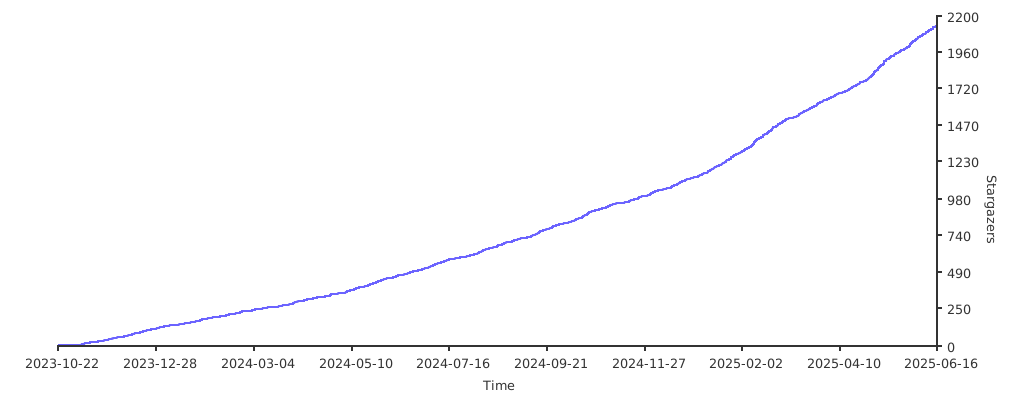](https://starchart.cc/JaKooLit/Hyprland-Dots) diff --git a/README.jp.md b/README.jp.md deleted file mode 100644 index 84d64692..00000000 --- a/README.jp.md +++ /dev/null @@ -1,228 +0,0 @@ -[](https://github.com/JaKooLit/Hyprland-Dots/blob/main/README.md) -[](https://github.com/JaKooLit/Hyprland-Dots/blob/main/README.de.md) - -<h3 align="center"> -<img align="center" width="80%" src=https://github.com/user-attachments/assets/bc18bd4d-944b-4d5f-a119-7578fa38f9b4 /> -</h3> - -<p align="center"> - <img src="https://raw.githubusercontent.com/JaKooLit/Hyprland-Dots/main/assets/latte.png" width="400" /> -</p> - -<div align="center"> -<br> - <a href="#installation"><kbd> <br> Installation <br> </kbd></a>   - <a href="https://www.youtube.com/playlist?list=PLDtGd5Fw5_GjXCznR0BzCJJDIQSZJRbxx"><kbd> <br> Youtube <br> </kbd></a>   - <a href="https://github.com/JaKooLit/Hyprland-Dots/wiki"><kbd> <br> Wiki <br> </kbd></a>   - <a href="https://github.com/JaKooLit/Hyprland-Dots/discussions"><kbd> <br> Discussions <br> </kbd></a>   - <a href="https://github.com/JaKooLit/Hyprland-Dots/wiki/Keybinds"><kbd> <br> Keybinds <br> </kbd></a>   - <a href="https://github.com/JaKooLit/Hyprland-Dots/wiki/FAQ"><kbd> <br> FAQ <br> </kbd></a>   - <a href="https://discord.gg/kool-tech-world"><kbd> <br> Discord <br> </kbd></a> -</div><br> - -<div align="center"> - -   <a href="https://discord.gg/kool-tech-world"> <img src="https://img.shields.io/discord/1151869464405606400?style=for-the-badge&logo=discord&color=cba6f7&link=https%3A%2F%2Fdiscord.gg%kool-tech-world"> </a> - -<br/> -</div> - -<h3 align="center"> - <img src="https://github.com/JaKooLit/Telegram-Animated-Emojis/blob/main/Activity/Sparkles.webp" alt="Sparkles" width="38" height="38" /> - KooL's Hyprland Dotfiles Showcase - <img src="https://github.com/JaKooLit/Telegram-Animated-Emojis/blob/main/Activity/Sparkles.webp" alt="Sparkles" width="38" height="38" /> -</h3> - -<div align="center"> - -https://github.com/user-attachments/assets/49bc12b2-abaf-45de-a21c-67aacd9bb872 - -</div> - -### 📹 動画による説明 - -- ページの下部へ - -### 🎞️ AGS概要デモ - -- 概要が気になる場合は、こちらにAGS概要の短いデモがあります [Youtube リンク](https://youtu.be/zY5SLNPBJTs) - -</details> - ---- - -[](https://git.io/typing-svg) - -### 🚩 🏁 自動化された Distro-Hyprland のインストールスクリプトのクローンと起動 🇵🇭 - -> [注意!] -> FISH SHELLを使用している場合、この関数を使わないでください。代わりにDistro-Hyprlandをクローンしinstall.shを実行してください。 - -- 重要:これを動作させるには、`curl` パッケージが必要です。 - -```bash -sh <(curl -L https://raw.githubusercontent.com/JaKooLit/Hyprland-Dots/main/Distro-Hyprland.sh) -``` - -- 上記のコマンドを使用して、Distro-Hyprland のインストールスクリプトを自動的にクローンできます。 -- インストールスクリプトをクローンし、`install.sh` を実行します😎 - -### 👁️🗨️ 私の Hyprland のインストールスクリプト 👁️🗨️ - -- 選択したディストロ向けの自動化された Hyprland スクリプトです。これらの設定をインストールするオプションを選択した場合、対応する dotfiles を取得します。 - -- [Arch-Linux](https://github.com/JaKooLit/Arch-Hyprland) - -- [OpenSUSE(Tumbleweed)](https://github.com/JaKooLit/OpenSuse-Hyprland) - -- [Fedora-Linux](https://github.com/JaKooLit/Fedora-Hyprland) - -- [Debian-Linux (Trixie & SID)](https://github.com/JaKooLit/Debian-Hyprland) - -- [NixOS](https://github.com/JaKooLit/NixOS-Hyprland) - -- [Ubuntu 24.04 LTS](https://github.com/JaKooLit/Ubuntu-Hyprland/tree/24.04) -- [Ubuntu 24.10](https://github.com/JaKooLit/Ubuntu-Hyprland/tree/24.10) -- [Ubuntu 25.04 - (ALPHA STAGE)](https://github.com/JaKooLit/Ubuntu-Hyprland/tree/25.04) - ---- - -### 🪧 注意 🪧 - -- このリポジトリにはパッケージは含まれておらず、インストールもされません。含まれているのは、あらかじめ設定された Hyprland の設定ファイルや dotfiles のみです。 -- 必要なパッケージについてはインストールスクリプトを参照してください。ただし、少なくとも Hyprland のパッケージは必須です 😏😏😏 -- このリポジトリは、上記の Distro-Hyprland インストールスクリプトによって、プリセットの dotfiles をダウンロードするオプションを選択した場合に取得されます。 - -### 👀 スクリーンショット 👀 - -- すべてのスクリーンショットはここにまとめられています。 [スクリーンショット](https://github.com/JaKooLit/screenshots/tree/main/Hyprland-ScreenShots) - -### 📦 変更点 - -- 変更を簡単に追跡できるよう、[変更ログ](https://github.com/JaKooLit/Hyprland-Dots/wiki/Changelogs) 変更が注目に値する場合はスクリーンショットも含めます! - -> [注意!] -> デフォルトでは、Kools Dots はスケーリングなしの 2K (1440p) ディスプレイ向けに調整・設定されています。 - -### 💥 コピー / インストール / アップデート手順 💥 - -- [`ここに詳細を記載しています`](https://github.com/JaKooLit/Hyprland-Dots/wiki/Install_&_Update) - > [注意!] - > 自動コピーのスクリプトである "copy.sh" は、コピー対象のディレクトリをバックアップします。しかし、スクリプトがバックアップに失敗する可能性もあるため、手動でバックアップを取るのも良い考えです! -- このリポジトリを git でクローンし、ディレクトリを移動して、実行可能にした後、スクリプトを実行してください。 - -> Master ブランチからダウンロードする場合 - -```bash -git clone --depth=1 https://github.com/JaKooLit/Hyprland-Dots.git -cd Hyprland-Dots -``` - -> 開発ブランチ(Development)からダウンロードする場合(開発およびテスト用) - -```bash -git clone --depth=1 https://github.com/JaKooLit/Hyprland-Dots.git -b development -cd Hyprland-Dots -``` - -- プリセット dotfiles の自動コピー/インストール(更新推奨) - -```bash -chmod +x copy.sh -./copy.sh -``` - -- リリース版(Stable)からコピー/インストール(メインより 1 バージョン古い点に注意) - -```bash -chmod +x release.sh -./release.sh -``` - -- UPGRADE.sh の関数について - > [重要!] - > これを動作させるには rsync が必要です。 - > この機能を使用する前に、KooL's Hyprland が既に動作している必要があります。 - -```bash -chmod +x upgrade.sh -./upgrade.sh -``` - -## ❗❗❗ DEBIAN および UBUNTU ユーザーへの注意! - -- KooL Hyprland の dotfiles 更新に関するメッセージが大量に届いています。 [`WIKI`](https://github.com/JaKooLit/Hyprland-Dots/wiki/Install_&_Update)に大きく注意書きを記載しました。 - -#### ⚠️⚠️⚠️ スクリプトによって作成されたバックアップについての注意 - -> [超重要!] -> copy.sh、release.sh、そして upgrade.sh もバックアップを作成します! -> $HOME/.config の内容を手動で確認してください。 -> 不要なバックアップは手動で削除してください。 - -#### 🛎️ 壁紙に関するちょっとした注意 - -- デフォルトでは、ダークとライト各 1 枚+3 枚の壁紙のみがコピーされます。追加の壁紙をダウンロードするオプションが提供されます。追加の壁紙は[`THIS`](https://github.com/JaKooLit/Wallpaper-Bank/tree/main/wallpapers) リンクからプレビュー/確認できます。 - -#### ⚠️⚠️⚠️これらの dotfiles をコピー / インストールした後の必須事項 - -- SUPER + W を押して壁紙を設定してください。これにより、Waybar、Kitty(TTY)、Rofi のテーマ用に Wallust を初期化できます。ただし、copy.sh または release.sh を使用した場合は、初期壁紙がプリセットされているため、この手順は不要です。 - -- NVIDIA の所有者へ。`~/.config/hypr/UserConfigs/ENVariables.conf`を編集してください(強く推奨)。 - -* NVIDIA の所有者とユーザーへ。 インsトール後に [`THIS`](https://github.com/JaKooLit/Hyprland-Dots/wiki/Notes_to_remember#--for-nvidia-gpu-users)を確認してください。 - -- 既に独自のキー設定やモニター設定を行っている場合は、ログアウトや再起動前に作成されたバックアップからコピーしてください。(推奨) - -#### 📖 既知の問題と可能な解決策 - -- こちらのページを確認してください: [FAQ](https://github.com/JaKooLit/Hyprland-Dots/wiki/FAQ) & [UNSOLVED ISSUES](https://github.com/JaKooLit/Hyprland-Dots/wiki/Known_Issues) - -#### 🙋 質問対応 ⁉️ - -- FAQ! はい、これらの dotfiles は他のディストロでも使用できます!ただし、適切なパッケージを事前にインストールしてください!安心できるなら、私も Gentoo で同じ設定を使っています :) -- クイックヒント! Waybar モジュールの HINT! をクリックしてください。 (Waybar のデフォルトレイアウトおよび Simple-L [TOP] レイアウトでのみ利用可能)。キーバインドの `SUPER H`でも起動できます。 -- さらに質問がありますか? こちらをクリックして [WIKI](https://github.com/JaKooLit/Hyprland-Dots/wiki/)を参照してください。 -- 旧設定が欲しい場合, すべて "Archive" リポジトリにまとめています。詳しくは[HERE](https://github.com/JaKooLit/Hyprland-Dots-releases-Archive)をご覧ください。 - -#### ⌨ キーバインド - -- キーバインドの説明はこちら: [`CLICK`](https://github.com/JaKooLit/Hyprland-Dots/wiki/Keybinds) - -#### 🙏 スペシャルリクエスト - -- dotfilesや設定の改善がある場合改善のためのPRをぜひ送ってください!私も皆さんと同じように学んでいるので、改善は大歓迎です! -- Waybar のスタイル(新しいパネルスタイルは微調整が必要)→ ご協力をお願いできますか?🙏 - -#### 🤷♂️ TO DO! - -- [ ] dotfiles の微調整 - 🚧 常に改善中 -- ~~[ ] Starship に切り替えるかも?(ただし、oh-my-zsh に比べてテーマが少ない)~~ → 今のところ予定なし - -#### 🔮 Discord サーバー - -- ぜひ [Discord](https://discord.com/invite/kool-tech-world)に参加してください! - -### 💖 サポート - -- GitHub のリポジトリにスターを付けてもらえると嬉しいです 🌟 - -- YouTube チャンネル登録もよろしく!→ [YouTube](https://www.youtube.com/@Ja.KooLit) - -- コーヒーや BTC でサポートも歓迎 😊 - -[](https://ko-fi.com/jakoolit) - -または - -[](https://www.buymeacoffee.com/JaKooLit) - -また、BTC での寄付も可能です - -> 1N3MeV2dsX6gQB42HXU6MF2hAix1mqjo8i - - - -## 🫰 スターありがとう 🩷 - -[](https://starchart.cc/JaKooLit/Hyprland-Dots) diff --git a/i18n/README.de.md b/i18n/README.de.md index 6171d949..d7680058 100644 --- a/i18n/README.de.md +++ b/i18n/README.de.md @@ -14,12 +14,11 @@ <div align="center"> <br> - <a href="#installation"><kbd> <br> Installation <br> </kbd></a>   + <a href="#-copying--installation--update-instructions-"><kbd> <br> Installation <br> </kbd></a>   <a href="https://www.youtube.com/playlist?list=PLDtGd5Fw5_GjXCznR0BzCJJDIQSZJRbxx"><kbd> <br> Youtube <br> </kbd></a>   <a href="https://github.com/JaKooLit/Hyprland-Dots/wiki"><kbd> <br> Wiki <br> </kbd></a>   <a href="https://github.com/JaKooLit/Hyprland-Dots/discussions"><kbd> <br> Discussions <br> </kbd></a>   <a href="https://github.com/JaKooLit/Hyprland-Dots/wiki/Keybinds"><kbd> <br> Keybinds <br> </kbd></a>   - <a href="https://github.com/JaKooLit/Hyprland-Dots/wiki/FAQ"><kbd> <br> FAQ <br> </kbd></a>   <a href="https://discord.gg/kool-tech-world"><kbd> <br> Discord <br> </kbd></a> </div><br> diff --git a/i18n/README.jp.md b/i18n/README.jp.md index 1ff83bee..e6e857a7 100644 --- a/i18n/README.jp.md +++ b/i18n/README.jp.md @@ -14,12 +14,11 @@ <div align="center"> <br> - <a href="#installation"><kbd> <br> Installation <br> </kbd></a>   + <a href="#-copying--installation--update-instructions-"><kbd> <br> Installation <br> </kbd></a>   <a href="https://www.youtube.com/playlist?list=PLDtGd5Fw5_GjXCznR0BzCJJDIQSZJRbxx"><kbd> <br> Youtube <br> </kbd></a>   <a href="https://github.com/JaKooLit/Hyprland-Dots/wiki"><kbd> <br> Wiki <br> </kbd></a>   <a href="https://github.com/JaKooLit/Hyprland-Dots/discussions"><kbd> <br> Discussions <br> </kbd></a>   <a href="https://github.com/JaKooLit/Hyprland-Dots/wiki/Keybinds"><kbd> <br> Keybinds <br> </kbd></a>   - <a href="https://github.com/JaKooLit/Hyprland-Dots/wiki/FAQ"><kbd> <br> FAQ <br> </kbd></a>   <a href="https://discord.gg/kool-tech-world"><kbd> <br> Discord <br> </kbd></a> </div><br> diff --git a/i18n/README.ro.md b/i18n/README.ro.md index a2788db2..8f694225 100644 --- a/i18n/README.ro.md +++ b/i18n/README.ro.md @@ -12,14 +12,14 @@ <img src="https://raw.githubusercontent.com/JaKooLit/Hyprland-Dots/main/assets/latte.png" width="400" /> </p> + <div align="center"> <br> - <a href="#instalare"><kbd> <br> Instalare <br> </kbd></a> - <a href="https://www.youtube.com/playlist?list=PLDtGd5Fw5_GjXCznR0BzCJJDIQSZJRbxx"><kbd> <br> YouTube <br> </kbd></a> - <a href="https://github.com/JaKooLit/Hyprland-Dots/wiki"><kbd> <br> Wiki <br> </kbd></a> - <a href="https://github.com/JaKooLit/Hyprland-Dots/discussions"><kbd> <br> Discuții <br> </kbd></a> - <a href="https://github.com/JaKooLit/Hyprland-Dots/wiki/Keybinds"><kbd> <br> Comenzi rapide <br> </kbd></a> - <a href="https://github.com/JaKooLit/Hyprland-Dots/wiki/FAQ"><kbd> <br> Întrebări frecvente <br> </kbd></a> + <a href="#-copying--installation--update-instructions-"><kbd> <br> Instalare <br> </kbd></a>   + <a href="https://www.youtube.com/playlist?list=PLDtGd5Fw5_GjXCznR0BzCJJDIQSZJRbxx"><kbd> <br> Youtube <br> </kbd></a>   + <a href="https://github.com/JaKooLit/Hyprland-Dots/wiki"><kbd> <br> Wiki <br> </kbd></a>   + <a href="https://github.com/JaKooLit/Hyprland-Dots/discussions"><kbd> <br> Discuții <br> </kbd></a>   + <a href="https://github.com/JaKooLit/Hyprland-Dots/wiki/Keybinds"><kbd> <br> Comenzi rapide <br> </kbd></a>   <a href="https://discord.gg/kool-tech-world"><kbd> <br> Discord <br> </kbd></a> </div><br> diff --git a/i18n/README.ru.md b/i18n/README.ru.md index 247f8b1e..680f454f 100644 --- a/i18n/README.ru.md +++ b/i18n/README.ru.md @@ -14,12 +14,11 @@ <div align="center"> <br> - <a href="#установка"><kbd> <br> Установка <br> </kbd></a> + <a href="#-copying--installation--update-instructions-"><kbd> <br> Установка <br> </kbd></a> <a href="https://www.youtube.com/playlist?list=PLDtGd5Fw5_GjXCznR0BzCJJDIQSZJRbxx"><kbd> <br> YouTube <br> </kbd></a> <a href="https://github.com/JaKooLit/Hyprland-Dots/wiki"><kbd> <br> Вики <br> </kbd></a> <a href="https://github.com/JaKooLit/Hyprland-Dots/discussions"><kbd> <br> Обсуждения <br> </kbd></a> <a href="https://github.com/JaKooLit/Hyprland-Dots/wiki/Keybinds"><kbd> <br> Горячие клавиши <br> </kbd></a> - <a href="https://github.com/JaKooLit/Hyprland-Dots/wiki/FAQ"><kbd> <br> Часто задаваемые вопросы <br> </kbd></a> <a href="https://discord.gg/kool-tech-world"><kbd> <br> Discord <br> </kbd></a> </div><br> diff --git a/i18n/README.uk.md b/i18n/README.uk.md index 6508235f..e42de8fa 100644 --- a/i18n/README.uk.md +++ b/i18n/README.uk.md @@ -14,12 +14,11 @@ <div align="center"> <br> - <a href="#встановлення"><kbd> <br> Встановлення <br> </kbd></a> + <a href="#-copying--installation--update-instructions-"><kbd> <br> Встановлення <br> </kbd></a> <a href="https://www.youtube.com/playlist?list=PLDtGd5Fw5_GjXCznR0BzCJJDIQSZJRbxx"><kbd> <br> YouTube <br> </kbd></a> <a href="https://github.com/JaKooLit/Hyprland-Dots/wiki"><kbd> <br> Вікі <br> </kbd></a> <a href="https://github.com/JaKooLit/Hyprland-Dots/discussions"><kbd> <br> Обговорення <br> </kbd></a> - <a href="https://github.com/JaKooLit/Hyprland-Dots/wiki/Keybinds"><kbd> <br> Гарячі клавіші <br> </kbd></a> - <a href="https://github.com/JaKooLit/Hyprland-Dots/wiki/FAQ"><kbd> <br> Поширені запитання <br> </kbd></a> + <a href="https://github.com/JaKooLit/Hyprland-Dots/wiki/Keybinds"><kbd> <br> Гарячі клавіші <br> </kbd></a> <a href="https://discord.gg/kool-tech-world"><kbd> <br> Discord <br> </kbd></a> </div><br> |