
diff options
| author | Don Williams <don.e.williams@gmail.com> | 2026-02-13 14:47:49 -0500 |
|---|---|---|
| committer | Don Williams <don.e.williams@gmail.com> | 2026-02-13 14:47:49 -0500 |
| commit | c8767dfaa8c9efbeeec0293ffe4287a40c02b34c (patch) | |
| tree | 08b67ab4524713a5e1aea53bc59b6298dea2b308 /i18n | |
| parent | 24499ec82d09787e8aa96a01633fe72891412cec (diff) | |
Migrated Jakoolit to LinuxBeginnings
On branch main
Your branch is up to date with 'origin/main'.
Changes to be committed:
modified: .github/FUNDING.yml
modified: .github/ISSUE_TEMPLATE/bug.yml
modified: .github/ISSUE_TEMPLATE/documentation-update.yml
modified: .github/ISSUE_TEMPLATE/feature.yml
modified: .github/PULL_REQUEST_TEMPLATE.md
modified: CHANGELOG.md
modified: CONTRIBUTING.es.md
modified: CONTRIBUTING.md
modified: Distro-Hyprland.sh
modified: README.md
modified: archive/release.sh
modified: archive/upgrade.sh
modified: config/cava/config
modified: config/fastfetch/config-compact.jsonc
modified: config/fastfetch/config-pokemon.jsonc
modified: config/fastfetch/config-v2.jsonc
modified: config/fastfetch/config.jsonc
modified: config/hypr/Monitor_Profiles/default.conf
modified: config/hypr/UserConfigs/00-Readme
modified: config/hypr/UserConfigs/01-UserDefaults.conf
modified: config/hypr/UserConfigs/ENVariables.conf
modified: config/hypr/UserConfigs/Laptops.conf
modified: config/hypr/UserConfigs/Startup_Apps.conf
modified: config/hypr/UserConfigs/UserAnimations.conf
modified: config/hypr/UserConfigs/UserDecorations.conf
modified: config/hypr/UserConfigs/UserKeybinds.conf
modified: config/hypr/UserConfigs/UserSettings.conf
modified: config/hypr/UserConfigs/WindowRules.conf
modified: config/hypr/UserConfigs/WorkSpaceRules.conf
modified: config/hypr/UserScripts/00-Readme
modified: config/hypr/UserScripts/RainbowBorders.bak.sh
modified: config/hypr/UserScripts/RofiBeats.sh
modified: config/hypr/UserScripts/RofiCalc.sh
modified: config/hypr/UserScripts/WallpaperAutoChange.sh
modified: config/hypr/UserScripts/WallpaperEffects.sh
modified: config/hypr/UserScripts/WallpaperRandom.sh
modified: config/hypr/UserScripts/WallpaperSelect.sh
modified: config/hypr/UserScripts/Weather.py
modified: config/hypr/UserScripts/Weather.sh
modified: config/hypr/UserScripts/WeatherWrap.sh
modified: config/hypr/UserScripts/ZshChangeTheme.sh
modified: config/hypr/animations/00-default.conf
modified: config/hypr/animations/01-default - v2.conf
modified: config/hypr/animations/03- Disable Animation.conf
modified: config/hypr/animations/END-4.conf
modified: config/hypr/animations/HYDE - Vertical.conf
modified: config/hypr/animations/HYDE - default.conf
modified: config/hypr/animations/HYDE - minimal-1.conf
modified: config/hypr/animations/HYDE - minimal-2.conf
modified: config/hypr/animations/HYDE - optimized.conf
modified: config/hypr/animations/ML4W - classic.conf
modified: config/hypr/animations/ML4W - dynamic.conf
modified: config/hypr/animations/ML4W - fast.conf
modified: config/hypr/animations/ML4W - high.conf
modified: config/hypr/animations/ML4W - moving.conf
modified: config/hypr/animations/ML4W - standard.conf
modified: config/hypr/animations/Mahaveer - me-1.conf
modified: config/hypr/animations/Mahaveer - me-2.conf
modified: config/hypr/application-style.conf
modified: config/hypr/configs/ENVariables.conf
modified: config/hypr/configs/Keybinds.conf
modified: config/hypr/configs/Laptops.conf
modified: config/hypr/configs/Startup_Apps.conf
modified: config/hypr/configs/SystemSettings.conf
modified: config/hypr/configs/WindowRules-config-v3.conf
modified: config/hypr/configs/WindowRules-pre-53.conf
modified: config/hypr/configs/WindowRules.conf
modified: config/hypr/hypridle.conf
modified: config/hypr/hyprland.conf
modified: config/hypr/hyprlock-1080p.conf
modified: config/hypr/hyprlock-2k.conf
modified: config/hypr/hyprlock.conf
modified: config/hypr/initial-boot.sh
modified: config/hypr/monitors.conf
modified: config/hypr/scripts/AirplaneMode.sh
modified: config/hypr/scripts/Animations.sh
modified: config/hypr/scripts/Brightness.sh
modified: config/hypr/scripts/BrightnessKbd.sh
modified: config/hypr/scripts/ChangeBlur.sh
modified: config/hypr/scripts/ChangeLayout.sh
modified: config/hypr/scripts/ClipManager.sh
modified: config/hypr/scripts/DarkLight.sh
modified: config/hypr/scripts/Distro_update.sh
modified: config/hypr/scripts/Dropterminal.sh
modified: config/hypr/scripts/GameMode.sh
modified: config/hypr/scripts/Hypridle.sh
modified: config/hypr/scripts/KeyBinds.sh
modified: config/hypr/scripts/KeyHints.sh
modified: config/hypr/scripts/KeybindsLayoutInit.sh
modified: config/hypr/scripts/KeyboardLayout.sh
modified: config/hypr/scripts/KillActiveProcess.sh
modified: config/hypr/scripts/Kitty_themes.sh
modified: config/hypr/scripts/KooLsDotsUpdate.sh
modified: config/hypr/scripts/Kool_Quick_Settings.sh
modified: config/hypr/scripts/LockScreen.sh
modified: config/hypr/scripts/MediaCtrl.sh
modified: config/hypr/scripts/MonitorProfiles.sh
modified: config/hypr/scripts/OverviewToggle.sh
modified: config/hypr/scripts/Polkit-NixOS.sh
modified: config/hypr/scripts/Polkit.sh
modified: config/hypr/scripts/PortalHyprland.sh
modified: config/hypr/scripts/Refresh.sh
modified: config/hypr/scripts/RefreshNoWaybar.sh
modified: config/hypr/scripts/RofiEmoji.sh
modified: config/hypr/scripts/RofiSearch.sh
modified: config/hypr/scripts/RofiThemeSelector-modified.sh
modified: config/hypr/scripts/RofiThemeSelector.sh
modified: config/hypr/scripts/ScreenShot.sh
modified: config/hypr/scripts/Sounds.sh
modified: config/hypr/scripts/TouchPad.sh
modified: config/hypr/scripts/UserConfigsSwitcher.sh
modified: config/hypr/scripts/Volume.sh
modified: config/hypr/scripts/WallustSwww.sh
modified: config/hypr/scripts/WaybarCava.sh
modified: config/hypr/scripts/WaybarLayout.sh
modified: config/hypr/scripts/WaybarScripts.sh
modified: config/hypr/scripts/WaybarStyles.sh
modified: config/hypr/scripts/Wlogout.sh
modified: config/hypr/scripts/sddm_wallpaper.sh
modified: config/hypr/v2.3.20
modified: config/hypr/wallust/wallust-hyprland.conf
modified: config/hypr/workspaces.conf
modified: config/kitty/kitty-themes/00-Default.conf
modified: config/kitty/kitty-themes/01-Wallust.conf
modified: config/kitty/kitty.conf
modified: config/rofi/0-shared-fonts.rasi
modified: config/rofi/config-Animations.rasi
modified: config/rofi/config-Monitors.rasi
modified: config/rofi/config-calc.rasi
modified: config/rofi/config-clipboard.rasi
modified: config/rofi/config-edit.rasi
modified: config/rofi/config-emoji.rasi
modified: config/rofi/config-keybinds.rasi
modified: config/rofi/config-kitty-theme.rasi
modified: config/rofi/config-rofi-Beats-menu.rasi
modified: config/rofi/config-rofi-Beats.rasi
modified: config/rofi/config-rofi-theme.rasi
modified: config/rofi/config-search.rasi
modified: config/rofi/config-wallpaper-effect.rasi
modified: config/rofi/config-wallpaper.rasi
modified: config/rofi/config-waybar-layout.rasi
modified: config/rofi/config-waybar-style.rasi
modified: config/rofi/config-zsh-theme.rasi
modified: config/rofi/config.rasi
modified: config/rofi/themes/KooL_LonerOrZ.rasi
modified: config/rofi/themes/KooL_style-1.rasi
modified: config/rofi/themes/KooL_style-10-Fancy-v2.rasi
modified: config/rofi/themes/KooL_style-10-Fancy.rasi
modified: config/rofi/themes/KooL_style-11-Win11-list-dark.rasi
modified: config/rofi/themes/KooL_style-11-Win11-list-light.rasi
modified: config/rofi/themes/KooL_style-12-TOP-Docu.rasi
modified: config/rofi/themes/KooL_style-13-Vertical.rasi
modified: config/rofi/themes/KooL_style-14.rasi
modified: config/rofi/themes/KooL_style-15-solarized.rasi
modified: config/rofi/themes/KooL_style-2-Dark.rasi
modified: config/rofi/themes/KooL_style-2-Light.rasi
modified: config/rofi/themes/KooL_style-3-FullScreen-v1.rasi
modified: config/rofi/themes/KooL_style-3-Fullscreen-v2.rasi
modified: config/rofi/themes/KooL_style-4.rasi
modified: config/rofi/themes/KooL_style-5.rasi
modified: config/rofi/themes/KooL_style-6.rasi
modified: config/rofi/themes/KooL_style-7.rasi
modified: config/rofi/themes/KooL_style-8.rasi
modified: config/rofi/themes/KooL_style-9.rasi
modified: config/rofi/wallust/colors-rofi.rasi
modified: config/swaync/style.css
modified: config/wallust/templates/colors-cava
modified: config/wallust/templates/colors-ghostty.conf
modified: config/wallust/templates/colors-hyprland.conf
modified: config/wallust/templates/colors-kitty.conf
modified: config/wallust/templates/colors-rofi.rasi
modified: config/wallust/templates/colors-swaync.css
modified: config/wallust/templates/colors-waybar.css
modified: config/wallust/wallust.toml
modified: config/waybar/Modules
modified: config/waybar/ModulesCustom
modified: config/waybar/ModulesGroups
modified: config/waybar/ModulesVertical
modified: config/waybar/ModulesWorkspaces
modified: config/waybar/UserModules
modified: config/waybar/configs/[BOT & Left] SouthWest
modified: config/waybar/configs/[BOT & Right] SouthEast
modified: config/waybar/configs/[BOT] Camellia
modified: config/waybar/configs/[BOT] Chrysanthemum
modified: config/waybar/configs/[BOT] Default
modified: config/waybar/configs/[BOT] Default Laptop
modified: config/waybar/configs/[BOT] Gardenia
modified: config/waybar/configs/[BOT] Peony
modified: config/waybar/configs/[BOT] Simple
modified: config/waybar/configs/[BOT] Sleek
modified: config/waybar/configs/[LEFT] WestWing
modified: config/waybar/configs/[LEFT] WestWing v2
modified: config/waybar/configs/[RIGHT] EastWing
modified: config/waybar/configs/[RIGHT] EastWing v2
modified: config/waybar/configs/[TOP & BOT] SummitSplit
modified: config/waybar/configs/[TOP & BOT] SummitSplit v2
modified: config/waybar/configs/[TOP & BOT] SummitSplit-glass
modified: config/waybar/configs/[TOP & Left] NorthWest
modified: config/waybar/configs/[TOP & Right] NorthEast
modified: config/waybar/configs/[TOP] 0-Ja-0
modified: config/waybar/configs/[TOP] Arrow
modified: config/waybar/configs/[TOP] Camellia
modified: config/waybar/configs/[TOP] Chrysanthemum
modified: config/waybar/configs/[TOP] Default
modified: config/waybar/configs/[TOP] Default (old v1)
modified: config/waybar/configs/[TOP] Default (old v2)
modified: config/waybar/configs/[TOP] Default (old v3)
modified: config/waybar/configs/[TOP] Default (old v4)
modified: config/waybar/configs/[TOP] Default Laptop
modified: config/waybar/configs/[TOP] Default Laptop (old v1)
modified: config/waybar/configs/[TOP] Default Laptop (old v2)
modified: config/waybar/configs/[TOP] Default Laptop (old v3)
modified: config/waybar/configs/[TOP] Default Laptop (old v4)
modified: config/waybar/configs/[TOP] Default Laptop (old v5)
modified: config/waybar/configs/[TOP] Default Laptop-glass
modified: config/waybar/configs/[TOP] Everforest
modified: config/waybar/configs/[TOP] Everforest-glass
modified: config/waybar/configs/[TOP] Gardenia
modified: config/waybar/configs/[TOP] Minimal - Long
modified: config/waybar/configs/[TOP] Minimal - Short
modified: config/waybar/configs/[TOP] Peony
modified: config/waybar/configs/[TOP] Simple
modified: config/waybar/configs/[TOP] Simpliest
modified: config/waybar/configs/[TOP] Sleek
modified: config/waybar/style/[0 VERTICAL] Golden Noir.css
modified: config/waybar/style/[0 VERTICAL] Oglo Chicklets.css
modified: config/waybar/style/[0 VERTICAL] [Catpuccin] Mocha.css
modified: config/waybar/style/[Black & White] Monochrome.css
modified: config/waybar/style/[Catppuccin] Frappe.css
modified: config/waybar/style/[Catppuccin] Latte.css
modified: config/waybar/style/[Catppuccin] Mocha.css
modified: config/waybar/style/[Colored] Chroma Glow.css
modified: config/waybar/style/[Colored] Translucent.css
modified: config/waybar/style/[Colorful] Aurora Blossom.css
modified: config/waybar/style/[Colorful] Aurora.css
modified: config/waybar/style/[Colorful] Oglo Chicklets.css
modified: config/waybar/style/[Colorful] Rainbow Spectrum.css
modified: config/waybar/style/[Colorful] stolen-style.css
modified: config/waybar/style/[Dark] Golden Eclipse.css
modified: config/waybar/style/[Dark] Golden Noir.css
modified: config/waybar/style/[Dark] Half-Moon.css
modified: config/waybar/style/[Dark] Latte-Wallust combined v2.css
modified: config/waybar/style/[Dark] Latte-Wallust combined.css
modified: config/waybar/style/[Dark] Purpl.css
modified: config/waybar/style/[Dark] Wallust Obsidian Edge.css
modified: config/waybar/style/[Extra] Arrow.css
modified: config/waybar/style/[Extra] Crimson.css
modified: config/waybar/style/[Extra] EverForest.css
modified: config/waybar/style/[Extra] ML4W starter.css
modified: config/waybar/style/[Extra] Mauve.css
modified: config/waybar/style/[Extra] Modern-Combined - Transparent.css
modified: config/waybar/style/[Extra] Modern-Combined.css
modified: config/waybar/style/[Extra] Neon Circuit.css
modified: config/waybar/style/[Extra] Prismatic Glow.css
modified: config/waybar/style/[Extra] Rose Pine.css
modified: config/waybar/style/[Extra] Simple Pink.css
modified: config/waybar/style/[Light] Monochrome Contrast.css
modified: config/waybar/style/[Light] Obsidian Glow.css
modified: config/waybar/style/[Rainbow] RGB Bordered.css
modified: config/waybar/style/[Retro] Simple Style.css
modified: config/waybar/style/[Transparent] Crystal Clear.css
modified: config/waybar/style/[VERTICAL] [Catpuccin] Mocha.css
modified: config/waybar/style/[WALLUST] ML4W-modern-mixed.css
modified: config/waybar/style/[WALLUST] ML4W-modern.css
modified: config/waybar/style/[Wallust Bordered] Chroma Fusion Edge.css
modified: config/waybar/style/[Wallust Bordered] Chroma Simple.css
modified: config/waybar/style/[Wallust Transparent] Crystal Clear.css
modified: config/waybar/style/[Wallust] Box type.css
modified: config/waybar/style/[Wallust] Chroma Edge.css
modified: config/waybar/style/[Wallust] Chroma Fusion.css
modified: config/waybar/style/[Wallust] Chroma Tally V2.css
modified: config/waybar/style/[Wallust] Chroma Tally.css
modified: config/waybar/style/[Wallust] Colored.css
modified: config/waybar/style/[Wallust] Simple.css
modified: config/waybar/wallust/colors-waybar.css
modified: config/wlogout/style.css
modified: copy.sh
modified: i18n/README.de.md
modified: i18n/README.jp.md
modified: i18n/README.ro.md
modified: i18n/README.ru.md
modified: i18n/README.ua.md
Diffstat (limited to 'i18n')
| -rw-r--r-- | i18n/README.de.md | 72 | ||||
| -rw-r--r-- | i18n/README.jp.md | 70 | ||||
| -rw-r--r-- | i18n/README.ro.md | 72 | ||||
| -rw-r--r-- | i18n/README.ru.md | 72 | ||||
| -rw-r--r-- | i18n/README.ua.md | 72 |
5 files changed, 164 insertions, 194 deletions
diff --git a/i18n/README.de.md b/i18n/README.de.md index 82a082b1..704dee2a 100644 --- a/i18n/README.de.md +++ b/i18n/README.de.md @@ -1,38 +1,37 @@ -[](https://github.com/JaKooLit/Hyprland-Dots/blob/main/README.md) -[](https://github.com/JaKooLit/Hyprland-Dots/blob/main/i18n/README.jp.md) -[](https://github.com/JaKooLit/Hyprland-Dots/blob/main/i18n/README.ro.md) -[](https://github.com/JaKooLit/Hyprland-Dots/blob/main/i18n/README.ru.md) -[](https://github.com/JaKooLit/Hyprland-Dots/blob/main/i18n/README.ua.md) +[](https://github.com/LinuxBeginnings/Hyprland-Dots/blob/main/README.md) +[](https://github.com/LinuxBeginnings/Hyprland-Dots/blob/main/i18n/README.jp.md) +[](https://github.com/LinuxBeginnings/Hyprland-Dots/blob/main/i18n/README.ro.md) +[](https://github.com/LinuxBeginnings/Hyprland-Dots/blob/main/i18n/README.ru.md) +[](https://github.com/LinuxBeginnings/Hyprland-Dots/blob/main/i18n/README.ua.md) <h3 align="center"> <img align="center" width="80%" src=https://github.com/user-attachments/assets/bc18bd4d-944b-4d5f-a119-7578fa38f9b4 /> </h3> <p align="center"> - <img src="https://raw.githubusercontent.com/JaKooLit/Hyprland-Dots/main/assets/latte.png" width="400" /> + <img src="https://raw.githubusercontent.com/LinuxBeginnings/Hyprland-Dots/main/assets/latte.png" width="400" /> </p> <div align="center"> <br> <a href="#-kopieren--installation--update-anleitung-"><kbd> <br> Installation <br> </kbd></a>   <a href="https://www.youtube.com/playlist?list=PLDtGd5Fw5_GjXCznR0BzCJJDIQSZJRbxx"><kbd> <br> Youtube <br> </kbd></a>   - <a href="https://github.com/JaKooLit/Hyprland-Dots/wiki"><kbd> <br> Wiki <br> </kbd></a>   - <a href="https://github.com/JaKooLit/Hyprland-Dots/discussions"><kbd> <br> Discussions <br> </kbd></a>   - <a href="https://github.com/JaKooLit/Hyprland-Dots/wiki/Keybinds"><kbd> <br> Keybinds <br> </kbd></a>   + <a href="https://github.com/LinuxBeginnings/Hyprland-Dots/wiki"><kbd> <br> Wiki <br> </kbd></a>   + <a href="https://github.com/LinuxBeginnings/Hyprland-Dots/discussions"><kbd> <br> Discussions <br> </kbd></a>   + <a href="https://github.com/LinuxBeginnings/Hyprland-Dots/wiki/Keybinds"><kbd> <br> Keybinds <br> </kbd></a>   <a href="https://discord.gg/kool-tech-world"><kbd> <br> Discord <br> </kbd></a> </div><br> <div align="center"> -   <a href="https://discord.gg/kool-tech-world"> <img src="https://img.shields.io/discord/1151869464405606400?style=for-the-badge&logo=discord&color=cba6f7&link=https%3A%2F%2Fdiscord.gg%kool-tech-world"> </a> <br/> </div> <h3 align="center"> - <img src="https://github.com/JaKooLit/Telegram-Animated-Emojis/blob/main/Activity/Sparkles.webp" alt="Sparkles" width="38" height="38" /> + <img src="https://github.com/LinuxBeginnings/Telegram-Animated-Emojis/blob/main/Activity/Sparkles.webp" alt="Sparkles" width="38" height="38" /> KooL's Hyprland Dotfiles Showcase - <img src="https://github.com/JaKooLit/Telegram-Animated-Emojis/blob/main/Activity/Sparkles.webp" alt="Sparkles" width="38" height="38" /> + <img src="https://github.com/LinuxBeginnings/Telegram-Animated-Emojis/blob/main/Activity/Sparkles.webp" alt="Sparkles" width="38" height="38" /> </h3> <div align="center"> @@ -63,7 +62,7 @@ https://github.com/user-attachments/assets/49bc12b2-abaf-45de-a21c-67aacd9bb872 - HINWEIS: Das Paket `curl` muss installiert sein, um die Skripte herunterzuladen ```bash -sh <(curl -L https://raw.githubusercontent.com/JaKooLit/Hyprland-Dots/main/Distro-Hyprland.sh) +sh <(curl -L https://raw.githubusercontent.com/LinuxBeginnings/Hyprland-Dots/main/Distro-Hyprland.sh) ``` - Mit dem obigen Befehl kannst du jetzt automatisch die Hyprland Installationsskripte herunterladen und ausführen. @@ -72,19 +71,19 @@ sh <(curl -L https://raw.githubusercontent.com/JaKooLit/Hyprland-Dots/main/Distr ### 👁️🗨️ Meine Hyprland-Installationsskripte 👁️🗨️ - Automatisierte Hyprland-Skripte für ein Distro deiner Wahl. Diese Skripte laden, wenn ben;tigt, meine vorkonfigurierten Dotfiles -- [Arch-Linux](https://github.com/JaKooLit/Arch-Hyprland) +- [Arch-Linux](https://github.com/LinuxBeginnings/Arch-Hyprland) -- [OpenSUSE(Tumbleweed)](https://github.com/JaKooLit/OpenSuse-Hyprland) +- [OpenSUSE(Tumbleweed)](https://github.com/LinuxBeginnings/OpenSuse-Hyprland) -- [Fedora-Linux](https://github.com/JaKooLit/Fedora-Hyprland) +- [Fedora-Linux](https://github.com/LinuxBeginnings/Fedora-Hyprland) -- [Debian-Linux (Trixie & SID)](https://github.com/JaKooLit/Debian-Hyprland) +- [Debian-Linux (Trixie & SID)](https://github.com/LinuxBeginnings/Debian-Hyprland) -- [NixOS](https://github.com/JaKooLit/NixOS-Hyprland) +- [NixOS](https://github.com/LinuxBeginnings/NixOS-Hyprland) -- [Ubuntu 24.04 LTS](https://github.com/JaKooLit/Ubuntu-Hyprland/tree/24.04) -- [Ubuntu 24.10](https://github.com/JaKooLit/Ubuntu-Hyprland/tree/24.10) -- [Ubuntu 25.04 - (ALPHA STAGE)](https://github.com/JaKooLit/Ubuntu-Hyprland/tree/25.04) +- [Ubuntu 24.04 LTS](https://github.com/LinuxBeginnings/Ubuntu-Hyprland/tree/24.04) +- [Ubuntu 24.10](https://github.com/LinuxBeginnings/Ubuntu-Hyprland/tree/24.10) +- [Ubuntu 25.04 - (ALPHA STAGE)](https://github.com/LinuxBeginnings/Ubuntu-Hyprland/tree/25.04) --- @@ -96,18 +95,18 @@ sh <(curl -L https://raw.githubusercontent.com/JaKooLit/Hyprland-Dots/main/Distr ### 👀 Screenshots 👀 -- Beispiel Screenshots findest du hier [Screenshots](https://github.com/JaKooLit/screenshots/tree/main/Hyprland-ScreenShots) +- Beispiel Screenshots findest du hier [Screenshots](https://github.com/LinuxBeginnings/screenshots/tree/main/Hyprland-ScreenShots) ### 📦 Whats new? -- Um Änderungen leicht nachzuvollziehen, werde ich die [CHANGELOGS](https://github.com/JaKooLit/Hyprland-Dots/wiki/Changelogs) regelmäßig aktualisieren. Es werden neue Screenshots hinzugefügt, wenn die Änderungen erwähnenswert sind! +- Um Änderungen leicht nachzuvollziehen, werde ich die [CHANGELOGS](https://github.com/LinuxBeginnings/Hyprland-Dots/wiki/Changelogs) regelmäßig aktualisieren. Es werden neue Screenshots hinzugefügt, wenn die Änderungen erwähnenswert sind! > [!NOTE] > Bitte beachte, dass Kools Dots standardmäßig für einen 2K (1440p) Monitor ohne Skalierung angepasst und konfiguriert sind. ### 💥 Kopieren / Installation / Update-Anleitung 💥 -- [`Weiter Infos hier`](https://github.com/JaKooLit/Hyprland-Dots/wiki/Install_&_Update) +- [`Weiter Infos hier`](https://github.com/LinuxBeginnings/Hyprland-Dots/wiki/Install_&_Update) > [!Note] > Das Kopierskript "copy.sh" erstellt Backups der zu kopierenden Konfigurationsverzeichnisse. Sollte das Skript fehlschlagen, empfiehlt es sich, manuell ein Backup zu erstellen. - Klone das Repository mit Git, wechsle in das Verzeichnis, mache die Datei ausführbar und führe das Skript aus: @@ -115,14 +114,14 @@ sh <(curl -L https://raw.githubusercontent.com/JaKooLit/Hyprland-Dots/main/Distr > Um den Master-Branch herunterzuladen ```bash -git clone --depth=1 https://github.com/JaKooLit/Hyprland-Dots.git +git clone --depth=1 https://github.com/LinuxBeginnings/Hyprland-Dots.git cd Hyprland-Dots ``` > Um den Entwicklungs-Branch (Development & Testing) herunterzuladen: ```bash -git clone --depth=1 https://github.com/JaKooLit/Hyprland-Dots.git -b development +git clone --depth=1 https://github.com/LinuxBeginnings/Hyprland-Dots.git -b development cd Hyprland-Dots ``` @@ -152,7 +151,7 @@ chmod +x upgrade.sh ## ❗❗❗ DEBIAN AND UBUNTU INFORMATION! -- Ich bekomme eine große Menge an Nachrichten über das Updaten eurer KooL Hyprland dotfiles. Es gibt dazu eine Info im [`WIKI`](https://github.com/JaKooLit/Hyprland-Dots/wiki/Install_&_Update) +- Ich bekomme eine große Menge an Nachrichten über das Updaten eurer KooL Hyprland dotfiles. Es gibt dazu eine Info im [`WIKI`](https://github.com/LinuxBeginnings/Hyprland-Dots/wiki/Install_&_Update) #### ⚠️⚠️⚠️ ACHTUNG - SKRIPT-ERSTELLTE BACKUPS @@ -163,7 +162,7 @@ chmod +x upgrade.sh #### 🛎️ kleiner Hinweis zu Hintergrundbildern -- ständardmäßig werden nur einige Hintergründe kopiert (jeweils 1 dunkeles und helles plus 3 weitere). Dir wird angeboten werden, weitere Hintergrundbilder herunterzuladen. Du kannst dir die verfügbaren Hintergründe [`HIER`](https://github.com/JaKooLit/Wallpaper-Bank/tree/main/wallpapers) anschauen. +- ständardmäßig werden nur einige Hintergründe kopiert (jeweils 1 dunkeles und helles plus 3 weitere). Dir wird angeboten werden, weitere Hintergrundbilder herunterzuladen. Du kannst dir die verfügbaren Hintergründe [`HIER`](https://github.com/LinuxBeginnings/Wallpaper-Bank/tree/main/wallpapers) anschauen. #### ⚠️⚠️⚠️ WICHTIG! Nach dem Kopieren / Der Installation der Dotfiles @@ -171,24 +170,24 @@ chmod +x upgrade.sh - Für Nvidia Benutzer. Stelle sicher, dass du deine `~/.config/hypr/UserConfigs/ENVariables.conf` anpasst (unbedingt empfohlen). -* Für NVIDIA Benutzer, schaue dir diese Informationen [`HIER`](https://github.com/JaKooLit/Hyprland-Dots/wiki/Notes_to_remember#--for-nvidia-gpu-users) an. +* Für NVIDIA Benutzer, schaue dir diese Informationen [`HIER`](https://github.com/LinuxBeginnings/Hyprland-Dots/wiki/Notes_to_remember#--for-nvidia-gpu-users) an. - Wenn die bereits deine Keybinds, Monitoren, usw. eingestellt hast... Kopiere die Einstellungen von dem Backup vor dem Logout / Reboot. (empfohlen) #### 📖 Bekannte Probleme und mögliche Lösungen -- Schau dir diese Seite an [FAQ](https://github.com/JaKooLit/Hyprland-Dots/wiki/FAQ) und checke die [UNSOLVED ISSUES](https://github.com/JaKooLit/Hyprland-Dots/wiki/Known_Issues) +- Schau dir diese Seite an [FAQ](https://github.com/LinuxBeginnings/Hyprland-Dots/wiki/FAQ) und checke die [UNSOLVED ISSUES](https://github.com/LinuxBeginnings/Hyprland-Dots/wiki/Known_Issues) #### 🙋 FRAGEN ?!?! ⁉️ - FAQ! Die Dotfiles funktionieren auch auf anderen Distros! Stelle nur sicher, die richtigen Pakete vorher zu installieren! Falls du dich dann besser fühlst, ich benutze die selbe Konfiguration für mein Gentoo:) - KLEINER HINWEIS! Klicke auf das HINT! Waybar Modul (Notiz, nur in Waybar default und Simple-L [TOP] Layout verfügbar). Kann auch mit der Tastenkombination `SUPER H` gestartet werden -- Weitere Fragen? Klicke hier um das [WIKI](https://github.com/JaKooLit/Hyprland-Dots/wiki/) zu durchstöbern. -- Falls du eine ältere Version der Konfiguration haben möchtest, sind diese in meinem "Archive" Repository verfügbar. Siehe [HIER](https://github.com/JaKooLit/Hyprland-Dots-releases-Archive) +- Weitere Fragen? Klicke hier um das [WIKI](https://github.com/LinuxBeginnings/Hyprland-Dots/wiki/) zu durchstöbern. +- Falls du eine ältere Version der Konfiguration haben möchtest, sind diese in meinem "Archive" Repository verfügbar. Siehe [HIER](https://github.com/LinuxBeginnings/Hyprland-Dots-releases-Archive) #### ⌨ Keybinds -- Keybinds [`KLICKE`](https://github.com/JaKooLit/Hyprland-Dots/wiki/Keybinds) +- Keybinds [`KLICKE`](https://github.com/LinuxBeginnings/Hyprland-Dots/wiki/Keybinds) #### 🙏 Hilfe gebraucht @@ -196,7 +195,7 @@ chmod +x upgrade.sh #### ✍️ Contributing -- Möchtest du contributen? Klicke [`HIER`](https://github.com/JaKooLit/Hyprland-Dots/blob/main/CONTRIBUTING.md) für eine Anleitung. +- Möchtest du contributen? Klicke [`HIER`](https://github.com/LinuxBeginnings/Hyprland-Dots/blob/main/CONTRIBUTING.md) für eine Anleitung. #### 🤷♂️ TO DO! @@ -215,18 +214,13 @@ chmod +x upgrade.sh - du kannst mich auch mit Kaffees oder BTC unterstützen 😊 -[](https://ko-fi.com/jakoolit) oder -[](https://www.buymeacoffee.com/JaKooLit) Oder du kannst auch Krypto an meine btc wallet spenden :) -> 1N3MeV2dsX6gQB42HXU6MF2hAix1mqjo8i - ## 🫰 Vielen Dank für die stars 🩷 -[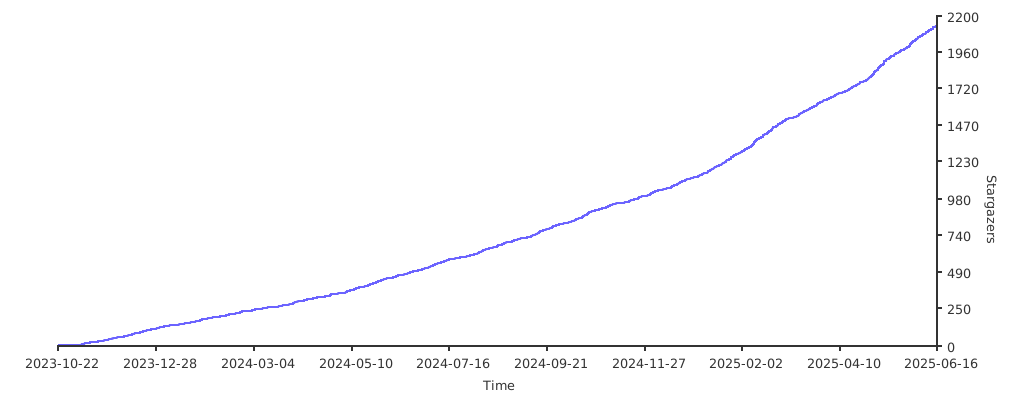](https://starchart.cc/JaKooLit/Hyprland-Dots) diff --git a/i18n/README.jp.md b/i18n/README.jp.md index 901ea2ca..b9244d01 100644 --- a/i18n/README.jp.md +++ b/i18n/README.jp.md @@ -1,38 +1,37 @@ -[](https://github.com/JaKooLit/Hyprland-Dots/blob/main/README.md) -[](https://github.com/JaKooLit/Hyprland-Dots/blob/main/i18n/README.ro.md) -[](https://github.com/JaKooLit/Hyprland-Dots/blob/main/i18n/README.ru.md) -[](https://github.com/JaKooLit/Hyprland-Dots/blob/main/i18n/README.ua.md) -[](https://github.com/JaKooLit/Hyprland-Dots/blob/main/i18n/README.de.md) +[](https://github.com/LinuxBeginnings/Hyprland-Dots/blob/main/README.md) +[](https://github.com/LinuxBeginnings/Hyprland-Dots/blob/main/i18n/README.ro.md) +[](https://github.com/LinuxBeginnings/Hyprland-Dots/blob/main/i18n/README.ru.md) +[](https://github.com/LinuxBeginnings/Hyprland-Dots/blob/main/i18n/README.ua.md) +[](https://github.com/LinuxBeginnings/Hyprland-Dots/blob/main/i18n/README.de.md) <h3 align="center"> <img align="center" width="80%" src=https://github.com/user-attachments/assets/bc18bd4d-944b-4d5f-a119-7578fa38f9b4 /> </h3> <p align="center"> - <img src="https://raw.githubusercontent.com/JaKooLit/Hyprland-Dots/main/assets/latte.png" width="400" /> + <img src="https://raw.githubusercontent.com/LinuxBeginnings/Hyprland-Dots/main/assets/latte.png" width="400" /> </p> <div align="center"> <br> <a href="#-コピー--インストール--アップデート手順-"><kbd> <br> Installation <br> </kbd></a>   <a href="https://www.youtube.com/playlist?list=PLDtGd5Fw5_GjXCznR0BzCJJDIQSZJRbxx"><kbd> <br> Youtube <br> </kbd></a>   - <a href="https://github.com/JaKooLit/Hyprland-Dots/wiki"><kbd> <br> Wiki <br> </kbd></a>   - <a href="https://github.com/JaKooLit/Hyprland-Dots/discussions"><kbd> <br> Discussions <br> </kbd></a>   - <a href="https://github.com/JaKooLit/Hyprland-Dots/wiki/Keybinds"><kbd> <br> Keybinds <br> </kbd></a>   + <a href="https://github.com/LinuxBeginnings/Hyprland-Dots/wiki"><kbd> <br> Wiki <br> </kbd></a>   + <a href="https://github.com/LinuxBeginnings/Hyprland-Dots/discussions"><kbd> <br> Discussions <br> </kbd></a>   + <a href="https://github.com/LinuxBeginnings/Hyprland-Dots/wiki/Keybinds"><kbd> <br> Keybinds <br> </kbd></a>   <a href="https://discord.gg/kool-tech-world"><kbd> <br> Discord <br> </kbd></a> </div><br> <div align="center"> -   <a href="https://discord.gg/kool-tech-world"> <img src="https://img.shields.io/discord/1151869464405606400?style=for-the-badge&logo=discord&color=cba6f7&link=https%3A%2F%2Fdiscord.gg%kool-tech-world"> </a> <br/> </div> <h3 align="center"> - <img src="https://github.com/JaKooLit/Telegram-Animated-Emojis/blob/main/Activity/Sparkles.webp" alt="Sparkles" width="38" height="38" /> + <img src="https://github.com/LinuxBeginnings/Telegram-Animated-Emojis/blob/main/Activity/Sparkles.webp" alt="Sparkles" width="38" height="38" /> KooL's Hyprland Dotfiles Showcase - <img src="https://github.com/JaKooLit/Telegram-Animated-Emojis/blob/main/Activity/Sparkles.webp" alt="Sparkles" width="38" height="38" /> + <img src="https://github.com/LinuxBeginnings/Telegram-Animated-Emojis/blob/main/Activity/Sparkles.webp" alt="Sparkles" width="38" height="38" /> </h3> <div align="center"> @@ -63,7 +62,7 @@ https://github.com/user-attachments/assets/49bc12b2-abaf-45de-a21c-67aacd9bb872 - 重要:これを動作させるには、`curl` パッケージが必要です。 ```bash -sh <(curl -L https://raw.githubusercontent.com/JaKooLit/Hyprland-Dots/main/Distro-Hyprland.sh) +sh <(curl -L https://raw.githubusercontent.com/LinuxBeginnings/Hyprland-Dots/main/Distro-Hyprland.sh) ``` - 上記のコマンドを使用して、Distro-Hyprland のインストールスクリプトを自動的にクローンできます。 @@ -73,19 +72,19 @@ sh <(curl -L https://raw.githubusercontent.com/JaKooLit/Hyprland-Dots/main/Distr - 選択したディストロ向けの自動化された Hyprland スクリプトです。これらの設定をインストールするオプションを選択した場合、対応する dotfiles を取得します。 -- [Arch-Linux](https://github.com/JaKooLit/Arch-Hyprland) +- [Arch-Linux](https://github.com/LinuxBeginnings/Arch-Hyprland) -- [OpenSUSE(Tumbleweed)](https://github.com/JaKooLit/OpenSuse-Hyprland) +- [OpenSUSE(Tumbleweed)](https://github.com/LinuxBeginnings/OpenSuse-Hyprland) -- [Fedora-Linux](https://github.com/JaKooLit/Fedora-Hyprland) +- [Fedora-Linux](https://github.com/LinuxBeginnings/Fedora-Hyprland) -- [Debian-Linux (Trixie & SID)](https://github.com/JaKooLit/Debian-Hyprland) +- [Debian-Linux (Trixie & SID)](https://github.com/LinuxBeginnings/Debian-Hyprland) -- [NixOS](https://github.com/JaKooLit/NixOS-Hyprland) +- [NixOS](https://github.com/LinuxBeginnings/NixOS-Hyprland) -- [Ubuntu 24.04 LTS](https://github.com/JaKooLit/Ubuntu-Hyprland/tree/24.04) -- [Ubuntu 24.10](https://github.com/JaKooLit/Ubuntu-Hyprland/tree/24.10) -- [Ubuntu 25.04 - (ALPHA STAGE)](https://github.com/JaKooLit/Ubuntu-Hyprland/tree/25.04) +- [Ubuntu 24.04 LTS](https://github.com/LinuxBeginnings/Ubuntu-Hyprland/tree/24.04) +- [Ubuntu 24.10](https://github.com/LinuxBeginnings/Ubuntu-Hyprland/tree/24.10) +- [Ubuntu 25.04 - (ALPHA STAGE)](https://github.com/LinuxBeginnings/Ubuntu-Hyprland/tree/25.04) --- @@ -97,18 +96,18 @@ sh <(curl -L https://raw.githubusercontent.com/JaKooLit/Hyprland-Dots/main/Distr ### 👀 スクリーンショット 👀 -- すべてのスクリーンショットはここにまとめられています。 [スクリーンショット](https://github.com/JaKooLit/screenshots/tree/main/Hyprland-ScreenShots) +- すべてのスクリーンショットはここにまとめられています。 [スクリーンショット](https://github.com/LinuxBeginnings/screenshots/tree/main/Hyprland-ScreenShots) ### 📦 変更点 -- 変更を簡単に追跡できるよう、[変更ログ](https://github.com/JaKooLit/Hyprland-Dots/wiki/Changelogs) 変更が注目に値する場合はスクリーンショットも含めます! +- 変更を簡単に追跡できるよう、[変更ログ](https://github.com/LinuxBeginnings/Hyprland-Dots/wiki/Changelogs) 変更が注目に値する場合はスクリーンショットも含めます! > [注意!] > デフォルトでは、Kools Dots はスケーリングなしの 2K (1440p) ディスプレイ向けに調整・設定されています。 ### 💥 コピー / インストール / アップデート手順 💥 -- [`ここに詳細を記載しています`](https://github.com/JaKooLit/Hyprland-Dots/wiki/Install_&_Update) +- [`ここに詳細を記載しています`](https://github.com/LinuxBeginnings/Hyprland-Dots/wiki/Install_&_Update) > [注意!] > 自動コピーのスクリプトである "copy.sh" は、コピー対象のディレクトリをバックアップします。しかし、スクリプトがバックアップに失敗する可能性もあるため、手動でバックアップを取るのも良い考えです! - このリポジトリを git でクローンし、ディレクトリを移動して、実行可能にした後、スクリプトを実行してください。 @@ -116,14 +115,14 @@ sh <(curl -L https://raw.githubusercontent.com/JaKooLit/Hyprland-Dots/main/Distr > Master ブランチからダウンロードする場合 ```bash -git clone --depth=1 https://github.com/JaKooLit/Hyprland-Dots.git +git clone --depth=1 https://github.com/LinuxBeginnings/Hyprland-Dots.git cd Hyprland-Dots ``` > 開発ブランチ(Development)からダウンロードする場合(開発およびテスト用) ```bash -git clone --depth=1 https://github.com/JaKooLit/Hyprland-Dots.git -b development +git clone --depth=1 https://github.com/LinuxBeginnings/Hyprland-Dots.git -b development cd Hyprland-Dots ``` @@ -153,7 +152,7 @@ chmod +x upgrade.sh ## ❗❗❗ DEBIAN および UBUNTU ユーザーへの注意! -- KooL Hyprland の dotfiles 更新に関するメッセージが大量に届いています。 [`WIKI`](https://github.com/JaKooLit/Hyprland-Dots/wiki/Install_&_Update)に大きく注意書きを記載しました。 +- KooL Hyprland の dotfiles 更新に関するメッセージが大量に届いています。 [`WIKI`](https://github.com/LinuxBeginnings/Hyprland-Dots/wiki/Install_&_Update)に大きく注意書きを記載しました。 #### ⚠️⚠️⚠️ スクリプトによって作成されたバックアップについての注意 @@ -164,7 +163,7 @@ chmod +x upgrade.sh #### 🛎️ 壁紙に関するちょっとした注意 -- デフォルトでは、ダークとライト各 1 枚+3 枚の壁紙のみがコピーされます。追加の壁紙をダウンロードするオプションが提供されます。追加の壁紙は[`THIS`](https://github.com/JaKooLit/Wallpaper-Bank/tree/main/wallpapers) リンクからプレビュー/確認できます。 +- デフォルトでは、ダークとライト各 1 枚+3 枚の壁紙のみがコピーされます。追加の壁紙をダウンロードするオプションが提供されます。追加の壁紙は[`THIS`](https://github.com/LinuxBeginnings/Wallpaper-Bank/tree/main/wallpapers) リンクからプレビュー/確認できます。 #### ⚠️⚠️⚠️これらの dotfiles をコピー / インストールした後の必須事項 @@ -172,24 +171,24 @@ chmod +x upgrade.sh - NVIDIA の所有者へ。`~/.config/hypr/UserConfigs/ENVariables.conf`を編集してください(強く推奨)。 -* NVIDIA の所有者とユーザーへ。 インsトール後に [`THIS`](https://github.com/JaKooLit/Hyprland-Dots/wiki/Notes_to_remember#--for-nvidia-gpu-users)を確認してください。 +* NVIDIA の所有者とユーザーへ。 インsトール後に [`THIS`](https://github.com/LinuxBeginnings/Hyprland-Dots/wiki/Notes_to_remember#--for-nvidia-gpu-users)を確認してください。 - 既に独自のキー設定やモニター設定を行っている場合は、ログアウトや再起動前に作成されたバックアップからコピーしてください。(推奨) #### 📖 既知の問題と可能な解決策 -- こちらのページを確認してください: [FAQ](https://github.com/JaKooLit/Hyprland-Dots/wiki/FAQ) & [UNSOLVED ISSUES](https://github.com/JaKooLit/Hyprland-Dots/wiki/Known_Issues) +- こちらのページを確認してください: [FAQ](https://github.com/LinuxBeginnings/Hyprland-Dots/wiki/FAQ) & [UNSOLVED ISSUES](https://github.com/LinuxBeginnings/Hyprland-Dots/wiki/Known_Issues) #### 🙋 質問対応 ⁉️ - FAQ! はい、これらの dotfiles は他のディストロでも使用できます!ただし、適切なパッケージを事前にインストールしてください!安心できるなら、私も Gentoo で同じ設定を使っています :) - クイックヒント! Waybar モジュールの HINT! をクリックしてください。 (Waybar のデフォルトレイアウトおよび Simple-L [TOP] レイアウトでのみ利用可能)。キーバインドの `SUPER H`でも起動できます。 -- さらに質問がありますか? こちらをクリックして [WIKI](https://github.com/JaKooLit/Hyprland-Dots/wiki/)を参照してください。 -- 旧設定が欲しい場合, すべて "Archive" リポジトリにまとめています。詳しくは[HERE](https://github.com/JaKooLit/Hyprland-Dots-releases-Archive)をご覧ください。 +- さらに質問がありますか? こちらをクリックして [WIKI](https://github.com/LinuxBeginnings/Hyprland-Dots/wiki/)を参照してください。 +- 旧設定が欲しい場合, すべて "Archive" リポジトリにまとめています。詳しくは[HERE](https://github.com/LinuxBeginnings/Hyprland-Dots-releases-Archive)をご覧ください。 #### ⌨ キーバインド -- キーバインドの説明はこちら: [`CLICK`](https://github.com/JaKooLit/Hyprland-Dots/wiki/Keybinds) +- キーバインドの説明はこちら: [`CLICK`](https://github.com/LinuxBeginnings/Hyprland-Dots/wiki/Keybinds) #### 🙏 スペシャルリクエスト @@ -213,18 +212,13 @@ chmod +x upgrade.sh - コーヒーや BTC でサポートも歓迎 😊 -[](https://ko-fi.com/jakoolit) または -[](https://www.buymeacoffee.com/JaKooLit) また、BTC での寄付も可能です -> 1N3MeV2dsX6gQB42HXU6MF2hAix1mqjo8i - ## 🫰 スターありがとう 🩷 -[](https://starchart.cc/JaKooLit/Hyprland-Dots) diff --git a/i18n/README.ro.md b/i18n/README.ro.md index 52d60eb7..17b1e66d 100644 --- a/i18n/README.ro.md +++ b/i18n/README.ro.md @@ -1,15 +1,15 @@ -[](https://github.com/JaKooLit/Hyprland-Dots/blob/main/README.md) -[](https://github.com/JaKooLit/Hyprland-Dots/blob/main/i18n/README.jp.md) -[](https://github.com/JaKooLit/Hyprland-Dots/blob/main/i18n/README.ru.md) -[](https://github.com/JaKooLit/Hyprland-Dots/blob/main/i18n/README.ua.md) -[](https://github.com/JaKooLit/Hyprland-Dots/blob/main/i18n/README.de.md) +[](https://github.com/LinuxBeginnings/Hyprland-Dots/blob/main/README.md) +[](https://github.com/LinuxBeginnings/Hyprland-Dots/blob/main/i18n/README.jp.md) +[](https://github.com/LinuxBeginnings/Hyprland-Dots/blob/main/i18n/README.ru.md) +[](https://github.com/LinuxBeginnings/Hyprland-Dots/blob/main/i18n/README.ua.md) +[](https://github.com/LinuxBeginnings/Hyprland-Dots/blob/main/i18n/README.de.md) <h3 align="center"> <img align="center" width="80%" src=https://github.com/user-attachments/assets/bc18bd4d-944b-4d5f-a119-7578fa38f9b4 /> </h3> <p align="center"> - <img src="https://raw.githubusercontent.com/JaKooLit/Hyprland-Dots/main/assets/latte.png" width="400" /> + <img src="https://raw.githubusercontent.com/LinuxBeginnings/Hyprland-Dots/main/assets/latte.png" width="400" /> </p> @@ -17,23 +17,22 @@ <br> <a href="#-instrucțiuni-de-copiere--instalare--actualizare-"><kbd> <br> Instalare <br> </kbd></a>   <a href="https://www.youtube.com/playlist?list=PLDtGd5Fw5_GjXCznR0BzCJJDIQSZJRbxx"><kbd> <br> Youtube <br> </kbd></a>   - <a href="https://github.com/JaKooLit/Hyprland-Dots/wiki"><kbd> <br> Wiki <br> </kbd></a>   - <a href="https://github.com/JaKooLit/Hyprland-Dots/discussions"><kbd> <br> Discuții <br> </kbd></a>   - <a href="https://github.com/JaKooLit/Hyprland-Dots/wiki/Keybinds"><kbd> <br> Comenzi rapide <br> </kbd></a>   + <a href="https://github.com/LinuxBeginnings/Hyprland-Dots/wiki"><kbd> <br> Wiki <br> </kbd></a>   + <a href="https://github.com/LinuxBeginnings/Hyprland-Dots/discussions"><kbd> <br> Discuții <br> </kbd></a>   + <a href="https://github.com/LinuxBeginnings/Hyprland-Dots/wiki/Keybinds"><kbd> <br> Comenzi rapide <br> </kbd></a>   <a href="https://discord.gg/kool-tech-world"><kbd> <br> Discord <br> </kbd></a> </div><br> <div align="center"> -   <a href="https://discord.gg/kool-tech-world"> <img src="https://img.shields.io/discord/1151869464405606400?style=for-the-badge&logo=discord&color=cba6f7&link=https%3A%2F%2Fdiscord.gg%kool-tech-world"> </a> <br/> </div> <h3 align="center"> - <img src="https://github.com/JaKooLit/Telegram-Animated-Emojis/blob/main/Activity/Sparkles.webp" alt="Sparkles" width="38" height="38" /> + <img src="https://github.com/LinuxBeginnings/Telegram-Animated-Emojis/blob/main/Activity/Sparkles.webp" alt="Sparkles" width="38" height="38" /> Prezentarea fișierelor Dotfiles Hyprland ale lui KooL - <img src="https://github.com/JaKooLit/Telegram-Animated-Emojis/blob/main/Activity/Sparkles.webp" alt="Sparkles" width="38" height="38" /> + <img src="https://github.com/LinuxBeginnings/Telegram-Animated-Emojis/blob/main/Activity/Sparkles.webp" alt="Sparkles" width="38" height="38" /> </h3> <div align="center"> @@ -59,7 +58,7 @@ https://github.com/user-attachments/assets/49bc12b2-abaf-45de-a21c-67aacd9bb872 - NOTĂ: ai nevoie de pachetul `curl` pentru ca aceasta să funcționeze ```bash -sh <(curl -L https://raw.githubusercontent.com/JaKooLit/Hyprland-Dots/main/Distro-Hyprland.sh) +sh <(curl -L https://raw.githubusercontent.com/LinuxBeginnings/Hyprland-Dots/main/Distro-Hyprland.sh) ``` - acum poți folosi comanda de mai sus pentru a clona automat scripturile de instalare Distro-Hyprland de mai jos @@ -68,14 +67,14 @@ sh <(curl -L https://raw.githubusercontent.com/JaKooLit/Hyprland-Dots/main/Distr ### 👁️🗨️ Scripturile mele de instalare Hyprland 👁️🗨️ - Scripturi automate Hyprland pentru distribuția aleasă, care vor descărca aceste dotfiles dacă optezi pentru instalarea acestor configurații -- [Arch-Linux](https://github.com/JaKooLit/Arch-Hyprland) -- [OpenSUSE(Tumbleweed)](https://github.com/JaKooLit/OpenSuse-Hyprland) -- [Fedora-Linux](https://github.com/JaKooLit/Fedora-Hyprland) -- [Debian-Linux (Trixie & SID)](https://github.com/JaKooLit/Debian-Hyprland) -- [NixOS](https://github.com/JaKooLit/NixOS-Hyprland) -- [Ubuntu 24.04 LTS](https://github.com/JaKooLit/Ubuntu-Hyprland/tree/24.04) -- [Ubuntu 24.10](https://github.com/JaKooLit/Ubuntu-Hyprland/tree/24.10) -- [Ubuntu 25.04 - (FAZĂ ALPHA)](https://github.com/JaKooLit/Ubuntu-Hyprland/tree/25.04) +- [Arch-Linux](https://github.com/LinuxBeginnings/Arch-Hyprland) +- [OpenSUSE(Tumbleweed)](https://github.com/LinuxBeginnings/OpenSuse-Hyprland) +- [Fedora-Linux](https://github.com/LinuxBeginnings/Fedora-Hyprland) +- [Debian-Linux (Trixie & SID)](https://github.com/LinuxBeginnings/Debian-Hyprland) +- [NixOS](https://github.com/LinuxBeginnings/NixOS-Hyprland) +- [Ubuntu 24.04 LTS](https://github.com/LinuxBeginnings/Ubuntu-Hyprland/tree/24.04) +- [Ubuntu 24.10](https://github.com/LinuxBeginnings/Ubuntu-Hyprland/tree/24.10) +- [Ubuntu 25.04 - (FAZĂ ALPHA)](https://github.com/LinuxBeginnings/Ubuntu-Hyprland/tree/25.04) --- @@ -85,16 +84,16 @@ sh <(curl -L https://raw.githubusercontent.com/JaKooLit/Hyprland-Dots/main/Distr - Acest repo va fi descărcat de scripturile de instalare Distro-Hyprland de mai sus dacă optezi pentru descărcarea dotfiles-urilor pre-configurate ### 👀 Capturi de ecran 👀 -- Toate capturile de ecran sunt colectate aici [Capturi de ecran](https://github.com/JaKooLit/screenshots/tree/main/Hyprland-ScreenShots) +- Toate capturile de ecran sunt colectate aici [Capturi de ecran](https://github.com/LinuxBeginnings/screenshots/tree/main/Hyprland-ScreenShots) ### 📦 Ce mai e nou? -- Pentru a urmări ușor modificările, voi actualiza [Jurnalul de modificări](https://github.com/JaKooLit/Hyprland-Dots/wiki/Changelogs). Capturile de ecran vor fi incluse dacă modificările merită menționate! +- Pentru a urmări ușor modificările, voi actualiza [Jurnalul de modificări](https://github.com/LinuxBeginnings/Hyprland-Dots/wiki/Changelogs). Capturile de ecran vor fi incluse dacă modificările merită menționate! > [!NOTĂ] > Reține că, în mod implicit, dotfiles-urile lui Kool sunt ajustate/configurate pentru afișaje 2k (1440p) fără scalare. ### 💥 Instrucțiuni de copiere / instalare / actualizare 💥 -- [`MAI MULTE INFORMAȚII AICI`](https://github.com/JaKooLit/Hyprland-Dots/wiki/Install_&_Update) +- [`MAI MULTE INFORMAȚII AICI`](https://github.com/LinuxBeginnings/Hyprland-Dots/wiki/Install_&_Update) > [!Notă] > Scriptul automat de copiere „copy.sh” va crea copii de rezervă ale directoarelor care urmează să fie copiate. Totuși, este o idee bună să faci manual o copie de rezervă, în caz că scriptul nu reușește să o facă! @@ -102,13 +101,13 @@ sh <(curl -L https://raw.githubusercontent.com/JaKooLit/Hyprland-Dots/main/Distr > pentru a descărca din ramura Master ```bash -git clone --depth=1 https://github.com/JaKooLit/Hyprland-Dots.git +git clone --depth=1 https://github.com/LinuxBeginnings/Hyprland-Dots.git cd Hyprland-Dots ``` > pentru a descărca din ramura Development (dezvoltare și testare) ```bash -git clone --depth=1 https://github.com/JaKooLit/Hyprland-Dots.git -b development +git clone --depth=1 https://github.com/LinuxBeginnings/Hyprland-Dots.git -b development cd Hyprland-Dots ``` @@ -134,7 +133,7 @@ chmod +x upgrade.sh ``` ## ❗❗❗ ATENȚIE PENTRU UTILIZATORII DEBIAN ȘI UBUNTU! -- Primesc o mulțime de mesaje despre actualizarea dotfiles-urilor Hyprland ale lui KooL. Am făcut o notă mare în [`WIKI`](https://github.com/JaKooLit/Hyprland-Dots/wiki/Install_&_Update) +- Primesc o mulțime de mesaje despre actualizarea dotfiles-urilor Hyprland ale lui KooL. Am făcut o notă mare în [`WIKI`](https://github.com/LinuxBeginnings/Hyprland-Dots/wiki/Install_&_Update) #### ⚠️⚠️⚠️ ATENȚIE - COPII DE REZERVĂ CREATE DE SCRIPT > [!ATENȚIE] @@ -143,33 +142,33 @@ chmod +x upgrade.sh > Șterge manual toate copiile de rezervă de care nu ai nevoie #### 🛎️ o mică notă despre imagini de fundal -- în mod implicit, doar câteva imagini de fundal vor fi copiate (1 pentru modul întunecat și deschis, plus încă 3). Ți se va oferi opțiunea de a descărca mai multe imagini de fundal. Poți previzualiza/verifica imaginile de fundal suplimentare de la [`ACEST`](https://github.com/JaKooLit/Wallpaper-Bank/tree/main/wallpapers) Link +- în mod implicit, doar câteva imagini de fundal vor fi copiate (1 pentru modul întunecat și deschis, plus încă 3). Ți se va oferi opțiunea de a descărca mai multe imagini de fundal. Poți previzualiza/verifica imaginile de fundal suplimentare de la [`ACEST`](https://github.com/LinuxBeginnings/Wallpaper-Bank/tree/main/wallpapers) Link #### ⚠️⚠️⚠️ OBLIGATORIU! după copierea / instalarea acestor dotfiles + Apasă SUPER W și setează o imagine de fundal. Aceasta este și pentru a inițializa wallust pentru temele waybar, kitty (tty) și rofi. Totuși, dacă folosești copy.sh sau release.sh, va exista o imagine de fundal inițială presetată și nu va trebui să faci asta + Proprietari de Nvidia. Asigură-te că editezi `~/.config/hypr/UserConfigs/ENVariables.conf` (foarte recomandat). -- Utilizatori / proprietari de Nvidia, după instalare, verifică [`ACESTA`](https://github.com/JaKooLit/Hyprland-Dots/wiki/Notes_to_remember#--for-nvidia-gpu-users) +- Utilizatori / proprietari de Nvidia, după instalare, verifică [`ACESTA`](https://github.com/LinuxBeginnings/Hyprland-Dots/wiki/Notes_to_remember#--for-nvidia-gpu-users) + Dacă ți-ai setat deja propriile comenzi rapide, monitoare etc., doar copiază-le din copia de rezervă creată înainte de a te deconecta sau reporni. (recomandat) #### 📖 Probleme cunoscute și posibile soluții -- verifică această pagină [Întrebări frecvente](https://github.com/JaKooLit/Hyprland-Dots/wiki/FAQ) și [PROBLEME NESOLUȚIONATE](https://github.com/JaKooLit/Hyprland-Dots/wiki/Known_Issues) +- verifică această pagină [Întrebări frecvente](https://github.com/LinuxBeginnings/Hyprland-Dots/wiki/FAQ) și [PROBLEME NESOLUȚIONATE](https://github.com/LinuxBeginnings/Hyprland-Dots/wiki/Known_Issues) #### 🙋 ÎNTREBĂRI ?!?! ⁉️ - Întrebări frecvente! Da, poți folosi aceste dotfiles pe alte distribuții! Asigură-te doar că instalezi pachetele corespunzătoare mai întâi! Dacă te face să te simți mai bine, folosesc aceeași configurație pe Gentoo-ul meu :) - SFAT RAPID! Apasă pe modulul HINT! din Waybar (notă: disponibil doar în layout-urile Waybar implicit și Simple-L [SUS]). Poate fi lansat cu comanda rapidă `SUPER H` -- Mai multe întrebări? click aici pentru a răsfoi acest [WIKI](https://github.com/JaKooLit/Hyprland-Dots/wiki/) -- Dacă vrei vechile configurații, acestea sunt colectate în repo-ul meu „Archive”. Vezi [AICI](https://github.com/JaKooLit/Hyprland-Dots-releases-Archive) +- Mai multe întrebări? click aici pentru a răsfoi acest [WIKI](https://github.com/LinuxBeginnings/Hyprland-Dots/wiki/) +- Dacă vrei vechile configurații, acestea sunt colectate în repo-ul meu „Archive”. Vezi [AICI](https://github.com/LinuxBeginnings/Hyprland-Dots-releases-Archive) #### ⌨ Comenzi rapide -- Comenzi rapide [`CLICK`](https://github.com/JaKooLit/Hyprland-Dots/wiki/Keybinds) +- Comenzi rapide [`CLICK`](https://github.com/LinuxBeginnings/Hyprland-Dots/wiki/Keybinds) #### 🙏 Cerere specială - Dacă ai îmbunătățiri pentru dotfiles sau configurații, nu ezita să trimiți un PR pentru îmbunătățiri. Întotdeauna primesc cu bucurie îmbunătățiri, deoarece și eu învăț, la fel ca voi! #### ✍️ Contribuții -- Vrei să contribui? Click [`AICI`](https://github.com/JaKooLit/Hyprland-Dots/blob/main/CONTRIBUTING.md) pentru un ghid despre cum să contribui +- Vrei să contribui? Click [`AICI`](https://github.com/LinuxBeginnings/Hyprland-Dots/blob/main/CONTRIBUTING.md) pentru un ghid despre cum să contribui #### 🤷♂️ DE FĂCUT! - [ ] Ajustarea dotfiles-urilor - 🚧 în progres constant @@ -185,16 +184,11 @@ chmod +x upgrade.sh - de asemenea, poți oferi suport prin cafele sau btc 😊 -[](https://ko-fi.com/jakoolit) sau -[](https://www.buymeacoffee.com/JaKooLit) Sau poți dona criptomonede pe portofelul meu btc :) -> 1N3MeV2dsX6gQB42HXU6MF2hAix1mqjo8i - ## 🫰 Mulțumesc pentru stele 🩷 -[](https://starchart.cc/JaKooLit/Hyprland-Dots) diff --git a/i18n/README.ru.md b/i18n/README.ru.md index 274198a6..5bd7c9d3 100644 --- a/i18n/README.ru.md +++ b/i18n/README.ru.md @@ -1,38 +1,37 @@ -[](https://github.com/JaKooLit/Hyprland-Dots/blob/main/README.md) -[](https://github.com/JaKooLit/Hyprland-Dots/blob/main/i18n/README.jp.md) -[](https://github.com/JaKooLit/Hyprland-Dots/blob/main/i18n/README.ro.md) -[](https://github.com/JaKooLit/Hyprland-Dots/blob/main/i18n/README.ua.md) -[](https://github.com/JaKooLit/Hyprland-Dots/blob/main/i18n/README.de.md) +[](https://github.com/LinuxBeginnings/Hyprland-Dots/blob/main/README.md) +[](https://github.com/LinuxBeginnings/Hyprland-Dots/blob/main/i18n/README.jp.md) +[](https://github.com/LinuxBeginnings/Hyprland-Dots/blob/main/i18n/README.ro.md) +[](https://github.com/LinuxBeginnings/Hyprland-Dots/blob/main/i18n/README.ua.md) +[](https://github.com/LinuxBeginnings/Hyprland-Dots/blob/main/i18n/README.de.md) <h3 align="center"> <img align="center" width="80%" src=https://github.com/user-attachments/assets/bc18bd4d-944b-4d5f-a119-7578fa38f9b4 /> </h3> <p align="center"> - <img src="https://raw.githubusercontent.com/JaKooLit/Hyprland-Dots/main/assets/latte.png" width="400" /> + <img src="https://raw.githubusercontent.com/LinuxBeginnings/Hyprland-Dots/main/assets/latte.png" width="400" /> </p> <div align="center"> <br> <a href="#-инструкции-по-копированию--установке--обновлению-"><kbd> <br> Установка <br> </kbd></a> <a href="https://www.youtube.com/playlist?list=PLDtGd5Fw5_GjXCznR0BzCJJDIQSZJRbxx"><kbd> <br> YouTube <br> </kbd></a> - <a href="https://github.com/JaKooLit/Hyprland-Dots/wiki"><kbd> <br> Вики <br> </kbd></a> - <a href="https://github.com/JaKooLit/Hyprland-Dots/discussions"><kbd> <br> Обсуждения <br> </kbd></a> - <a href="https://github.com/JaKooLit/Hyprland-Dots/wiki/Keybinds"><kbd> <br> Горячие клавиши <br> </kbd></a> + <a href="https://github.com/LinuxBeginnings/Hyprland-Dots/wiki"><kbd> <br> Вики <br> </kbd></a> + <a href="https://github.com/LinuxBeginnings/Hyprland-Dots/discussions"><kbd> <br> Обсуждения <br> </kbd></a> + <a href="https://github.com/LinuxBeginnings/Hyprland-Dots/wiki/Keybinds"><kbd> <br> Горячие клавиши <br> </kbd></a> <a href="https://discord.gg/kool-tech-world"><kbd> <br> Discord <br> </kbd></a> </div><br> <div align="center"> -   <a href="https://discord.gg/kool-tech-world"> <img src="https://img.shields.io/discord/1151869464405606400?style=for-the-badge&logo=discord&color=cba6f7&link=https%3A%2F%2Fdiscord.gg%kool-tech-world"> </a> <br/> </div> <h3 align="center"> - <img src="https://github.com/JaKooLit/Telegram-Animated-Emojis/blob/main/Activity/Sparkles.webp" alt="Sparkles" width="38" height="38" /> + <img src="https://github.com/LinuxBeginnings/Telegram-Animated-Emojis/blob/main/Activity/Sparkles.webp" alt="Sparkles" width="38" height="38" /> Демонстрация Dotfiles Hyprland от KooL - <img src="https://github.com/JaKooLit/Telegram-Animated-Emojis/blob/main/Activity/Sparkles.webp" alt="Sparkles" width="38" height="38" /> + <img src="https://github.com/LinuxBeginnings/Telegram-Animated-Emojis/blob/main/Activity/Sparkles.webp" alt="Sparkles" width="38" height="38" /> </h3> <div align="center"> @@ -58,7 +57,7 @@ https://github.com/user-attachments/assets/49bc12b2-abaf-45de-a21c-67aacd9bb872 - ПРИМЕЧАНИЕ: для работы требуется пакет `curl` ```bash -sh <(curl -L https://raw.githubusercontent.com/JaKooLit/Hyprland-Dots/main/Distro-Hyprland.sh) +sh <(curl -L https://raw.githubusercontent.com/LinuxBeginnings/Hyprland-Dots/main/Distro-Hyprland.sh) ``` - теперь вы можете использовать приведённую выше команду для автоматического клонирования скриптов установки Distro-Hyprland, указанных ниже @@ -67,14 +66,14 @@ sh <(curl -L https://raw.githubusercontent.com/JaKooLit/Hyprland-Dots/main/Distr ### 👁️🗨️ Мои скрипты установки Hyprland 👁️🗨️ - Автоматические скрипты Hyprland для выбранного дистрибутива, которые загрузят эти dotfiles, если вы выберете установку этих конфигураций -- [Arch-Linux](https://github.com/JaKooLit/Arch-Hyprland) -- [OpenSUSE(Tumbleweed)](https://github.com/JaKooLit/OpenSuse-Hyprland) -- [Fedora-Linux](https://github.com/JaKooLit/Fedora-Hyprland) -- [Debian-Linux (Trixie & SID)](https://github.com/JaKooLit/Debian-Hyprland) -- [NixOS](https://github.com/JaKooLit/NixOS-Hyprland) -- [Ubuntu 24.04 LTS](https://github.com/JaKooLit/Ubuntu-Hyprland/tree/24.04) -- [Ubuntu 24.10](https://github.com/JaKooLit/Ubuntu-Hyprland/tree/24.10) -- [Ubuntu 25.04 - (АЛЬФА-СТАДИЯ)](https://github.com/JaKooLit/Ubuntu-Hyprland/tree/25.04) +- [Arch-Linux](https://github.com/LinuxBeginnings/Arch-Hyprland) +- [OpenSUSE(Tumbleweed)](https://github.com/LinuxBeginnings/OpenSuse-Hyprland) +- [Fedora-Linux](https://github.com/LinuxBeginnings/Fedora-Hyprland) +- [Debian-Linux (Trixie & SID)](https://github.com/LinuxBeginnings/Debian-Hyprland) +- [NixOS](https://github.com/LinuxBeginnings/NixOS-Hyprland) +- [Ubuntu 24.04 LTS](https://github.com/LinuxBeginnings/Ubuntu-Hyprland/tree/24.04) +- [Ubuntu 24.10](https://github.com/LinuxBeginnings/Ubuntu-Hyprland/tree/24.10) +- [Ubuntu 25.04 - (АЛЬФА-СТАДИЯ)](https://github.com/LinuxBeginnings/Ubuntu-Hyprland/tree/25.04) --- @@ -84,16 +83,16 @@ sh <(curl -L https://raw.githubusercontent.com/JaKooLit/Hyprland-Dots/main/Distr - Этот репозиторий будет загружен скриптами установки Distro-Hyprland, указанными выше, если вы выберете загрузку предварительно настроенных dotfiles ### 👀 Скриншоты 👀 -- Все скриншоты собраны здесь [Скриншоты](https://github.com/JaKooLit/screenshots/tree/main/Hyprland-ScreenShots) +- Все скриншоты собраны здесь [Скриншоты](https://github.com/LinuxBeginnings/screenshots/tree/main/Hyprland-ScreenShots) ### 📦 Что нового? -- Чтобы легко отслеживать изменения, я буду обновлять [Журнал изменений](https://github.com/JaKooLit/Hyprland-Dots/wiki/Changelogs). Скриншоты будут включены, если изменения заслуживают упоминания! +- Чтобы легко отслеживать изменения, я буду обновлять [Журнал изменений](https://github.com/LinuxBeginnings/Hyprland-Dots/wiki/Changelogs). Скриншоты будут включены, если изменения заслуживают упоминания! > [!ПРИМЕЧАНИЕ] > Обратите внимание, что по умолчанию dotfiles от KooL настроены для дисплеев 2k (1440p) без масштабирования. ### 💥 Инструкции по копированию / установке / обновлению 💥 -- [`БОЛЬШЕ ИНФОРМАЦИИ ЗДЕСЬ`](https://github.com/JaKooLit/Hyprland-Dots/wiki/Install_&_Update) +- [`БОЛЬШЕ ИНФОРМАЦИИ ЗДЕСЬ`](https://github.com/LinuxBeginnings/Hyprland-Dots/wiki/Install_&_Update) > [!Примечание] > Автоматический скрипт копирования „copy.sh“ создаёт резервные копии директорий, которые будут скопированы. Тем не менее, рекомендуется сделать резервную копию вручную на случай, если скрипт не сможет этого сделать! @@ -101,13 +100,13 @@ sh <(curl -L https://raw.githubusercontent.com/JaKooLit/Hyprland-Dots/main/Distr > для загрузки из ветки Master ```bash -git clone --depth=1 https://github.com/JaKooLit/Hyprland-Dots.git +git clone --depth=1 https://github.com/LinuxBeginnings/Hyprland-Dots.git cd Hyprland-Dots ``` > для загрузки из ветки Development (разработка и тестирование) ```bash -git clone --depth=1 https://github.com/JaKooLit/Hyprland-Dots.git -b development +git clone --depth=1 https://github.com/LinuxBeginnings/Hyprland-Dots.git -b development cd Hyprland-Dots ``` @@ -133,7 +132,7 @@ chmod +x upgrade.sh ``` ## ❗❗❗ ВНИМАНИЕ ДЛЯ ПОЛЬЗОВАТЕЛЕЙ DEBIAN И UBUNTU! -- Я получаю огромное количество сообщений об обновлении dotfiles Hyprland от KooL. Я сделал большую заметку в [`ВИКИ`](https://github.com/JaKooLit/Hyprland-Dots/wiki/Install_&_Update) +- Я получаю огромное количество сообщений об обновлении dotfiles Hyprland от KooL. Я сделал большую заметку в [`ВИКИ`](https://github.com/LinuxBeginnings/Hyprland-Dots/wiki/Install_&_Update) #### ⚠️⚠️⚠️ ВНИМАНИЕ - РЕЗЕРВНЫЕ КОПИИ, СОЗДАННЫЕ СКРИПТОМ > [!ВНИМАНИЕ] @@ -142,33 +141,33 @@ chmod +x upgrade.sh > Удалите вручную все ненужные резервные копии #### 🛎️ Небольшое замечание об обоях -- по умолчанию копируется только несколько обоев (по 1 для тёмного и светлого режима, плюс ещё 3). Вам будет предложено загрузить дополнительные обои. Вы можете просмотреть/проверить дополнительные обои по [`ЭТОЙ`](https://github.com/JaKooLit/Wallpaper-Bank/tree/main/wallpapers) ссылке +- по умолчанию копируется только несколько обоев (по 1 для тёмного и светлого режима, плюс ещё 3). Вам будет предложено загрузить дополнительные обои. Вы можете просмотреть/проверить дополнительные обои по [`ЭТОЙ`](https://github.com/LinuxBeginnings/Wallpaper-Bank/tree/main/wallpapers) ссылке #### ⚠️⚠️⚠️ ОБЯЗАТЕЛЬНО! после копирования / установки этих dotfiles + Нажмите SUPER W и установите обои. Это также необходимо для инициализации wallust для тем waybar, kitty (tty) и rofi. Однако, если вы используете copy.sh или release.sh, начальные обои уже будут установлены, и этого делать не придётся + Владельцы Nvidia. Обязательно отредактируйте `~/.config/hypr/UserConfigs/ENVariables.conf` (настоятельно рекомендуется). -- Пользователи / владельцы Nvidia, после установки проверьте [`ЭТО`](https://github.com/JaKooLit/Hyprland-Dots/wiki/Notes_to_remember#--for-nvidia-gpu-users) +- Пользователи / владельцы Nvidia, после установки проверьте [`ЭТО`](https://github.com/LinuxBeginnings/Hyprland-Dots/wiki/Notes_to_remember#--for-nvidia-gpu-users) + Если вы уже настроили свои горячие клавиши, мониторы и т.д., просто скопируйте их из созданной резервной копии перед выходом из системы или перезагрузкой. (рекомендуется) #### 📖 Известные проблемы и возможные решения -- ознакомьтесь с этой страницей [Часто задаваемые вопросы](https://github.com/JaKooLit/Hyprland-Dots/wiki/FAQ) и [НЕРЕШЁННЫЕ ПРОБЛЕМЫ](https://github.com/JaKooLit/Hyprland-Dots/wiki/Known_Issues) +- ознакомьтесь с этой страницей [Часто задаваемые вопросы](https://github.com/LinuxBeginnings/Hyprland-Dots/wiki/FAQ) и [НЕРЕШЁННЫЕ ПРОБЛЕМЫ](https://github.com/LinuxBeginnings/Hyprland-Dots/wiki/Known_Issues) #### 🙋 ВОПРОСЫ ?!?! ⁉️ - Часто задаваемые вопросы! Да, вы можете использовать эти dotfiles на других дистрибутивах! Просто убедитесь, что сначала установлены соответствующие пакеты! Если вам от этого легче, я использую ту же конфигурацию на моём Gentoo :) - БЫСТРЫЙ СОВЕТ! Нажмите на модуль HINT! в Waybar (примечание: доступно только в стандартном и Simple-L [ВЕРХНЕМ] макете Waybar). Можно запустить с помощью горячей клавиши `SUPER H` -- Ещё вопросы? щёлкните здесь, чтобы просмотреть эту [ВИКИ](https://github.com/JaKooLit/Hyprland-Dots/wiki/) -- Если вам нужны старые конфигурации, они собраны в моём репозитории „Archive“. Смотрите [ЗДЕСЬ](https://github.com/JaKooLit/Hyprland-Dots-releases-Archive) +- Ещё вопросы? щёлкните здесь, чтобы просмотреть эту [ВИКИ](https://github.com/LinuxBeginnings/Hyprland-Dots/wiki/) +- Если вам нужны старые конфигурации, они собраны в моём репозитории „Archive“. Смотрите [ЗДЕСЬ](https://github.com/LinuxBeginnings/Hyprland-Dots-releases-Archive) #### ⌨ Горячие клавиши -- Горячие клавиши [`ЩЁЛКНИТЕ`](https://github.com/JaKooLit/Hyprland-Dots/wiki/Keybinds) +- Горячие клавиши [`ЩЁЛКНИТЕ`](https://github.com/LinuxBeginnings/Hyprland-Dots/wiki/Keybinds) #### 🙏 Особая просьба - Если у вас есть улучшения для dotfiles или конфигураций, не стесняйтесь отправить PR для улучшений. Я всегда приветствую улучшения, так как тоже учусь, как и вы! #### ✍️ Вклад -- Хотите внести вклад? Щёлкните [`ЗДЕСЬ`](https://github.com/JaKooLit/Hyprland-Dots/blob/main/CONTRIBUTING.md) для руководства по внесению вклада +- Хотите внести вклад? Щёлкните [`ЗДЕСЬ`](https://github.com/LinuxBeginnings/Hyprland-Dots/blob/main/CONTRIBUTING.md) для руководства по внесению вклада #### 🤷♂️ ЧТО ДЕЛАТЬ! - [ ] Настройка dotfiles - 🚧 в постоянном прогрессе @@ -184,16 +183,11 @@ chmod +x upgrade.sh - также вы можете поддержать через кофе или btc 😊 -[](https://ko-fi.com/jakoolit) или -[](https://www.buymeacoffee.com/JaKooLit) Или вы можете пожертвовать криптовалюту на мой btc-кошелёк :) -> 1N3MeV2dsX6gQB42HXU6MF2hAix1mqjo8i - ## 🫰 Спасибо за звёзды 🩷 -[](https://starchart.cc/JaKooLit/Hyprland-Dots) diff --git a/i18n/README.ua.md b/i18n/README.ua.md index 9d1038ec..e7460408 100644 --- a/i18n/README.ua.md +++ b/i18n/README.ua.md @@ -1,38 +1,37 @@ -[](https://github.com/JaKooLit/Hyprland-Dots/blob/main/README.md) -[](https://github.com/JaKooLit/Hyprland-Dots/blob/main/i18n/README.jp.md) -[](https://github.com/JaKooLit/Hyprland-Dots/blob/main/i18n/README.ro.md) -[](https://github.com/JaKooLit/Hyprland-Dots/blob/main/i18n/README.ru.md) -[](https://github.com/JaKooLit/Hyprland-Dots/blob/main/i18n/README.de.md) +[](https://github.com/LinuxBeginnings/Hyprland-Dots/blob/main/README.md) +[](https://github.com/LinuxBeginnings/Hyprland-Dots/blob/main/i18n/README.jp.md) +[](https://github.com/LinuxBeginnings/Hyprland-Dots/blob/main/i18n/README.ro.md) +[](https://github.com/LinuxBeginnings/Hyprland-Dots/blob/main/i18n/README.ru.md) +[](https://github.com/LinuxBeginnings/Hyprland-Dots/blob/main/i18n/README.de.md) <h3 align="center"> <img align="center" width="80%" src=https://github.com/user-attachments/assets/bc18bd4d-944b-4d5f-a119-7578fa38f9b4 /> </h3> <p align="center"> - <img src="https://raw.githubusercontent.com/JaKooLit/Hyprland-Dots/main/assets/latte.png" width="400" /> + <img src="https://raw.githubusercontent.com/LinuxBeginnings/Hyprland-Dots/main/assets/latte.png" width="400" /> </p> <div align="center"> <br> <a href="#-інструкції-з-копіювання--встановлення--оновлення-"><kbd> <br> Встановлення <br> </kbd></a> <a href="https://www.youtube.com/playlist?list=PLDtGd5Fw5_GjXCznR0BzCJJDIQSZJRbxx"><kbd> <br> YouTube <br> </kbd></a> - <a href="https://github.com/JaKooLit/Hyprland-Dots/wiki"><kbd> <br> Вікі <br> </kbd></a> - <a href="https://github.com/JaKooLit/Hyprland-Dots/discussions"><kbd> <br> Обговорення <br> </kbd></a> - <a href="https://github.com/JaKooLit/Hyprland-Dots/wiki/Keybinds"><kbd> <br> Гарячі клавіші <br> </kbd></a> + <a href="https://github.com/LinuxBeginnings/Hyprland-Dots/wiki"><kbd> <br> Вікі <br> </kbd></a> + <a href="https://github.com/LinuxBeginnings/Hyprland-Dots/discussions"><kbd> <br> Обговорення <br> </kbd></a> + <a href="https://github.com/LinuxBeginnings/Hyprland-Dots/wiki/Keybinds"><kbd> <br> Гарячі клавіші <br> </kbd></a> <a href="https://discord.gg/kool-tech-world"><kbd> <br> Discord <br> </kbd></a> </div><br> <div align="center"> -   <a href="https://discord.gg/kool-tech-world"> <img src="https://img.shields.io/discord/1151869464405606400?style=for-the-badge&logo=discord&color=cba6f7&link=https%3A%2F%2Fdiscord.gg%kool-tech-world"> </a> <br/> </div> <h3 align="center"> - <img src="https://github.com/JaKooLit/Telegram-Animated-Emojis/blob/main/Activity/Sparkles.webp" alt="Sparkles" width="38" height="38" /> + <img src="https://github.com/LinuxBeginnings/Telegram-Animated-Emojis/blob/main/Activity/Sparkles.webp" alt="Sparkles" width="38" height="38" /> Презентація Dotfiles Hyprland від KooL - <img src="https://github.com/JaKooLit/Telegram-Animated-Emojis/blob/main/Activity/Sparkles.webp" alt="Sparkles" width="38" height="38" /> + <img src="https://github.com/LinuxBeginnings/Telegram-Animated-Emojis/blob/main/Activity/Sparkles.webp" alt="Sparkles" width="38" height="38" /> </h3> <div align="center"> @@ -58,7 +57,7 @@ https://github.com/user-attachments/assets/49bc12b2-abaf-45de-a21c-67aacd9bb872 - ПРИМІТКА: для роботи потрібен пакет `curl` ```bash -sh <(curl -L https://raw.githubusercontent.com/JaKooLit/Hyprland-Dots/main/Distro-Hyprland.sh) +sh <(curl -L https://raw.githubusercontent.com/LinuxBeginnings/Hyprland-Dots/main/Distro-Hyprland.sh) ``` - тепер ви можете використовувати наведену вище команду для автоматичного клонування скриптів встановлення Distro-Hyprland, зазначених нижче @@ -67,14 +66,14 @@ sh <(curl -L https://raw.githubusercontent.com/JaKooLit/Hyprland-Dots/main/Distr ### 👁️🗨️ Мої скрипти встановлення Hyprland 👁️🗨️ - Автоматичні скрипти Hyprland для обраного дистрибутива, які завантажать ці dotfiles, якщо ви оберете встановлення цих конфігурацій -- [Arch-Linux](https://github.com/JaKooLit/Arch-Hyprland) -- [OpenSUSE(Tumbleweed)](https://github.com/JaKooLit/OpenSuse-Hyprland) -- [Fedora-Linux](https://github.com/JaKooLit/Fedora-Hyprland) -- [Debian-Linux (Trixie & SID)](https://github.com/JaKooLit/Debian-Hyprland) -- [NixOS](https://github.com/JaKooLit/NixOS-Hyprland) -- [Ubuntu 24.04 LTS](https://github.com/JaKooLit/Ubuntu-Hyprland/tree/24.04) -- [Ubuntu 24.10](https://github.com/JaKooLit/Ubuntu-Hyprland/tree/24.10) -- [Ubuntu 25.04 - (АЛЬФА-ЕТАП)](https://github.com/JaKooLit/Ubuntu-Hyprland/tree/25.04) +- [Arch-Linux](https://github.com/LinuxBeginnings/Arch-Hyprland) +- [OpenSUSE(Tumbleweed)](https://github.com/LinuxBeginnings/OpenSuse-Hyprland) +- [Fedora-Linux](https://github.com/LinuxBeginnings/Fedora-Hyprland) +- [Debian-Linux (Trixie & SID)](https://github.com/LinuxBeginnings/Debian-Hyprland) +- [NixOS](https://github.com/LinuxBeginnings/NixOS-Hyprland) +- [Ubuntu 24.04 LTS](https://github.com/LinuxBeginnings/Ubuntu-Hyprland/tree/24.04) +- [Ubuntu 24.10](https://github.com/LinuxBeginnings/Ubuntu-Hyprland/tree/24.10) +- [Ubuntu 25.04 - (АЛЬФА-ЕТАП)](https://github.com/LinuxBeginnings/Ubuntu-Hyprland/tree/25.04) --- @@ -84,16 +83,16 @@ sh <(curl -L https://raw.githubusercontent.com/JaKooLit/Hyprland-Dots/main/Distr - Цей репозиторій буде завантажено скриптами встановлення Distro-Hyprland, зазначеними вище, якщо ви оберете завантаження попередньо налаштованих dotfiles ### 👀 Скріншоти 👀 -- Усі скріншоти зібрано тут [Скріншоти](https://github.com/JaKooLit/screenshots/tree/main/Hyprland-ScreenShots) +- Усі скріншоти зібрано тут [Скріншоти](https://github.com/LinuxBeginnings/screenshots/tree/main/Hyprland-ScreenShots) ### 📦 Що нового? -- Щоб легко відстежувати зміни, я оновлюватиму [Журнал змін](https://github.com/JaKooLit/Hyprland-Dots/wiki/Changelogs). Скріншоти будуть додані, якщо зміни варті згадки! +- Щоб легко відстежувати зміни, я оновлюватиму [Журнал змін](https://github.com/LinuxBeginnings/Hyprland-Dots/wiki/Changelogs). Скріншоти будуть додані, якщо зміни варті згадки! > [!ПРИМІТКА] > Зверніть увагу, що за замовчуванням dotfiles від KooL налаштовані для дисплеїв 2k (1440p) без масштабування. ### 💥 Інструкції з копіювання / встановлення / оновлення 💥 -- [`БІЛЬШЕ ІНФОРМАЦІЇ ТУТ`](https://github.com/JaKooLit/Hyprland-Dots/wiki/Install_&_Update) +- [`БІЛЬШЕ ІНФОРМАЦІЇ ТУТ`](https://github.com/LinuxBeginnings/Hyprland-Dots/wiki/Install_&_Update) > [!Примітака] > Автоматичний скрипт копіювання „copy.sh“ створює резервні копії директорій, які будуть скопійовані. Проте рекомендується зробити резервну копію вручну на випадок, якщо скрипт не зможе цього зробити! @@ -101,13 +100,13 @@ sh <(curl -L https://raw.githubusercontent.com/JaKooLit/Hyprland-Dots/main/Distr > для завантаження з гілки Master ```bash -git clone --depth=1 https://github.com/JaKooLit/Hyprland-Dots.git +git clone --depth=1 https://github.com/LinuxBeginnings/Hyprland-Dots.git cd Hyprland-Dots ``` > для завантаження з гілки Development (розробка та тестування) ```bash -git clone --depth=1 https://github.com/JaKooLit/Hyprland-Dots.git -b development +git clone --depth=1 https://github.com/LinuxBeginnings/Hyprland-Dots.git -b development cd Hyprland-Dots ``` @@ -133,7 +132,7 @@ chmod +x upgrade.sh ``` ## ❗❗❗ УВАГА ДЛЯ КОРИСТУВАЧІВ DEBIAN ТА UBUNTU! -- Я отримую величезну кількість повідомлень щодо оновлення dotfiles Hyprland від KooL. Я зробив велику примітку у [`ВІКІ`](https://github.com/JaKooLit/Hyprland-Dots/wiki/Install_&_Update) +- Я отримую величезну кількість повідомлень щодо оновлення dotfiles Hyprland від KooL. Я зробив велику примітку у [`ВІКІ`](https://github.com/LinuxBeginnings/Hyprland-Dots/wiki/Install_&_Update) #### ⚠️⚠️⚠️ УВАГА - РЕЗЕРВНІ КОПІЇ, СТВОРЕНІ СКРИПТОМ > [!УВАГА] @@ -142,33 +141,33 @@ chmod +x upgrade.sh > Видаліть вручну всі непотрібні резервні копії #### 🛎️ Невелика примітка про шпалери -- за замовчуванням копіюється лише кілька шпалер (по 1 для темного та світлого режиму, плюс ще 3). Вам буде запропоновано завантажити додаткові шпалери. Ви можете переглянути/перевірити додаткові шпалери за [`ЦИМ`](https://github.com/JaKooLit/Wallpaper-Bank/tree/main/wallpapers) посиланням +- за замовчуванням копіюється лише кілька шпалер (по 1 для темного та світлого режиму, плюс ще 3). Вам буде запропоновано завантажити додаткові шпалери. Ви можете переглянути/перевірити додаткові шпалери за [`ЦИМ`](https://github.com/LinuxBeginnings/Wallpaper-Bank/tree/main/wallpapers) посиланням #### ⚠️⚠️⚠️ ОБОВ’ЯЗКОВО! після копіювання / встановлення цих dotfiles + Натисніть SUPER W і встановіть шпалери. Це також необхідно для ініціалізації wallust для тем waybar, kitty (tty) і rofi. Однак, якщо ви використовуєте copy.sh або release.sh, початкові шпалери вже будуть встановлені, і цього робити не доведеться + Власники Nvidia. Обов’язково відредагуйте `~/.config/hypr/UserConfigs/ENVariables.conf` (настійно рекомендується). -- Користувачі / власники Nvidia, після встановлення перевірте [`ЦЕ`](https://github.com/JaKooLit/Hyprland-Dots/wiki/Notes_to_remember#--for-nvidia-gpu-users) +- Користувачі / власники Nvidia, після встановлення перевірте [`ЦЕ`](https://github.com/LinuxBeginnings/Hyprland-Dots/wiki/Notes_to_remember#--for-nvidia-gpu-users) + Якщо ви вже налаштували власні гарячі клавіші, монітори тощо, просто скопіюйте їх із створеної резервної копії перед виходом із системи або перезавантаженням. (рекомендується) #### 📖 Відомі проблеми та можливі рішення -- перегляньте цю сторінку [Поширені запитання](https://github.com/JaKooLit/Hyprland-Dots/wiki/FAQ) та [НЕРОЗВ’ЯЗАНІ ПРОБЛЕМИ](https://github.com/JaKooLit/Hyprland-Dots/wiki/Known_Issues) +- перегляньте цю сторінку [Поширені запитання](https://github.com/LinuxBeginnings/Hyprland-Dots/wiki/FAQ) та [НЕРОЗВ’ЯЗАНІ ПРОБЛЕМИ](https://github.com/LinuxBeginnings/Hyprland-Dots/wiki/Known_Issues) #### 🙋 ЗАПИТАННЯ ?!?! ⁉️ - Поширені запитання! Так, ви можете використовувати ці dotfiles на інших дистрибутивах! Просто переконайтеся, що спочатку встановлено відповідні пакети! Якщо вам від цього легше, я використовую ту саму конфігурацію на моєму Gentoo :) - ШВИДКА ПОРАДА! Натисніть на модуль HINT! у Waybar (примітка: доступно лише у стандартному та Simple-L [ВЕРХНЬОМУ] макеті Waybar). Можна запустити за допомогою гарячої клавіші `SUPER H` -- Ще запитання? натисніть тут, щоб переглянути цю [ВІКІ](https://github.com/JaKooLit/Hyprland-Dots/wiki/) -- Якщо вам потрібні старі конфігурації, вони зібрані в моєму репозиторії „Archive“. Дивіться [ТУТ](https://github.com/JaKooLit/Hyprland-Dots-releases-Archive) +- Ще запитання? натисніть тут, щоб переглянути цю [ВІКІ](https://github.com/LinuxBeginnings/Hyprland-Dots/wiki/) +- Якщо вам потрібні старі конфігурації, вони зібрані в моєму репозиторії „Archive“. Дивіться [ТУТ](https://github.com/LinuxBeginnings/Hyprland-Dots-releases-Archive) #### ⌨ Гарячі клавіші -- Гарячі клавіші [`КЛІКНІТЬ`](https://github.com/JaKooLit/Hyprland-Dots/wiki/Keybinds) +- Гарячі клавіші [`КЛІКНІТЬ`](https://github.com/LinuxBeginnings/Hyprland-Dots/wiki/Keybinds) #### 🙏 Особливе прохання - Якщо у вас є покращення для dotfiles або конфігурацій, не соромтеся надіслати PR для покращень. Я завжди вітаю покращення, адже я також вчуся, як і ви! #### ✍️ Внесок -- Хочете зробити внесок? Клікніть [`ТУТ`](https://github.com/JaKooLit/Hyprland-Dots/blob/main/CONTRIBUTING.md) для посібника зі внесення внеску +- Хочете зробити внесок? Клікніть [`ТУТ`](https://github.com/LinuxBeginnings/Hyprland-Dots/blob/main/CONTRIBUTING.md) для посібника зі внесення внеску #### 🤷♂️ ЩО РОБИТИ! - [ ] Налаштування dotfiles - 🚧 у постійному прогресі @@ -184,16 +183,11 @@ chmod +x upgrade.sh - також ви можете підтримати через каву або btc 😊 -[](https://ko-fi.com/jakoolit) або -[](https://www.buymeacoffee.com/JaKooLit) Або ви можете пожертвувати криптовалюту на мій btc-гаманець :) -> 1N3MeV2dsX6gQB42HXU6MF2hAix1mqjo8i - ## 🫰 Дякую за зірки 🩷 -[](https://starchart.cc/JaKooLit/Hyprland-Dots) |