
diff options
| author | JaKooLit <ejhay.games@gmail.com> | 2025-06-09 08:57:41 +0900 |
|---|---|---|
| committer | JaKooLit <ejhay.games@gmail.com> | 2025-06-09 08:57:41 +0900 |
| commit | 3e2f835d233e23104eaa541ebbf32781ffc95b40 (patch) | |
| tree | b8fcc2b636872fe43d3d78ada19ddab339d96380 /i18n | |
| parent | a21e9e7d13386171aa96fbe509340978ac2b4b1a (diff) | |
updated readme. added Readme translations
Diffstat (limited to 'i18n')
| -rw-r--r-- | i18n/README.de.md | 233 | ||||
| -rw-r--r-- | i18n/README.jp.md | 231 | ||||
| -rw-r--r-- | i18n/README.ro.md | 200 | ||||
| -rw-r--r-- | i18n/README.ru.md | 200 | ||||
| -rw-r--r-- | i18n/README.uk.md | 200 |
5 files changed, 1064 insertions, 0 deletions
diff --git a/i18n/README.de.md b/i18n/README.de.md new file mode 100644 index 00000000..6171d949 --- /dev/null +++ b/i18n/README.de.md @@ -0,0 +1,233 @@ +[](https://github.com/JaKooLit/Hyprland-Dots/blob/main/README.md) +[](https://github.com/JaKooLit/Hyprland-Dots/blob/main/i18n/README.jp.md) +[](https://github.com/JaKooLit/Hyprland-Dots/blob/main/i18n/README.ro.md) +[](https://github.com/JaKooLit/Hyprland-Dots/blob/main/i18n/README.ru.md) +[](https://github.com/JaKooLit/Hyprland-Dots/blob/main/i18n/README.uk.md) + +<h3 align="center"> +<img align="center" width="80%" src=https://github.com/user-attachments/assets/bc18bd4d-944b-4d5f-a119-7578fa38f9b4 /> +</h3> + +<p align="center"> + <img src="https://raw.githubusercontent.com/JaKooLit/Hyprland-Dots/main/assets/latte.png" width="400" /> +</p> + +<div align="center"> +<br> + <a href="#installation"><kbd> <br> Installation <br> </kbd></a>   + <a href="https://www.youtube.com/playlist?list=PLDtGd5Fw5_GjXCznR0BzCJJDIQSZJRbxx"><kbd> <br> Youtube <br> </kbd></a>   + <a href="https://github.com/JaKooLit/Hyprland-Dots/wiki"><kbd> <br> Wiki <br> </kbd></a>   + <a href="https://github.com/JaKooLit/Hyprland-Dots/discussions"><kbd> <br> Discussions <br> </kbd></a>   + <a href="https://github.com/JaKooLit/Hyprland-Dots/wiki/Keybinds"><kbd> <br> Keybinds <br> </kbd></a>   + <a href="https://github.com/JaKooLit/Hyprland-Dots/wiki/FAQ"><kbd> <br> FAQ <br> </kbd></a>   + <a href="https://discord.gg/kool-tech-world"><kbd> <br> Discord <br> </kbd></a> +</div><br> + +<div align="center"> + +   <a href="https://discord.gg/kool-tech-world"> <img src="https://img.shields.io/discord/1151869464405606400?style=for-the-badge&logo=discord&color=cba6f7&link=https%3A%2F%2Fdiscord.gg%kool-tech-world"> </a> + +<br/> +</div> + +<h3 align="center"> + <img src="https://github.com/JaKooLit/Telegram-Animated-Emojis/blob/main/Activity/Sparkles.webp" alt="Sparkles" width="38" height="38" /> + KooL's Hyprland Dotfiles Showcase + <img src="https://github.com/JaKooLit/Telegram-Animated-Emojis/blob/main/Activity/Sparkles.webp" alt="Sparkles" width="38" height="38" /> +</h3> + +<div align="center"> + +https://github.com/user-attachments/assets/49bc12b2-abaf-45de-a21c-67aacd9bb872 + +</div> + +### 📹 Ein Video Guide + +- folgt nach der Textanleitung + +### 🎞️ AGS Übersicht DEMO + +- Hier ist eine kurze Demo der AGS [Youtube LINK](https://youtu.be/zY5SLNPBJTs) + +</details> + +--- + +[](https://git.io/typing-svg) + +### 🚩 🏁 Distro Hyprland Installationsskripte herunterladen und ausführen + +> [!VORSICHT] +> Wenn du die FISH-SHELL benutzt, VERWENDE diese Funktion NICHT. Klone stattdessen das Distro-Hyprland-Repository und führe install.sh aus. + +- HINWEIS: Das Paket `curl` muss installiert sein, um die Skripte herunterzuladen + +```bash +sh <(curl -L https://raw.githubusercontent.com/JaKooLit/Hyprland-Dots/main/Distro-Hyprland.sh) +``` + +- Mit dem obigen Befehl kannst du jetzt automatisch die Hyprland Installationsskripte herunterladen und ausführen. +- Das Skript wird weitere Installationsskripte klonen und die `install.sh` starten. 😎 + +### 👁️🗨️ Meine Hyprland-Installationsskripte 👁️🗨️ + +- Automatisierte Hyprland-Skripte für ein Distro deiner Wahl. Diese Skripte laden, wenn ben;tigt, meine vorkonfigurierten Dotfiles +- [Arch-Linux](https://github.com/JaKooLit/Arch-Hyprland) + +- [OpenSUSE(Tumbleweed)](https://github.com/JaKooLit/OpenSuse-Hyprland) + +- [Fedora-Linux](https://github.com/JaKooLit/Fedora-Hyprland) + +- [Debian-Linux (Trixie & SID)](https://github.com/JaKooLit/Debian-Hyprland) + +- [NixOS](https://github.com/JaKooLit/NixOS-Hyprland) + +- [Ubuntu 24.04 LTS](https://github.com/JaKooLit/Ubuntu-Hyprland/tree/24.04) +- [Ubuntu 24.10](https://github.com/JaKooLit/Ubuntu-Hyprland/tree/24.10) +- [Ubuntu 25.04 - (ALPHA STAGE)](https://github.com/JaKooLit/Ubuntu-Hyprland/tree/25.04) + +--- + +### 🪧 Achtung 🪧 + +- Dieses Repository enthält keine Pakete und wird keine Pakete installieren. Es enthält nur vorkonfigurierte Hyprland-Configs/Dotfiles. +- In den Installationsskripten kann man die benötigten Pakete finden. Zumindest müssen aber die Hyprland-Pakete installiert sein 😏😏😏 logisch!! +- Dieses Repository wird von den oben beschriebenen Distro Hyprland-Installationsskripten heruntergeladen, wenn du dich entscheidest, die vorkonfigurierten Dotfiles verwenden zu wollen. + +### 👀 Screenshots 👀 + +- Beispiel Screenshots findest du hier [Screenshots](https://github.com/JaKooLit/screenshots/tree/main/Hyprland-ScreenShots) + +### 📦 Whats new? + +- Um Änderungen leicht nachzuvollziehen, werde ich die [CHANGELOGS](https://github.com/JaKooLit/Hyprland-Dots/wiki/Changelogs) regelmäßig aktualisieren. Es werden neue Screenshots hinzugefügt, wenn die Änderungen erwähnenswert sind! + +> [!NOTE] +> Bitte beachte, dass Kools Dots standardmäßig für einen 2K (1440p) Monitor ohne Skalierung angepasst und konfiguriert sind. + +### 💥 Kopieren / Installation / Update-Anleitung 💥 + +- [`Weiter Infos hier`](https://github.com/JaKooLit/Hyprland-Dots/wiki/Install_&_Update) + > [!Note] + > Das Kopierskript "copy.sh" erstellt Backups der zu kopierenden Konfigurationsverzeichnisse. Sollte das Skript fehlschlagen, empfiehlt es sich, manuell ein Backup zu erstellen. +- Klone das Repository mit Git, wechsle in das Verzeichnis, mache die Datei ausführbar und führe das Skript aus: + +> Um den Master-Branch herunterzuladen + +```bash +git clone --depth=1 https://github.com/JaKooLit/Hyprland-Dots.git +cd Hyprland-Dots +``` + +> Um den Entwicklungs-Branch (Development & Testing) herunterzuladen: + +```bash +git clone --depth=1 https://github.com/JaKooLit/Hyprland-Dots.git -b development +cd Hyprland-Dots +``` + +- Automatisiertes Kopieren und Installieren der vorkonfigurierten Dotfiles (empfohlen für Updates): + +```bash +chmod +x copy.sh +./copy.sh +``` + +- Kopieren und Installieren aus den Releases (stable) (beachte, dass dies eine Version älter als "main" ist): + +```bash +chmod +x release.sh +./release.sh +``` + +- UPGRADE.sh für ein Versionsupgrade + > [!IMPORTANT] + > rsync wird benötigt, damit es funktioniert. + > KooL's Hyprland sollte bereits laufen, bevor du dieses Skript verwendest. + +```bash +chmod +x upgrade.sh +./upgrade.sh +``` + +## ❗❗❗ DEBIAN AND UBUNTU INFORMATION! + +- Ich bekomme eine große Menge an Nachrichten über das Updaten eurer KooL Hyprland dotfiles. Es gibt dazu eine Info im [`WIKI`](https://github.com/JaKooLit/Hyprland-Dots/wiki/Install_&_Update) + +#### ⚠️⚠️⚠️ ACHTUNG - SKRIPT-ERSTELLTE BACKUPS + +> [!CAUTION] +> copy.sh, release.sh und auch upgrade.sh erstellen Backups! +> Schaue dir bitte manuell den Inhalt deines $HOME/.config Ordners an +> Entferne alle nicht mehr benötigten Backups bitte selbst + +#### 🛎️ kleiner Hinweis zu Hintergrundbildern + +- ständardmäßig werden nur einige Hintergründe kopiert (jeweils 1 dunkeles und helles plus 3 weitere). Dir wird angeboten werden, weitere Hintergrundbilder herunterzuladen. Du kannst dir die verfügbaren Hintergründe [`HIER`](https://github.com/JaKooLit/Wallpaper-Bank/tree/main/wallpapers) anschauen. + +#### ⚠️⚠️⚠️ WICHTIG! Nach dem Kopieren / Der Installation der Dotfiles + +- Drücke SUPER W und wähle ein Hintergrundbild. Desweiteren wird hierdurch wallust für waybar, kitty (tty) und die rofi Themes aktiviert. Wenn du copy.sh oder release.sh benutzt hast, wird ein Standard Hintergrund gesetzt sein und die Initialisierung ist bereits gesehen + +- Für Nvidia Benutzer. Stelle sicher, dass du deine `~/.config/hypr/UserConfigs/ENVariables.conf` anpasst (unbedingt empfohlen). + +* Für NVIDIA Benutzer, schaue dir diese Informationen [`HIER`](https://github.com/JaKooLit/Hyprland-Dots/wiki/Notes_to_remember#--for-nvidia-gpu-users) an. + +- Wenn die bereits deine Keybinds, Monitoren, usw. eingestellt hast... Kopiere die Einstellungen von dem Backup vor dem Logout / Reboot. (empfohlen) + +#### 📖 Bekannte Probleme und mögliche Lösungen + +- Schau dir diese Seite an [FAQ](https://github.com/JaKooLit/Hyprland-Dots/wiki/FAQ) und checke die [UNSOLVED ISSUES](https://github.com/JaKooLit/Hyprland-Dots/wiki/Known_Issues) + +#### 🙋 FRAGEN ?!?! ⁉️ + +- FAQ! Die Dotfiles funktionieren auch auf anderen Distros! Stelle nur sicher, die richtigen Pakete vorher zu installieren! Falls du dich dann besser fühlst, ich benutze die selbe Konfiguration für mein Gentoo:) +- KLEINER HINWEIS! Klicke auf das HINT! Waybar Modul (Notiz, nur in Waybar default und Simple-L [TOP] Layout verfügbar). Kann auch mit der Tastenkombination `SUPER H` gestartet werden +- Weitere Fragen? Klicke hier um das [WIKI](https://github.com/JaKooLit/Hyprland-Dots/wiki/) zu durchstöbern. +- Falls du eine ältere Version der Konfiguration haben möchtest, sind diese in meinem "Archive" Repository verfügbar. Siehe [HIER](https://github.com/JaKooLit/Hyprland-Dots-releases-Archive) + +#### ⌨ Keybinds + +- Keybinds [`KLICKE`](https://github.com/JaKooLit/Hyprland-Dots/wiki/Keybinds) + +#### 🙏 Hilfe gebraucht + +- Wenn du Verbesserungen der Dotfiles oder Konfigurationen hast, mache gerne einen PR für die Verbesserung. Ich heiße Verbesserungen immer Willkommen, da ich genau wie ihr Alle immer viel Neues lerne. + +#### ✍️ Contributing + +- Möchtest du contributen? Klicke [`HIER`](https://github.com/JaKooLit/Hyprland-Dots/blob/main/CONTRIBUTING.md) für eine Anleitung. + +#### 🤷♂️ TO DO! + +- [ ] Dotfiles verbesser - 🚧 in ständiger Entwicklung +- ~~[ ] Vielleicht zu starship wechseln. Jedoch limitiere Themes im Vergleich zu oh-my-zsh.~~ momentan nicht geplant + +#### 🔮 Discord Server + +- Bitte joine meinem [Discord](https://discord.com/invite/kool-tech-world) + +#### 💖 Unterstützung + +- ein Star auf meinen Github repos wäre nett 🌟 + +- Abbonieren meinen Youtube Kanal [YouTube](https://www.youtube.com/@Ja.KooLit) + +- du kannst mich auch mit Kaffees oder BTC unterstützen 😊 + +[](https://ko-fi.com/jakoolit) + +oder + +[](https://www.buymeacoffee.com/JaKooLit) + +Oder du kannst auch Krypto an meine btc wallet spenden :) + +> 1N3MeV2dsX6gQB42HXU6MF2hAix1mqjo8i + + + +## 🫰 Vielen Dank für die stars 🩷 + +[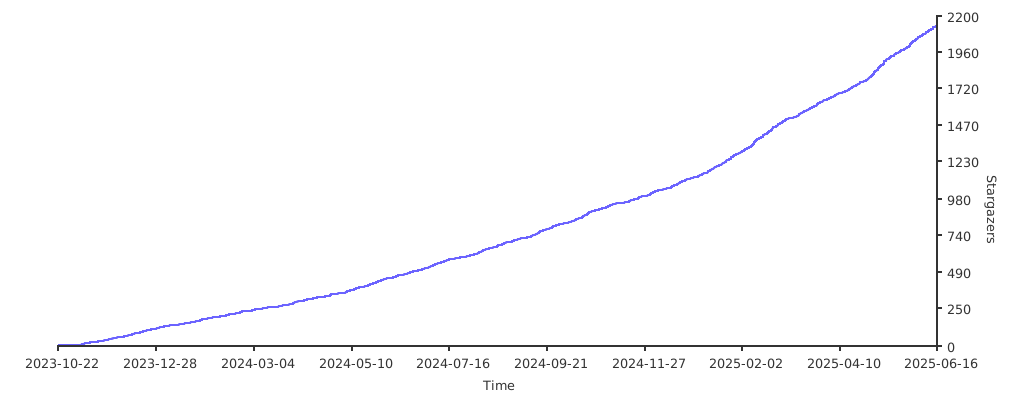](https://starchart.cc/JaKooLit/Hyprland-Dots) diff --git a/i18n/README.jp.md b/i18n/README.jp.md new file mode 100644 index 00000000..1ff83bee --- /dev/null +++ b/i18n/README.jp.md @@ -0,0 +1,231 @@ +[](https://github.com/JaKooLit/Hyprland-Dots/blob/main/README.md) +[](https://github.com/JaKooLit/Hyprland-Dots/blob/main/i18n/README.ro.md) +[](https://github.com/JaKooLit/Hyprland-Dots/blob/main/i18n/README.ru.md) +[](https://github.com/JaKooLit/Hyprland-Dots/blob/main/i18n/README.uk.md) +[](https://github.com/JaKooLit/Hyprland-Dots/blob/main/i18n/README.de.md) + +<h3 align="center"> +<img align="center" width="80%" src=https://github.com/user-attachments/assets/bc18bd4d-944b-4d5f-a119-7578fa38f9b4 /> +</h3> + +<p align="center"> + <img src="https://raw.githubusercontent.com/JaKooLit/Hyprland-Dots/main/assets/latte.png" width="400" /> +</p> + +<div align="center"> +<br> + <a href="#installation"><kbd> <br> Installation <br> </kbd></a>   + <a href="https://www.youtube.com/playlist?list=PLDtGd5Fw5_GjXCznR0BzCJJDIQSZJRbxx"><kbd> <br> Youtube <br> </kbd></a>   + <a href="https://github.com/JaKooLit/Hyprland-Dots/wiki"><kbd> <br> Wiki <br> </kbd></a>   + <a href="https://github.com/JaKooLit/Hyprland-Dots/discussions"><kbd> <br> Discussions <br> </kbd></a>   + <a href="https://github.com/JaKooLit/Hyprland-Dots/wiki/Keybinds"><kbd> <br> Keybinds <br> </kbd></a>   + <a href="https://github.com/JaKooLit/Hyprland-Dots/wiki/FAQ"><kbd> <br> FAQ <br> </kbd></a>   + <a href="https://discord.gg/kool-tech-world"><kbd> <br> Discord <br> </kbd></a> +</div><br> + +<div align="center"> + +   <a href="https://discord.gg/kool-tech-world"> <img src="https://img.shields.io/discord/1151869464405606400?style=for-the-badge&logo=discord&color=cba6f7&link=https%3A%2F%2Fdiscord.gg%kool-tech-world"> </a> + +<br/> +</div> + +<h3 align="center"> + <img src="https://github.com/JaKooLit/Telegram-Animated-Emojis/blob/main/Activity/Sparkles.webp" alt="Sparkles" width="38" height="38" /> + KooL's Hyprland Dotfiles Showcase + <img src="https://github.com/JaKooLit/Telegram-Animated-Emojis/blob/main/Activity/Sparkles.webp" alt="Sparkles" width="38" height="38" /> +</h3> + +<div align="center"> + +https://github.com/user-attachments/assets/49bc12b2-abaf-45de-a21c-67aacd9bb872 + +</div> + +### 📹 動画による説明 + +- ページの下部へ + +### 🎞️ AGS概要デモ + +- 概要が気になる場合は、こちらにAGS概要の短いデモがあります [Youtube リンク](https://youtu.be/zY5SLNPBJTs) + +</details> + +--- + +[](https://git.io/typing-svg) + +### 🚩 🏁 自動化された Distro-Hyprland のインストールスクリプトのクローンと起動 🇵🇭 + +> [注意!] +> FISH SHELLを使用している場合、この関数を使わないでください。代わりにDistro-Hyprlandをクローンしinstall.shを実行してください。 + +- 重要:これを動作させるには、`curl` パッケージが必要です。 + +```bash +sh <(curl -L https://raw.githubusercontent.com/JaKooLit/Hyprland-Dots/main/Distro-Hyprland.sh) +``` + +- 上記のコマンドを使用して、Distro-Hyprland のインストールスクリプトを自動的にクローンできます。 +- インストールスクリプトをクローンし、`install.sh` を実行します😎 + +### 👁️🗨️ 私の Hyprland のインストールスクリプト 👁️🗨️ + +- 選択したディストロ向けの自動化された Hyprland スクリプトです。これらの設定をインストールするオプションを選択した場合、対応する dotfiles を取得します。 + +- [Arch-Linux](https://github.com/JaKooLit/Arch-Hyprland) + +- [OpenSUSE(Tumbleweed)](https://github.com/JaKooLit/OpenSuse-Hyprland) + +- [Fedora-Linux](https://github.com/JaKooLit/Fedora-Hyprland) + +- [Debian-Linux (Trixie & SID)](https://github.com/JaKooLit/Debian-Hyprland) + +- [NixOS](https://github.com/JaKooLit/NixOS-Hyprland) + +- [Ubuntu 24.04 LTS](https://github.com/JaKooLit/Ubuntu-Hyprland/tree/24.04) +- [Ubuntu 24.10](https://github.com/JaKooLit/Ubuntu-Hyprland/tree/24.10) +- [Ubuntu 25.04 - (ALPHA STAGE)](https://github.com/JaKooLit/Ubuntu-Hyprland/tree/25.04) + +--- + +### 🪧 注意 🪧 + +- このリポジトリにはパッケージは含まれておらず、インストールもされません。含まれているのは、あらかじめ設定された Hyprland の設定ファイルや dotfiles のみです。 +- 必要なパッケージについてはインストールスクリプトを参照してください。ただし、少なくとも Hyprland のパッケージは必須です 😏😏😏 +- このリポジトリは、上記の Distro-Hyprland インストールスクリプトによって、プリセットの dotfiles をダウンロードするオプションを選択した場合に取得されます。 + +### 👀 スクリーンショット 👀 + +- すべてのスクリーンショットはここにまとめられています。 [スクリーンショット](https://github.com/JaKooLit/screenshots/tree/main/Hyprland-ScreenShots) + +### 📦 変更点 + +- 変更を簡単に追跡できるよう、[変更ログ](https://github.com/JaKooLit/Hyprland-Dots/wiki/Changelogs) 変更が注目に値する場合はスクリーンショットも含めます! + +> [注意!] +> デフォルトでは、Kools Dots はスケーリングなしの 2K (1440p) ディスプレイ向けに調整・設定されています。 + +### 💥 コピー / インストール / アップデート手順 💥 + +- [`ここに詳細を記載しています`](https://github.com/JaKooLit/Hyprland-Dots/wiki/Install_&_Update) + > [注意!] + > 自動コピーのスクリプトである "copy.sh" は、コピー対象のディレクトリをバックアップします。しかし、スクリプトがバックアップに失敗する可能性もあるため、手動でバックアップを取るのも良い考えです! +- このリポジトリを git でクローンし、ディレクトリを移動して、実行可能にした後、スクリプトを実行してください。 + +> Master ブランチからダウンロードする場合 + +```bash +git clone --depth=1 https://github.com/JaKooLit/Hyprland-Dots.git +cd Hyprland-Dots +``` + +> 開発ブランチ(Development)からダウンロードする場合(開発およびテスト用) + +```bash +git clone --depth=1 https://github.com/JaKooLit/Hyprland-Dots.git -b development +cd Hyprland-Dots +``` + +- プリセット dotfiles の自動コピー/インストール(更新推奨) + +```bash +chmod +x copy.sh +./copy.sh +``` + +- リリース版(Stable)からコピー/インストール(メインより 1 バージョン古い点に注意) + +```bash +chmod +x release.sh +./release.sh +``` + +- UPGRADE.sh の関数について + > [重要!] + > これを動作させるには rsync が必要です。 + > この機能を使用する前に、KooL's Hyprland が既に動作している必要があります。 + +```bash +chmod +x upgrade.sh +./upgrade.sh +``` + +## ❗❗❗ DEBIAN および UBUNTU ユーザーへの注意! + +- KooL Hyprland の dotfiles 更新に関するメッセージが大量に届いています。 [`WIKI`](https://github.com/JaKooLit/Hyprland-Dots/wiki/Install_&_Update)に大きく注意書きを記載しました。 + +#### ⚠️⚠️⚠️ スクリプトによって作成されたバックアップについての注意 + +> [超重要!] +> copy.sh、release.sh、そして upgrade.sh もバックアップを作成します! +> $HOME/.config の内容を手動で確認してください。 +> 不要なバックアップは手動で削除してください。 + +#### 🛎️ 壁紙に関するちょっとした注意 + +- デフォルトでは、ダークとライト各 1 枚+3 枚の壁紙のみがコピーされます。追加の壁紙をダウンロードするオプションが提供されます。追加の壁紙は[`THIS`](https://github.com/JaKooLit/Wallpaper-Bank/tree/main/wallpapers) リンクからプレビュー/確認できます。 + +#### ⚠️⚠️⚠️これらの dotfiles をコピー / インストールした後の必須事項 + +- SUPER + W を押して壁紙を設定してください。これにより、Waybar、Kitty(TTY)、Rofi のテーマ用に Wallust を初期化できます。ただし、copy.sh または release.sh を使用した場合は、初期壁紙がプリセットされているため、この手順は不要です。 + +- NVIDIA の所有者へ。`~/.config/hypr/UserConfigs/ENVariables.conf`を編集してください(強く推奨)。 + +* NVIDIA の所有者とユーザーへ。 インsトール後に [`THIS`](https://github.com/JaKooLit/Hyprland-Dots/wiki/Notes_to_remember#--for-nvidia-gpu-users)を確認してください。 + +- 既に独自のキー設定やモニター設定を行っている場合は、ログアウトや再起動前に作成されたバックアップからコピーしてください。(推奨) + +#### 📖 既知の問題と可能な解決策 + +- こちらのページを確認してください: [FAQ](https://github.com/JaKooLit/Hyprland-Dots/wiki/FAQ) & [UNSOLVED ISSUES](https://github.com/JaKooLit/Hyprland-Dots/wiki/Known_Issues) + +#### 🙋 質問対応 ⁉️ + +- FAQ! はい、これらの dotfiles は他のディストロでも使用できます!ただし、適切なパッケージを事前にインストールしてください!安心できるなら、私も Gentoo で同じ設定を使っています :) +- クイックヒント! Waybar モジュールの HINT! をクリックしてください。 (Waybar のデフォルトレイアウトおよび Simple-L [TOP] レイアウトでのみ利用可能)。キーバインドの `SUPER H`でも起動できます。 +- さらに質問がありますか? こちらをクリックして [WIKI](https://github.com/JaKooLit/Hyprland-Dots/wiki/)を参照してください。 +- 旧設定が欲しい場合, すべて "Archive" リポジトリにまとめています。詳しくは[HERE](https://github.com/JaKooLit/Hyprland-Dots-releases-Archive)をご覧ください。 + +#### ⌨ キーバインド + +- キーバインドの説明はこちら: [`CLICK`](https://github.com/JaKooLit/Hyprland-Dots/wiki/Keybinds) + +#### 🙏 スペシャルリクエスト + +- dotfilesや設定の改善がある場合改善のためのPRをぜひ送ってください!私も皆さんと同じように学んでいるので、改善は大歓迎です! +- Waybar のスタイル(新しいパネルスタイルは微調整が必要)→ ご協力をお願いできますか?🙏 + +#### 🤷♂️ TO DO! + +- [ ] dotfiles の微調整 - 🚧 常に改善中 +- ~~[ ] Starship に切り替えるかも?(ただし、oh-my-zsh に比べてテーマが少ない)~~ → 今のところ予定なし + +#### 🔮 Discord サーバー + +- ぜひ [Discord](https://discord.com/invite/kool-tech-world)に参加してください! + +### 💖 サポート + +- GitHub のリポジトリにスターを付けてもらえると嬉しいです 🌟 + +- YouTube チャンネル登録もよろしく!→ [YouTube](https://www.youtube.com/@Ja.KooLit) + +- コーヒーや BTC でサポートも歓迎 😊 + +[](https://ko-fi.com/jakoolit) + +または + +[](https://www.buymeacoffee.com/JaKooLit) + +また、BTC での寄付も可能です + +> 1N3MeV2dsX6gQB42HXU6MF2hAix1mqjo8i + + + +## 🫰 スターありがとう 🩷 + +[](https://starchart.cc/JaKooLit/Hyprland-Dots) diff --git a/i18n/README.ro.md b/i18n/README.ro.md new file mode 100644 index 00000000..a2788db2 --- /dev/null +++ b/i18n/README.ro.md @@ -0,0 +1,200 @@ +[](https://github.com/JaKooLit/Hyprland-Dots/blob/main/README.md) +[](https://github.com/JaKooLit/Hyprland-Dots/blob/main/i18n/README.jp.md) +[](https://github.com/JaKooLit/Hyprland-Dots/blob/main/i18n/README.ru.md) +[](https://github.com/JaKooLit/Hyprland-Dots/blob/main/i18n/README.uk.md) +[](https://github.com/JaKooLit/Hyprland-Dots/blob/main/i18n/README.de.md) + +<h3 align="center"> +<img align="center" width="80%" src=https://github.com/user-attachments/assets/bc18bd4d-944b-4d5f-a119-7578fa38f9b4 /> +</h3> + +<p align="center"> + <img src="https://raw.githubusercontent.com/JaKooLit/Hyprland-Dots/main/assets/latte.png" width="400" /> +</p> + +<div align="center"> +<br> + <a href="#instalare"><kbd> <br> Instalare <br> </kbd></a> + <a href="https://www.youtube.com/playlist?list=PLDtGd5Fw5_GjXCznR0BzCJJDIQSZJRbxx"><kbd> <br> YouTube <br> </kbd></a> + <a href="https://github.com/JaKooLit/Hyprland-Dots/wiki"><kbd> <br> Wiki <br> </kbd></a> + <a href="https://github.com/JaKooLit/Hyprland-Dots/discussions"><kbd> <br> Discuții <br> </kbd></a> + <a href="https://github.com/JaKooLit/Hyprland-Dots/wiki/Keybinds"><kbd> <br> Comenzi rapide <br> </kbd></a> + <a href="https://github.com/JaKooLit/Hyprland-Dots/wiki/FAQ"><kbd> <br> Întrebări frecvente <br> </kbd></a> + <a href="https://discord.gg/kool-tech-world"><kbd> <br> Discord <br> </kbd></a> +</div><br> + +<div align="center"> + +   <a href="https://discord.gg/kool-tech-world"> <img src="https://img.shields.io/discord/1151869464405606400?style=for-the-badge&logo=discord&color=cba6f7&link=https%3A%2F%2Fdiscord.gg%kool-tech-world"> </a> + +<br/> +</div> + +<h3 align="center"> + <img src="https://github.com/JaKooLit/Telegram-Animated-Emojis/blob/main/Activity/Sparkles.webp" alt="Sparkles" width="38" height="38" /> + Prezentarea fișierelor Dotfiles Hyprland ale lui KooL + <img src="https://github.com/JaKooLit/Telegram-Animated-Emojis/blob/main/Activity/Sparkles.webp" alt="Sparkles" width="38" height="38" /> +</h3> + +<div align="center"> + +https://github.com/user-attachments/assets/49bc12b2-abaf-45de-a21c-67aacd9bb872 + +</div> + +### 📹 Ghiduri video +- la finalul paginii + +### 🎞️ Demo AGS Overview +- în caz că te întrebi, aici este un demo scurt al AGS overview [Link YouTube](https://youtu.be/zY5SLNPBJTs) + +</details> + +--- +[](https://git.io/typing-svg) +### 🚩 🏁 Scripturi automate de instalare Hyprland pentru distribuții, clonare și pornire 🇵🇭 +> [!ATENȚIE] +> Dacă folosești FISH SHELL, NU utiliza această funcție. Clonează Distro-Hyprland și rulează install.sh în schimb. + +- NOTĂ: ai nevoie de pachetul `curl` pentru ca aceasta să funcționeze + +```bash +sh <(curl -L https://raw.githubusercontent.com/JaKooLit/Hyprland-Dots/main/Distro-Hyprland.sh) +``` + +- acum poți folosi comanda de mai sus pentru a clona automat scripturile de instalare Distro-Hyprland de mai jos +- va clona scripturile de instalare și va porni `install.sh` 😎 + +### 👁️🗨️ Scripturile mele de instalare Hyprland 👁️🗨️ +- Scripturi automate Hyprland pentru distribuția aleasă, care vor descărca aceste dotfiles dacă optezi pentru instalarea acestor configurații + +- [Arch-Linux](https://github.com/JaKooLit/Arch-Hyprland) +- [OpenSUSE(Tumbleweed)](https://github.com/JaKooLit/OpenSuse-Hyprland) +- [Fedora-Linux](https://github.com/JaKooLit/Fedora-Hyprland) +- [Debian-Linux (Trixie & SID)](https://github.com/JaKooLit/Debian-Hyprland) +- [NixOS](https://github.com/JaKooLit/NixOS-Hyprland) +- [Ubuntu 24.04 LTS](https://github.com/JaKooLit/Ubuntu-Hyprland/tree/24.04) +- [Ubuntu 24.10](https://github.com/JaKooLit/Ubuntu-Hyprland/tree/24.10) +- [Ubuntu 25.04 - (FAZĂ ALPHA)](https://github.com/JaKooLit/Ubuntu-Hyprland/tree/25.04) + +--- + +### 🪧 Atenție 🪧 +- Acest repo NU conține și NU va instala niciun pachet. Acestea sunt doar configurații Hyprland pre-configurate sau dotfiles +- consultă scripturile de instalare pentru a vedea ce pachete trebuie instalate... dar cel puțin, pachetele Hyprland sunt necesare 😏😏😏 evident!! +- Acest repo va fi descărcat de scripturile de instalare Distro-Hyprland de mai sus dacă optezi pentru descărcarea dotfiles-urilor pre-configurate + +### 👀 Capturi de ecran 👀 +- Toate capturile de ecran sunt colectate aici [Capturi de ecran](https://github.com/JaKooLit/screenshots/tree/main/Hyprland-ScreenShots) + +### 📦 Ce mai e nou? +- Pentru a urmări ușor modificările, voi actualiza [Jurnalul de modificări](https://github.com/JaKooLit/Hyprland-Dots/wiki/Changelogs). Capturile de ecran vor fi incluse dacă modificările merită menționate! + +> [!NOTĂ] +> Reține că, în mod implicit, dotfiles-urile lui Kool sunt ajustate/configurate pentru afișaje 2k (1440p) fără scalare. + +### 💥 Instrucțiuni de copiere / instalare / actualizare 💥 +- [`MAI MULTE INFORMAȚII AICI`](https://github.com/JaKooLit/Hyprland-Dots/wiki/Install_&_Update) +> [!Notă] +> Scriptul automat de copiere „copy.sh” va crea copii de rezervă ale directoarelor care urmează să fie copiate. Totuși, este o idee bună să faci manual o copie de rezervă, în caz că scriptul nu reușește să o facă! + +- clonează acest repo folosind git. Schimbă directorul, fă scriptul executabil și rulează-l + +> pentru a descărca din ramura Master +```bash +git clone --depth=1 https://github.com/JaKooLit/Hyprland-Dots.git +cd Hyprland-Dots +``` + +> pentru a descărca din ramura Development (dezvoltare și testare) +```bash +git clone --depth=1 https://github.com/JaKooLit/Hyprland-Dots.git -b development +cd Hyprland-Dots +``` + +- copiere/instalare automată a dotfiles-urilor pre-configurate (recomandat pentru actualizări) +```bash +chmod +x copy.sh +./copy.sh +``` + +- pentru a copia/instala din versiuni (stabile) (notă: aceasta este cu o versiune mai veche decât cea din ramura principală) +```bash +chmod +x release.sh +./release.sh +``` + +- Funcția UPGRADE.sh +> [!IMPORTANT] +> Ai nevoie de rsync pentru ca aceasta să funcționeze +> trebuie să ai deja configurat și funcțional Hyprland-ul lui KooL înainte de a folosi această funcție +```bash +chmod +x upgrade.sh +./upgrade.sh +``` + +## ❗❗❗ ATENȚIE PENTRU UTILIZATORII DEBIAN ȘI UBUNTU! +- Primesc o mulțime de mesaje despre actualizarea dotfiles-urilor Hyprland ale lui KooL. Am făcut o notă mare în [`WIKI`](https://github.com/JaKooLit/Hyprland-Dots/wiki/Install_&_Update) + +#### ⚠️⚠️⚠️ ATENȚIE - COPII DE REZERVĂ CREATE DE SCRIPT +> [!ATENȚIE] +> copy.sh, release.sh și chiar upgrade.sh creează o copie de rezervă! +> Verifică manual conținutul din $HOME/.config +> Șterge manual toate copiile de rezervă de care nu ai nevoie + +#### 🛎️ o mică notă despre imagini de fundal +- în mod implicit, doar câteva imagini de fundal vor fi copiate (1 pentru modul întunecat și deschis, plus încă 3). Ți se va oferi opțiunea de a descărca mai multe imagini de fundal. Poți previzualiza/verifica imaginile de fundal suplimentare de la [`ACEST`](https://github.com/JaKooLit/Wallpaper-Bank/tree/main/wallpapers) Link + +#### ⚠️⚠️⚠️ OBLIGATORIU! după copierea / instalarea acestor dotfiles ++ Apasă SUPER W și setează o imagine de fundal. Aceasta este și pentru a inițializa wallust pentru temele waybar, kitty (tty) și rofi. Totuși, dacă folosești copy.sh sau release.sh, va exista o imagine de fundal inițială presetată și nu va trebui să faci asta + ++ Proprietari de Nvidia. Asigură-te că editezi `~/.config/hypr/UserConfigs/ENVariables.conf` (foarte recomandat). +- Utilizatori / proprietari de Nvidia, după instalare, verifică [`ACESTA`](https://github.com/JaKooLit/Hyprland-Dots/wiki/Notes_to_remember#--for-nvidia-gpu-users) + ++ Dacă ți-ai setat deja propriile comenzi rapide, monitoare etc., doar copiază-le din copia de rezervă creată înainte de a te deconecta sau reporni. (recomandat) + +#### 📖 Probleme cunoscute și posibile soluții +- verifică această pagină [Întrebări frecvente](https://github.com/JaKooLit/Hyprland-Dots/wiki/FAQ) și [PROBLEME NESOLUȚIONATE](https://github.com/JaKooLit/Hyprland-Dots/wiki/Known_Issues) + +#### 🙋 ÎNTREBĂRI ?!?! ⁉️ +- Întrebări frecvente! Da, poți folosi aceste dotfiles pe alte distribuții! Asigură-te doar că instalezi pachetele corespunzătoare mai întâi! Dacă te face să te simți mai bine, folosesc aceeași configurație pe Gentoo-ul meu :) +- SFAT RAPID! Apasă pe modulul HINT! din Waybar (notă: disponibil doar în layout-urile Waybar implicit și Simple-L [SUS]). Poate fi lansat cu comanda rapidă `SUPER H` +- Mai multe întrebări? click aici pentru a răsfoi acest [WIKI](https://github.com/JaKooLit/Hyprland-Dots/wiki/) +- Dacă vrei vechile configurații, acestea sunt colectate în repo-ul meu „Archive”. Vezi [AICI](https://github.com/JaKooLit/Hyprland-Dots-releases-Archive) + +#### ⌨ Comenzi rapide +- Comenzi rapide [`CLICK`](https://github.com/JaKooLit/Hyprland-Dots/wiki/Keybinds) + +#### 🙏 Cerere specială +- Dacă ai îmbunătățiri pentru dotfiles sau configurații, nu ezita să trimiți un PR pentru îmbunătățiri. Întotdeauna primesc cu bucurie îmbunătățiri, deoarece și eu învăț, la fel ca voi! + +#### ✍️ Contribuții +- Vrei să contribui? Click [`AICI`](https://github.com/JaKooLit/Hyprland-Dots/blob/main/CONTRIBUTING.md) pentru un ghid despre cum să contribui + +#### 🤷♂️ DE FĂCUT! +- [ ] Ajustarea dotfiles-urilor - 🚧 în progres constant +- ~~[ ] Posibil trecerea la starship? Deși starship are teme limitate comparativ cu oh-my-zsh.~~ fără planuri pentru moment + +#### 🔮 Server Discord +- te invit să te alături serverului meu [Discord](https://discord.com/invite/kool-tech-world) + +#### 💖 Suport +- o stea pe repo-urile mele de Github ar fi minunată 🌟 + +- Abonează-te la canalul meu de YouTube [YouTube](https://www.youtube.com/@Ja.KooLit) + +- de asemenea, poți oferi suport prin cafele sau btc 😊 + +[](https://ko-fi.com/jakoolit) + +sau + +[](https://www.buymeacoffee.com/JaKooLit) + +Sau poți dona criptomonede pe portofelul meu btc :) +> 1N3MeV2dsX6gQB42HXU6MF2hAix1mqjo8i + + + +## 🫰 Mulțumesc pentru stele 🩷 +[](https://starchart.cc/JaKooLit/Hyprland-Dots)
\ No newline at end of file diff --git a/i18n/README.ru.md b/i18n/README.ru.md new file mode 100644 index 00000000..247f8b1e --- /dev/null +++ b/i18n/README.ru.md @@ -0,0 +1,200 @@ +[](https://github.com/JaKooLit/Hyprland-Dots/blob/main/README.md) +[](https://github.com/JaKooLit/Hyprland-Dots/blob/main/i18n/README.jp.md) +[](https://github.com/JaKooLit/Hyprland-Dots/blob/main/i18n/README.ro.md) +[](https://github.com/JaKooLit/Hyprland-Dots/blob/main/i18n/README.uk.md) +[](https://github.com/JaKooLit/Hyprland-Dots/blob/main/i18n/README.de.md) + +<h3 align="center"> +<img align="center" width="80%" src=https://github.com/user-attachments/assets/bc18bd4d-944b-4d5f-a119-7578fa38f9b4 /> +</h3> + +<p align="center"> + <img src="https://raw.githubusercontent.com/JaKooLit/Hyprland-Dots/main/assets/latte.png" width="400" /> +</p> + +<div align="center"> +<br> + <a href="#установка"><kbd> <br> Установка <br> </kbd></a> + <a href="https://www.youtube.com/playlist?list=PLDtGd5Fw5_GjXCznR0BzCJJDIQSZJRbxx"><kbd> <br> YouTube <br> </kbd></a> + <a href="https://github.com/JaKooLit/Hyprland-Dots/wiki"><kbd> <br> Вики <br> </kbd></a> + <a href="https://github.com/JaKooLit/Hyprland-Dots/discussions"><kbd> <br> Обсуждения <br> </kbd></a> + <a href="https://github.com/JaKooLit/Hyprland-Dots/wiki/Keybinds"><kbd> <br> Горячие клавиши <br> </kbd></a> + <a href="https://github.com/JaKooLit/Hyprland-Dots/wiki/FAQ"><kbd> <br> Часто задаваемые вопросы <br> </kbd></a> + <a href="https://discord.gg/kool-tech-world"><kbd> <br> Discord <br> </kbd></a> +</div><br> + +<div align="center"> + +   <a href="https://discord.gg/kool-tech-world"> <img src="https://img.shields.io/discord/1151869464405606400?style=for-the-badge&logo=discord&color=cba6f7&link=https%3A%2F%2Fdiscord.gg%kool-tech-world"> </a> + +<br/> +</div> + +<h3 align="center"> + <img src="https://github.com/JaKooLit/Telegram-Animated-Emojis/blob/main/Activity/Sparkles.webp" alt="Sparkles" width="38" height="38" /> + Демонстрация Dotfiles Hyprland от KooL + <img src="https://github.com/JaKooLit/Telegram-Animated-Emojis/blob/main/Activity/Sparkles.webp" alt="Sparkles" width="38" height="38" /> +</h3> + +<div align="center"> + +https://github.com/user-attachments/assets/49bc12b2-abaf-45de-a21c-67aacd9bb872 + +</div> + +### 📹 Видеообзоры +- в конце страницы + +### 🎞️ Демо AGS Overview +- если интересно, вот короткое демо AGS overview [Ссылка на YouTube](https://youtu.be/zY5SLNPBJTs) + +</details> + +--- +[](https://git.io/typing-svg) +### 🚩 🏁 Автоматические скрипты установки Hyprland для дистрибутивов, клонирование и запуск 🇵🇭 +> [!ВНИМАНИЕ] +> Если вы используете FISH SHELL, НЕ используйте эту функцию. Вместо этого клонируйте Distro-Hyprland и запустите install.sh. + +- ПРИМЕЧАНИЕ: для работы требуется пакет `curl` + +```bash +sh <(curl -L https://raw.githubusercontent.com/JaKooLit/Hyprland-Dots/main/Distro-Hyprland.sh) +``` + +- теперь вы можете использовать приведённую выше команду для автоматического клонирования скриптов установки Distro-Hyprland, указанных ниже +- она клонирует скрипты установки и запускает `install.sh` 😎 + +### 👁️🗨️ Мои скрипты установки Hyprland 👁️🗨️ +- Автоматические скрипты Hyprland для выбранного дистрибутива, которые загрузят эти dotfiles, если вы выберете установку этих конфигураций + +- [Arch-Linux](https://github.com/JaKooLit/Arch-Hyprland) +- [OpenSUSE(Tumbleweed)](https://github.com/JaKooLit/OpenSuse-Hyprland) +- [Fedora-Linux](https://github.com/JaKooLit/Fedora-Hyprland) +- [Debian-Linux (Trixie & SID)](https://github.com/JaKooLit/Debian-Hyprland) +- [NixOS](https://github.com/JaKooLit/NixOS-Hyprland) +- [Ubuntu 24.04 LTS](https://github.com/JaKooLit/Ubuntu-Hyprland/tree/24.04) +- [Ubuntu 24.10](https://github.com/JaKooLit/Ubuntu-Hyprland/tree/24.10) +- [Ubuntu 25.04 - (АЛЬФА-СТАДИЯ)](https://github.com/JaKooLit/Ubuntu-Hyprland/tree/25.04) + +--- + +### 🪧 Внимание 🪧 +- Этот репозиторий НЕ содержит и НЕ устанавливает пакеты. Это только предварительно настроенные конфигурации Hyprland или dotfiles +- обратитесь к скриптам установки, чтобы узнать, какие пакеты нужно установить... но, как минимум, пакеты Hyprland необходимы 😏😏😏 очевидно!! +- Этот репозиторий будет загружен скриптами установки Distro-Hyprland, указанными выше, если вы выберете загрузку предварительно настроенных dotfiles + +### 👀 Скриншоты 👀 +- Все скриншоты собраны здесь [Скриншоты](https://github.com/JaKooLit/screenshots/tree/main/Hyprland-ScreenShots) + +### 📦 Что нового? +- Чтобы легко отслеживать изменения, я буду обновлять [Журнал изменений](https://github.com/JaKooLit/Hyprland-Dots/wiki/Changelogs). Скриншоты будут включены, если изменения заслуживают упоминания! + +> [!ПРИМЕЧАНИЕ] +> Обратите внимание, что по умолчанию dotfiles от KooL настроены для дисплеев 2k (1440p) без масштабирования. + +### 💥 Инструкции по копированию / установке / обновлению 💥 +- [`БОЛЬШЕ ИНФОРМАЦИИ ЗДЕСЬ`](https://github.com/JaKooLit/Hyprland-Dots/wiki/Install_&_Update) +> [!Примечание] +> Автоматический скрипт копирования „copy.sh“ создаёт резервные копии директорий, которые будут скопированы. Тем не менее, рекомендуется сделать резервную копию вручную на случай, если скрипт не сможет этого сделать! + +- клонируйте этот репозиторий с помощью git. Перейдите в директорию, сделайте скрипт исполняемым и запустите его + +> для загрузки из ветки Master +```bash +git clone --depth=1 https://github.com/JaKooLit/Hyprland-Dots.git +cd Hyprland-Dots +``` + +> для загрузки из ветки Development (разработка и тестирование) +```bash +git clone --depth=1 https://github.com/JaKooLit/Hyprland-Dots.git -b development +cd Hyprland-Dots +``` + +- автоматическое копирование/установка предварительно настроенных dotfiles (рекомендуется для обновлений) +```bash +chmod +x copy.sh +./copy.sh +``` + +- для копирования/установки из релизов (стабильные) (примечание: это на одну версию старше, чем в основной ветке) +```bash +chmod +x release.sh +./release.sh +``` + +- Функция UPGRADE.sh +> [!ВАЖНО] +> Для работы требуется rsync +> у вас уже должен быть настроен и запущен Hyprland от KooL перед использованием этой функции +```bash +chmod +x upgrade.sh +./upgrade.sh +``` + +## ❗❗❗ ВНИМАНИЕ ДЛЯ ПОЛЬЗОВАТЕЛЕЙ DEBIAN И UBUNTU! +- Я получаю огромное количество сообщений об обновлении dotfiles Hyprland от KooL. Я сделал большую заметку в [`ВИКИ`](https://github.com/JaKooLit/Hyprland-Dots/wiki/Install_&_Update) + +#### ⚠️⚠️⚠️ ВНИМАНИЕ - РЕЗЕРВНЫЕ КОПИИ, СОЗДАННЫЕ СКРИПТОМ +> [!ВНИМАНИЕ] +> copy.sh, release.sh и даже upgrade.sh создают резервную копию! +> Проверьте содержимое в $HOME/.config вручную +> Удалите вручную все ненужные резервные копии + +#### 🛎️ Небольшое замечание об обоях +- по умолчанию копируется только несколько обоев (по 1 для тёмного и светлого режима, плюс ещё 3). Вам будет предложено загрузить дополнительные обои. Вы можете просмотреть/проверить дополнительные обои по [`ЭТОЙ`](https://github.com/JaKooLit/Wallpaper-Bank/tree/main/wallpapers) ссылке + +#### ⚠️⚠️⚠️ ОБЯЗАТЕЛЬНО! после копирования / установки этих dotfiles ++ Нажмите SUPER W и установите обои. Это также необходимо для инициализации wallust для тем waybar, kitty (tty) и rofi. Однако, если вы используете copy.sh или release.sh, начальные обои уже будут установлены, и этого делать не придётся + ++ Владельцы Nvidia. Обязательно отредактируйте `~/.config/hypr/UserConfigs/ENVariables.conf` (настоятельно рекомендуется). +- Пользователи / владельцы Nvidia, после установки проверьте [`ЭТО`](https://github.com/JaKooLit/Hyprland-Dots/wiki/Notes_to_remember#--for-nvidia-gpu-users) + ++ Если вы уже настроили свои горячие клавиши, мониторы и т.д., просто скопируйте их из созданной резервной копии перед выходом из системы или перезагрузкой. (рекомендуется) + +#### 📖 Известные проблемы и возможные решения +- ознакомьтесь с этой страницей [Часто задаваемые вопросы](https://github.com/JaKooLit/Hyprland-Dots/wiki/FAQ) и [НЕРЕШЁННЫЕ ПРОБЛЕМЫ](https://github.com/JaKooLit/Hyprland-Dots/wiki/Known_Issues) + +#### 🙋 ВОПРОСЫ ?!?! ⁉️ +- Часто задаваемые вопросы! Да, вы можете использовать эти dotfiles на других дистрибутивах! Просто убедитесь, что сначала установлены соответствующие пакеты! Если вам от этого легче, я использую ту же конфигурацию на моём Gentoo :) +- БЫСТРЫЙ СОВЕТ! Нажмите на модуль HINT! в Waybar (примечание: доступно только в стандартном и Simple-L [ВЕРХНЕМ] макете Waybar). Можно запустить с помощью горячей клавиши `SUPER H` +- Ещё вопросы? щёлкните здесь, чтобы просмотреть эту [ВИКИ](https://github.com/JaKooLit/Hyprland-Dots/wiki/) +- Если вам нужны старые конфигурации, они собраны в моём репозитории „Archive“. Смотрите [ЗДЕСЬ](https://github.com/JaKooLit/Hyprland-Dots-releases-Archive) + +#### ⌨ Горячие клавиши +- Горячие клавиши [`ЩЁЛКНИТЕ`](https://github.com/JaKooLit/Hyprland-Dots/wiki/Keybinds) + +#### 🙏 Особая просьба +- Если у вас есть улучшения для dotfiles или конфигураций, не стесняйтесь отправить PR для улучшений. Я всегда приветствую улучшения, так как тоже учусь, как и вы! + +#### ✍️ Вклад +- Хотите внести вклад? Щёлкните [`ЗДЕСЬ`](https://github.com/JaKooLit/Hyprland-Dots/blob/main/CONTRIBUTING.md) для руководства по внесению вклада + +#### 🤷♂️ ЧТО ДЕЛАТЬ! +- [ ] Настройка dotfiles - 🚧 в постоянном прогрессе +- ~~[ ] Возможно, переход на starship? Хотя у starship ограниченные темы по сравнению с oh-my-zsh.~~ пока планов нет + +#### 🔮 Сервер Discord +- приглашаю присоединиться к моему [Discord](https://discord.com/invite/kool-tech-world) + +#### 💖 Поддержка +- звезда на моих репозиториях GitHub была бы замечательной 🌟 + +- Подпишитесь на мой канал YouTube [YouTube](https://www.youtube.com/@Ja.KooLit) + +- также вы можете поддержать через кофе или btc 😊 + +[](https://ko-fi.com/jakoolit) + +или + +[](https://www.buymeacoffee.com/JaKooLit) + +Или вы можете пожертвовать криптовалюту на мой btc-кошелёк :) +> 1N3MeV2dsX6gQB42HXU6MF2hAix1mqjo8i + + + +## 🫰 Спасибо за звёзды 🩷 +[](https://starchart.cc/JaKooLit/Hyprland-Dots)
\ No newline at end of file diff --git a/i18n/README.uk.md b/i18n/README.uk.md new file mode 100644 index 00000000..6508235f --- /dev/null +++ b/i18n/README.uk.md @@ -0,0 +1,200 @@ +[](https://github.com/JaKooLit/Hyprland-Dots/blob/main/README.md) +[](https://github.com/JaKooLit/Hyprland-Dots/blob/main/i18n/README.jp.md) +[](https://github.com/JaKooLit/Hyprland-Dots/blob/main/i18n/README.ro.md) +[](https://github.com/JaKooLit/Hyprland-Dots/blob/main/i18n/README.ru.md) +[](https://github.com/JaKooLit/Hyprland-Dots/blob/main/i18n/README.de.md) + +<h3 align="center"> +<img align="center" width="80%" src=https://github.com/user-attachments/assets/bc18bd4d-944b-4d5f-a119-7578fa38f9b4 /> +</h3> + +<p align="center"> + <img src="https://raw.githubusercontent.com/JaKooLit/Hyprland-Dots/main/assets/latte.png" width="400" /> +</p> + +<div align="center"> +<br> + <a href="#встановлення"><kbd> <br> Встановлення <br> </kbd></a> + <a href="https://www.youtube.com/playlist?list=PLDtGd5Fw5_GjXCznR0BzCJJDIQSZJRbxx"><kbd> <br> YouTube <br> </kbd></a> + <a href="https://github.com/JaKooLit/Hyprland-Dots/wiki"><kbd> <br> Вікі <br> </kbd></a> + <a href="https://github.com/JaKooLit/Hyprland-Dots/discussions"><kbd> <br> Обговорення <br> </kbd></a> + <a href="https://github.com/JaKooLit/Hyprland-Dots/wiki/Keybinds"><kbd> <br> Гарячі клавіші <br> </kbd></a> + <a href="https://github.com/JaKooLit/Hyprland-Dots/wiki/FAQ"><kbd> <br> Поширені запитання <br> </kbd></a> + <a href="https://discord.gg/kool-tech-world"><kbd> <br> Discord <br> </kbd></a> +</div><br> + +<div align="center"> + +   <a href="https://discord.gg/kool-tech-world"> <img src="https://img.shields.io/discord/1151869464405606400?style=for-the-badge&logo=discord&color=cba6f7&link=https%3A%2F%2Fdiscord.gg%kool-tech-world"> </a> + +<br/> +</div> + +<h3 align="center"> + <img src="https://github.com/JaKooLit/Telegram-Animated-Emojis/blob/main/Activity/Sparkles.webp" alt="Sparkles" width="38" height="38" /> + Презентація Dotfiles Hyprland від KooL + <img src="https://github.com/JaKooLit/Telegram-Animated-Emojis/blob/main/Activity/Sparkles.webp" alt="Sparkles" width="38" height="38" /> +</h3> + +<div align="center"> + +https://github.com/user-attachments/assets/49bc12b2-abaf-45de-a21c-67aacd9bb872 + +</div> + +### 📹 Відеоогляди +- у кінці сторінки + +### 🎞️ Демо AGS Overview +- якщо вам цікаво, ось коротке демо AGS overview [Посилання на YouTube](https://youtu.be/zY5SLNPBJTs) + +</details> + +--- +[](https://git.io/typing-svg) +### 🚩 🏁 Автоматичні скрипти встановлення Hyprland для дистрибутивів, клонування та запуск 🇵🇭 +> [!УВАГА] +> Якщо ви використовуєте FISH SHELL, НЕ використовуйте цю функцію. Натомість клонуйте Distro-Hyprland і запустіть install.sh. + +- ПРИМІТКА: для роботи потрібен пакет `curl` + +```bash +sh <(curl -L https://raw.githubusercontent.com/JaKooLit/Hyprland-Dots/main/Distro-Hyprland.sh) +``` + +- тепер ви можете використовувати наведену вище команду для автоматичного клонування скриптів встановлення Distro-Hyprland, зазначених нижче +- вона клонує скрипти встановлення та запускає `install.sh` 😎 + +### 👁️🗨️ Мої скрипти встановлення Hyprland 👁️🗨️ +- Автоматичні скрипти Hyprland для обраного дистрибутива, які завантажать ці dotfiles, якщо ви оберете встановлення цих конфігурацій + +- [Arch-Linux](https://github.com/JaKooLit/Arch-Hyprland) +- [OpenSUSE(Tumbleweed)](https://github.com/JaKooLit/OpenSuse-Hyprland) +- [Fedora-Linux](https://github.com/JaKooLit/Fedora-Hyprland) +- [Debian-Linux (Trixie & SID)](https://github.com/JaKooLit/Debian-Hyprland) +- [NixOS](https://github.com/JaKooLit/NixOS-Hyprland) +- [Ubuntu 24.04 LTS](https://github.com/JaKooLit/Ubuntu-Hyprland/tree/24.04) +- [Ubuntu 24.10](https://github.com/JaKooLit/Ubuntu-Hyprland/tree/24.10) +- [Ubuntu 25.04 - (АЛЬФА-ЕТАП)](https://github.com/JaKooLit/Ubuntu-Hyprland/tree/25.04) + +--- + +### 🪧 Увага 🪧 +- Цей репозиторій НЕ містить і НЕ встановлює жодних пакетів. Це лише попередньо налаштовані конфігурації Hyprland або dotfiles +- зверніться до скриптів встановлення, щоб дізнатися, які пакети потрібно встановити... але принаймні пакети Hyprland потрібні 😏😏😏 очевидно!! +- Цей репозиторій буде завантажено скриптами встановлення Distro-Hyprland, зазначеними вище, якщо ви оберете завантаження попередньо налаштованих dotfiles + +### 👀 Скріншоти 👀 +- Усі скріншоти зібрано тут [Скріншоти](https://github.com/JaKooLit/screenshots/tree/main/Hyprland-ScreenShots) + +### 📦 Що нового? +- Щоб легко відстежувати зміни, я оновлюватиму [Журнал змін](https://github.com/JaKooLit/Hyprland-Dots/wiki/Changelogs). Скріншоти будуть додані, якщо зміни варті згадки! + +> [!ПРИМІТКА] +> Зверніть увагу, що за замовчуванням dotfiles від KooL налаштовані для дисплеїв 2k (1440p) без масштабування. + +### 💥 Інструкції з копіювання / встановлення / оновлення 💥 +- [`БІЛЬШЕ ІНФОРМАЦІЇ ТУТ`](https://github.com/JaKooLit/Hyprland-Dots/wiki/Install_&_Update) +> [!Примітака] +> Автоматичний скрипт копіювання „copy.sh“ створює резервні копії директорій, які будуть скопійовані. Проте рекомендується зробити резервну копію вручну на випадок, якщо скрипт не зможе цього зробити! + +- клонуйте цей репозиторій за допомогою git. Перейдіть до директорії, зробіть скрипт виконуваним і запустіть його + +> для завантаження з гілки Master +```bash +git clone --depth=1 https://github.com/JaKooLit/Hyprland-Dots.git +cd Hyprland-Dots +``` + +> для завантаження з гілки Development (розробка та тестування) +```bash +git clone --depth=1 https://github.com/JaKooLit/Hyprland-Dots.git -b development +cd Hyprland-Dots +``` + +- автоматичне копіювання/встановлення попередньо налаштованих dotfiles (рекомендується для оновлень) +```bash +chmod +x copy.sh +./copy.sh +``` + +- для копіювання/встановлення з релізів (стабільні) (примітка: це на одну версію старше, ніж у основній гілці) +```bash +chmod +x release.sh +./release.sh +``` + +- Функція UPGRADE.sh +> [!ВАЖЛИВО] +> Для роботи потрібен rsync +> у вас уже має бути налаштований і запущений Hyprland від KooL перед використанням цієї функції +```bash +chmod +x upgrade.sh +./upgrade.sh +``` + +## ❗❗❗ УВАГА ДЛЯ КОРИСТУВАЧІВ DEBIAN ТА UBUNTU! +- Я отримую величезну кількість повідомлень щодо оновлення dotfiles Hyprland від KooL. Я зробив велику примітку у [`ВІКІ`](https://github.com/JaKooLit/Hyprland-Dots/wiki/Install_&_Update) + +#### ⚠️⚠️⚠️ УВАГА - РЕЗЕРВНІ КОПІЇ, СТВОРЕНІ СКРИПТОМ +> [!УВАГА] +> copy.sh, release.sh і навіть upgrade.sh створюють резервну копію! +> Перевірте вміст у $HOME/.config вручну +> Видаліть вручну всі непотрібні резервні копії + +#### 🛎️ Невелика примітка про шпалери +- за замовчуванням копіюється лише кілька шпалер (по 1 для темного та світлого режиму, плюс ще 3). Вам буде запропоновано завантажити додаткові шпалери. Ви можете переглянути/перевірити додаткові шпалери за [`ЦИМ`](https://github.com/JaKooLit/Wallpaper-Bank/tree/main/wallpapers) посиланням + +#### ⚠️⚠️⚠️ ОБОВ’ЯЗКОВО! після копіювання / встановлення цих dotfiles ++ Натисніть SUPER W і встановіть шпалери. Це також необхідно для ініціалізації wallust для тем waybar, kitty (tty) і rofi. Однак, якщо ви використовуєте copy.sh або release.sh, початкові шпалери вже будуть встановлені, і цього робити не доведеться + ++ Власники Nvidia. Обов’язково відредагуйте `~/.config/hypr/UserConfigs/ENVariables.conf` (настійно рекомендується). +- Користувачі / власники Nvidia, після встановлення перевірте [`ЦЕ`](https://github.com/JaKooLit/Hyprland-Dots/wiki/Notes_to_remember#--for-nvidia-gpu-users) + ++ Якщо ви вже налаштували власні гарячі клавіші, монітори тощо, просто скопіюйте їх із створеної резервної копії перед виходом із системи або перезавантаженням. (рекомендується) + +#### 📖 Відомі проблеми та можливі рішення +- перегляньте цю сторінку [Поширені запитання](https://github.com/JaKooLit/Hyprland-Dots/wiki/FAQ) та [НЕРОЗВ’ЯЗАНІ ПРОБЛЕМИ](https://github.com/JaKooLit/Hyprland-Dots/wiki/Known_Issues) + +#### 🙋 ЗАПИТАННЯ ?!?! ⁉️ +- Поширені запитання! Так, ви можете використовувати ці dotfiles на інших дистрибутивах! Просто переконайтеся, що спочатку встановлено відповідні пакети! Якщо вам від цього легше, я використовую ту саму конфігурацію на моєму Gentoo :) +- ШВИДКА ПОРАДА! Натисніть на модуль HINT! у Waybar (примітка: доступно лише у стандартному та Simple-L [ВЕРХНЬОМУ] макеті Waybar). Можна запустити за допомогою гарячої клавіші `SUPER H` +- Ще запитання? натисніть тут, щоб переглянути цю [ВІКІ](https://github.com/JaKooLit/Hyprland-Dots/wiki/) +- Якщо вам потрібні старі конфігурації, вони зібрані в моєму репозиторії „Archive“. Дивіться [ТУТ](https://github.com/JaKooLit/Hyprland-Dots-releases-Archive) + +#### ⌨ Гарячі клавіші +- Гарячі клавіші [`КЛІКНІТЬ`](https://github.com/JaKooLit/Hyprland-Dots/wiki/Keybinds) + +#### 🙏 Особливе прохання +- Якщо у вас є покращення для dotfiles або конфігурацій, не соромтеся надіслати PR для покращень. Я завжди вітаю покращення, адже я також вчуся, як і ви! + +#### ✍️ Внесок +- Хочете зробити внесок? Клікніть [`ТУТ`](https://github.com/JaKooLit/Hyprland-Dots/blob/main/CONTRIBUTING.md) для посібника зі внесення внеску + +#### 🤷♂️ ЩО РОБИТИ! +- [ ] Налаштування dotfiles - 🚧 у постійному прогресі +- ~~[ ] Можливо, перехід на starship? Хоча у starship обмежені теми порівняно з oh-my-zsh.~~ поки що планів немає + +#### 🔮 Сервер Discord +- запрошую приєднатися до мого [Discord](https://discord.com/invite/kool-tech-world) + +#### 💖 Підтримка +- зірка на моїх репозиторіях GitHub була б чудовою 🌟 + +- Підпишіться на мій канал YouTube [YouTube](https://www.youtube.com/@Ja.KooLit) + +- також ви можете підтримати через каву або btc 😊 + +[](https://ko-fi.com/jakoolit) + +або + +[](https://www.buymeacoffee.com/JaKooLit) + +Або ви можете пожертвувати криптовалюту на мій btc-гаманець :) +> 1N3MeV2dsX6gQB42HXU6MF2hAix1mqjo8i + + + +## 🫰 Дякую за зірки 🩷 +[](https://starchart.cc/JaKooLit/Hyprland-Dots)
\ No newline at end of file |