
diff options
| author | Ja.KooLit <85185940+JaKooLit@users.noreply.github.com> | 2025-03-22 00:02:58 +0900 |
|---|---|---|
| committer | GitHub <noreply@github.com> | 2025-03-22 00:02:58 +0900 |
| commit | c9bd8af72d5836e31152eee4e97f35267df303c1 (patch) | |
| tree | 266b8d149d90825fa607e657168b0e0b63af742d | |
| parent | 910e350fd0eaecaf274694695d38879d2d5c0727 (diff) | |
| parent | c1f0fc471b082f59aae939c3343312e09320ca36 (diff) | |
Merge pull request #642 from JaKooLit/main
main to development
| -rw-r--r-- | README.de.md | 131 |
1 files changed, 65 insertions, 66 deletions
diff --git a/README.de.md b/README.de.md index aacbb083..73711113 100644 --- a/README.de.md +++ b/README.de.md @@ -39,34 +39,33 @@ https://github.com/user-attachments/assets/49bc12b2-abaf-45de-a21c-67aacd9bb872 </div> -### 📹 A video walkthroughs -- at the bottom +### 📹 Ein Video Guide +- folgt nach der Textanleitung -### 🎞️ AGS Overview DEMO -- in case you wonder, here is a short demo of AGS overview [Youtube LINK](https://youtu.be/zY5SLNPBJTs) +### 🎞️ AGS Übersicht DEMO +- Hier ist eine kurze Demo der AGS [Youtube LINK](https://youtu.be/zY5SLNPBJTs) </details> --- [](https://git.io/typing-svg) -### 🚩 🏁 Auto Distro-Hyprland install scripts cloning and starting 🇵🇭 -- NOTE: you need package `curl` for this to work +### 🚩 🏁 Distro Hyprland Installationsskripte herunterladen und ausführen +- HINWEIS: Das Paket `curl` muss installiert sein, um die Skripte herunterzuladen ```bash sh <(curl -L https://raw.githubusercontent.com/JaKooLit/Hyprland-Dots/main/Distro-Hyprland.sh) ``` -- if you are using say fish or a non-POSIX compliant +- Falls du z.B. `fish` oder eine andere nicht-POSIX Shell benutzt ```bash curl -sL https://raw.githubusercontent.com/JaKooLit/Hyprland-Dots/main/Distro-Hyprland.sh | bash ``` -- you can now use above command to automatically clone the Distro-Hyprland install scripts below -- it will clone the install scripts and start the `install.sh` 😎 +- Mit dem obigen Befehl kannst du jetzt automatisch die Hyprland Installationsskripte herunterladen und ausführen. +- Das Skript wird weitere Installationsskripte klonen und die `install.sh` starten. 😎 -### 👁️🗨️ My Hyprland install Scripts 👁️🗨️ -- Automated Hyprland Scripts for Distro of choice which will pull this dotfiles if opted to install these configurations - +### 👁️🗨️ Meine Hyprland-Installationsskripte 👁️🗨️ +- Automatisierte Hyprland-Skripte für ein Distro deiner Wahl. Diese Skripte laden, wenn ben;tigt, meine vorkonfigurierten Dotfiles - [Arch-Linux](https://github.com/JaKooLit/Arch-Hyprland) - [OpenSUSE(Tumbleweed)](https://github.com/JaKooLit/OpenSuse-Hyprland) @@ -82,131 +81,131 @@ curl -sL https://raw.githubusercontent.com/JaKooLit/Hyprland-Dots/main/Distro-Hy - [Ubuntu 25.04 - (ALPHA STAGE)](https://github.com/JaKooLit/Ubuntu-Hyprland/tree/25.04) --- -### 🪧 Attention 🪧 -- This repo does NOT contain or will NOT install any packages. These are only pre-configured-hyprland configs or dotfiles -- refer to install scripts what packages needed to install... but atleast, Hyprland packages is needed 😏😏😏 duh!! -- This repo will be pulled by the Distro-Hyprland install scripts above if you opt to download pre-configured dots +### 🪧 Achtung 🪧 +- Dieses Repository enthält keine Pakete und wird keine Pakete installieren. Es enthält nur vorkonfigurierte Hyprland-Configs/Dotfiles. +- In den Installationsskripten kann man die benötigten Pakete finden. Zumindest müssen aber die Hyprland-Pakete installiert sein 😏😏😏 logisch!! +- Dieses Repository wird von den oben beschriebenen Distro Hyprland-Installationsskripten heruntergeladen, wenn du dich entscheidest, die vorkonfigurierten Dotfiles verwenden zu wollen. ### 👀 Screenshots 👀 -- All screenshots are collected here [Screenshots](https://github.com/JaKooLit/screenshots/tree/main/Hyprland-ScreenShots) +- Beispiel Screenshots findest du hier [Screenshots](https://github.com/JaKooLit/screenshots/tree/main/Hyprland-ScreenShots) ### 📦 Whats new? -- To easily track changes, I will be updating the [CHANGELOGS](https://github.com/JaKooLit/Hyprland-Dots/wiki/Changelogs) Screenshots will be included if worth mentioning the changes! +- Um Änderungen leicht nachzuvollziehen, werde ich die [CHANGELOGS](https://github.com/JaKooLit/Hyprland-Dots/wiki/Changelogs) regelmäßig aktualisieren. Es werden neue Screenshots hinzugefügt, wenn die Änderungen erwähnenswert sind! > [!NOTE] -> Kindly note that by defeault, Kools Dots are adjusted / configured for 2k (1440p) display without scaling. +> Bitte beachte, dass Kools Dots standardmäßig für einen 2K (1440p) Monitor ohne Skalierung angepasst und konfiguriert sind. -### 💥 Copying / Installation / Update instructions 💥 -- [`MORE INFO HERE`](https://github.com/JaKooLit/Hyprland-Dots/wiki/Install_&_Update) +### 💥 Kopieren / Installation / Update-Anleitung 💥 +- [`Weiter Infos hier`](https://github.com/JaKooLit/Hyprland-Dots/wiki/Install_&_Update) > [!Note] -> The auto copy script "copy.sh" will create backups of intended directories to be copied. However, still a good idea to manually backup just incase script failed to backup! -- clone this repo by using git. Change directory, make executable and run the script +> Das Kopierskript "copy.sh" erstellt Backups der zu kopierenden Konfigurationsverzeichnisse. Sollte das Skript fehlschlagen, empfiehlt es sich, manuell ein Backup zu erstellen. +- Klone das Repository mit Git, wechsle in das Verzeichnis, mache die Datei ausführbar und führe das Skript aus: -> to download from Master branch +> Um den Master-Branch herunterzuladen ```bash git clone --depth=1 https://github.com/JaKooLit/Hyprland-Dots.git cd Hyprland-Dots ``` -> to download from Development branch (development and testing) +> Um den Entwicklungs-Branch (Development & Testing) herunterzuladen: ```bash git clone --depth=1 https://github.com/JaKooLit/Hyprland-Dots.git -b development cd Hyprland-Dots ``` -- automatic copy/install of pre-configured dots (recommended for updating) +- Automatisiertes Kopieren und Installieren der vorkonfigurierten Dotfiles (empfohlen für Updates): + ```bash chmod +x copy.sh ./copy.sh ``` -- to copy/install from releases (stable) (note this is 1 version older than in main) +- Kopieren und Installieren aus den Releases (stable) (beachte, dass dies eine Version älter als "main" ist): ```bash chmod +x release.sh ./release.sh ``` -- UPGRADE.sh function +- UPGRADE.sh für ein Versionsupgrade > [!IMPORTANT] -> You need rsync for it to work -> you should have already up and running KooL's Hyprland before using this function +> rsync wird benötigt, damit es funktioniert. +> KooL's Hyprland sollte bereits laufen, bevor du dieses Skript verwendest. ```bash chmod +x upgrade.sh ./upgrade.sh ``` -## ❗❗❗ DEBIAN AND UBUNTU HEADS UP! -- I am getting ridiculously amount of messages for updating your KooL Hyprland dotfiles. I have made a BIG note on [`WIKI`](https://github.com/JaKooLit/Hyprland-Dots/wiki/Install_&_Update) +## ❗❗❗ DEBIAN AND UBUNTU INFORMATION! +- Ich bekomme eine große Menge an Nachrichten über das Updaten eurer KooL Hyprland dotfiles. Es gibt dazu eine Info im [`WIKI`](https://github.com/JaKooLit/Hyprland-Dots/wiki/Install_&_Update) -#### ⚠️⚠️⚠️ ATTENTION - BACKUPS CREATED by SCRIPT +#### ⚠️⚠️⚠️ ACHTUNG - SKRIPT-ERSTELLTE BACKUPS > [!CAUTION] -> copy.sh, release.sh and even upgrade.sh creates a backup! -> Kindly investigate manually contents on your $HOME/.config -> Delete manually all the backups which you dont need +> copy.sh, release.sh und auch upgrade.sh erstellen Backups! +> Schaue dir bitte manuell den Inhalt deines $HOME/.config Ordners an +> Entferne alle nicht mehr benötigten Backups bitte selbst -#### 🛎️ a small note on wallpapers -- by default, only few wallpapers will be copied (1 each dark and light plus 3 more). You will be offered to download more wallpapers. You can preview/check the additional wallpapers from [`THIS`](https://github.com/JaKooLit/Wallpaper-Bank/tree/main/wallpapers) Link +#### 🛎️ kleiner Hinweis zu Hintergrundbildern +- ständardmäßig werden nur einige Hintergründe kopiert (jeweils 1 dunkeles und helles plus 3 weitere). Dir wird angeboten werden, weitere Hintergrundbilder herunterzuladen. Du kannst dir die verfügbaren Hintergründe [`HIER`](https://github.com/JaKooLit/Wallpaper-Bank/tree/main/wallpapers) anschauen. -#### ⚠️⚠️⚠️ A MUST! after copying / Installing these dots -+ Press SUPER W and set a wallpaper. This is also to initiate wallust for waybar, kitty (tty) and rofi themes. However, If you use the copy.sh or the release.sh, there will be a preset initial Wallpaper and you dont have to do this +#### ⚠️⚠️⚠️ WICHTIG! Nach dem Kopieren / Der Installation der Dotfiles ++ Drücke SUPER W und wähle ein Hintergrundbild. Desweiteren wird hierdurch wallust für waybar, kitty (tty) und die rofi Themes aktiviert. Wenn du copy.sh oder release.sh benutzt hast, wird ein Standard Hintergrund gesetzt sein und die Initialisierung ist bereits gesehen -+ Nvidia Owners. Make sure to edit your `~/.config/hypr/UserConfigs/ENVariables.conf` (highly recommended). -- NVIDIA users / owners, after installation, check [`THIS`](https://github.com/JaKooLit/Hyprland-Dots/wiki/Notes_to_remember#--for-nvidia-gpu-users) ++ Für Nvidia Benutzer. Stelle sicher, dass du deine `~/.config/hypr/UserConfigs/ENVariables.conf` anpasst (unbedingt empfohlen). +- Für NVIDIA Benutzer, schaue dir diese Informationen [`HIER`](https://github.com/JaKooLit/Hyprland-Dots/wiki/Notes_to_remember#--for-nvidia-gpu-users) an. -+ If you have already set your own keybinds, monitors, etc.... Just copy over from backup created before log-out or reboot. (recommended) ++ Wenn die bereits deine Keybinds, Monitoren, usw. eingestellt hast... Kopiere die Einstellungen von dem Backup vor dem Logout / Reboot. (empfohlen) -#### 📖 Known issues and possible solutions -- check out this page [FAQ](https://github.com/JaKooLit/Hyprland-Dots/wiki/FAQ) and [UNSOLVED ISSUES](https://github.com/JaKooLit/Hyprland-Dots/wiki/Known_Issues) +#### 📖 Bekannte Probleme und mögliche Lösungen +- Schau dir diese Seite an [FAQ](https://github.com/JaKooLit/Hyprland-Dots/wiki/FAQ) und checke die [UNSOLVED ISSUES](https://github.com/JaKooLit/Hyprland-Dots/wiki/Known_Issues) -#### 🙋 QUESTIONS ?!?! ⁉️ -- FAQ! Yes you can use these dotfiles to other distro! Just ensure to install proper packages first! If it makes you feel better, I use same config on my Gentoo:) -- QUICK HINT! Click the HINT! Waybar module (note only available in Waybar default and Simple-L [TOP] layout). Can be launched by Keybind `SUPER H` -- More question? click here browse through this [WIKI](https://github.com/JaKooLit/Hyprland-Dots/wiki/) -- If you want the old configs, it is collected on my "Archive" repo. See [HERE](https://github.com/JaKooLit/Hyprland-Dots-releases-Archive) +#### 🙋 FRAGEN ?!?! ⁉️ +- FAQ! Die Dotfiles funktionieren auch auf anderen Distros! Stelle nur sicher, die richtigen Pakete vorher zu installieren! Falls du dich dann besser fühlst, ich benutze die selbe Konfiguration für mein Gentoo:) +- KLEINER HINWEIS! Klicke auf das HINT! Waybar Modul (Notiz, nur in Waybar default und Simple-L [TOP] Layout verfügbar). Kann auch mit der Tastenkombination `SUPER H` gestartet werden +- Weitere Fragen? Klicke hier um das [WIKI](https://github.com/JaKooLit/Hyprland-Dots/wiki/) zu durchstöbern. +- Falls du eine ältere Version der Konfiguration haben möchtest, sind diese in meinem "Archive" Repository verfügbar. Siehe [HIER](https://github.com/JaKooLit/Hyprland-Dots-releases-Archive) #### ⌨ Keybinds -- Keybinds [`CLICK`](https://github.com/JaKooLit/Hyprland-Dots/wiki/Keybinds) +- Keybinds [`KLICKE`](https://github.com/JaKooLit/Hyprland-Dots/wiki/Keybinds) -#### 🙏 Special request -- If you have improvements on the dotfiles or configuration, feel free to submit a PR for improvement. I always welcome improvements as I am also just learning just like you guys! +#### 🙏 Hilfe gebraucht +- Wenn du Verbesserungen der Dotfiles oder Konfigurationen hast, mache gerne einen PR für die Verbesserung. Ich heiße Verbesserungen immer Willkommen, da ich genau wie ihr Alle immer viel Neues lerne. #### ✍️ Contributing -- Want to contribute? Click [`HERE`](https://github.com/JaKooLit/Hyprland-Dots/blob/main/CONTRIBUTING.md) for a guide how to contribute - +- Möchtest du contributen? Klicke [`HIER`](https://github.com/JaKooLit/Hyprland-Dots/blob/main/CONTRIBUTING.md) für eine Anleitung. #### 🤷♂️ TO DO! -- [ ] Tweak dots - 🚧 in constant progress -- ~~[ ] Quite possibly switch to starship? Although starship has limited themes compared to oh-my-zsh.~~ no plans for now +- [ ] Dotfiles verbesser - 🚧 in ständiger Entwicklung +- ~~[ ] Vielleicht zu starship wechseln. Jedoch limitiere Themes im Vergleich zu oh-my-zsh.~~ momentan nicht geplant #### 🔮 Discord Server -- kindly join my [Discord](https://discord.com/invite/kool-tech-world) +- Bitte joine meinem [Discord](https://discord.com/invite/kool-tech-world) -#### 💖 Support -- a Star on my Github repos would be nice 🌟 +#### 💖 Unterstützung +- ein Star auf meinen Github repos wäre nett 🌟 -- Subscribe to my Youtube Channel [YouTube](https://www.youtube.com/@Ja.KooLit) +- Abbonieren meinen Youtube Kanal [YouTube](https://www.youtube.com/@Ja.KooLit) -- you can also give support through coffee's or btc 😊 +- du kannst mich auch mit Kaffees oder BTC unterstützen 😊 [](https://ko-fi.com/jakoolit) -or +oder [](https://www.buymeacoffee.com/JaKooLit) -Or you can donate cryto on my btc wallet :) +Oder du kannst auch Krypto an meine btc wallet spenden :) > 1N3MeV2dsX6gQB42HXU6MF2hAix1mqjo8i  -## 🫰 Thank you for the stars 🩷 -[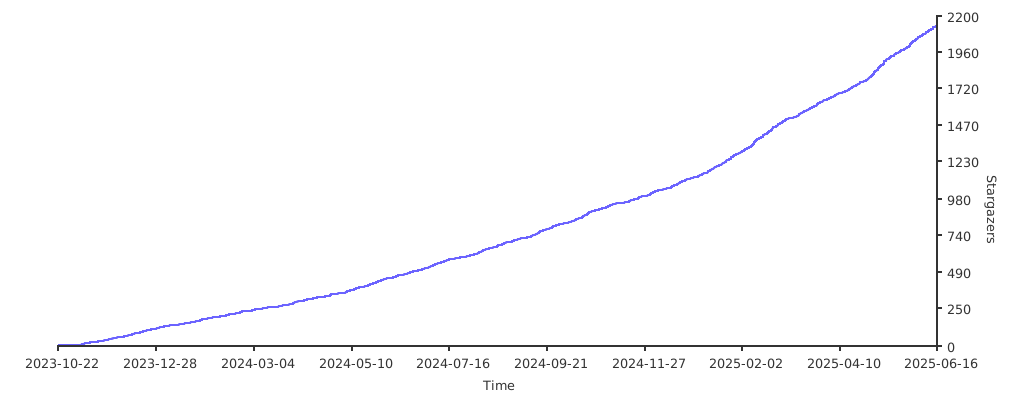](https://starchart.cc/JaKooLit/Hyprland-Dots) +## 🫰 Vielen Dank für die stars 🩷 +[](https://starchart.cc/JaKooLit/Hyprland-Dots)
\ No newline at end of file |