
diff options
| -rw-r--r-- | src/content/blog/mc-server-selfhost.md | 248 |
1 files changed, 248 insertions, 0 deletions
diff --git a/src/content/blog/mc-server-selfhost.md b/src/content/blog/mc-server-selfhost.md new file mode 100644 index 0000000..d60fffa --- /dev/null +++ b/src/content/blog/mc-server-selfhost.md @@ -0,0 +1,248 @@ +--- +title: 'Running a Minecraft server for "free"' +description: 'Stop wasting money on managed hosting services if you already have SSH access to some from of computing' +pubDate: 'Mar 28 2025' +--- + +For many, the first thing people think of when they access a new computational device is to see whether or not they can run DOOM on it. Being born in the 2000s, +the equivalent I think of is whether or not I can run a Minecraft server on it. + +In case you aren't already familiar, running a Java Edition server is relatively simple. All you really need to do is install the Java Runtime and then run the +[server.jar](https://www.minecraft.net/en-us/download/server) provided by Mojang. Thanks in large to Notch's early decisions to write Minecraft in Java, the JVM +abstracts much of the cross-platform shenangians meaning that the server executable will run wherever the Java itself is capable of running. + +The networking required is also fairly simple. At the bare minimum all Minecraft needs is a singular TCP port to allow for multiplayer functionality. + +# Running within a constricted environment +Obviously under most conditions you'll likely have full root access to the machine as well as full admin access to the router. But what I want to show is that +in fact **neither of the 2 above are hard-set conditions for running a server.** Rather all you need is access to internet and the ability to run binary executables. + +As an example, I will be using a computational environment that I myself have a user on but I do not control the router nor do I have root access (and let's just +assume that neither can I install user applications via the built-in package manager). This particular machine is running Ubuntu, while the ideas here are also +theoretically applicable to a Windows machine; I myself (and most other people) will find that working with Windows Server Edition is more trouble than its worth. + +So let's set out a few of the restrictions and requirements for this particular setup. +1. Once again, no root access, no access to router, no access to the package manager +2. Other players other than yourself must be able to also join and play simultaneously +3. This computational environment only allows a process to run for 2 hours before `renice 19` (the lowest CPU scheduling priority pretty much only runs when CPU is idle) +4. We want to be nice. Meaning if there are no players, then there is no point in leaving the server running. However, it must still be available on demand + +*Let's go through and tackle each of these points above...* + +## 1. Getting the thing to run +This is relatively straight forward actually. Instead of relying on the package manager itself you can just grab a [pre-built binary of the JDK](jdk.java.net/21/) +which comes with the `java` binary itself. Grab the appropriate version according to which Minecraft update you'd like to run. + +As for the server JAR itself, most people don't use the one provided by Mojang but rather elect for one that has been patched with various performance gains. +For me, I personally use [Purpur](https://purpurmc.org/) which is directly built on top of Paper + +Once you have both of these, all you need to do is run the JAR. +```bash +PATH_TO_JAVA/java -Xmx1024M -Xms1024M -jar minecraft_server.VERSION.jar nogui +``` +Now you have the server running, but there's no way to access it since its only listening from `localhost`. Luckily as a quick testing method, SSH provides some +level of tunneling that allows you to port forward through SSH + +```bash +ssh -L 25565:localhost:25565 user@remote.ip +``` + +This will essentially route port 25565 to your local 25565. So once you SSH in using this command and run the server, you'll be able to play by connecting to `localhost:25565` + +## 2. Allowing other players to join +This is great, but a Minecraft server for a single person is no better than just running a single-player world. Again, we don't have access to the router so we can't +exactly expose this port to the outside world even if we set the server to listen on `0.0.0.0` + +You could in theory port forward your local port or even share a VPN connection with everyone joining. But this creates a massive bottleneck which is the stability of the +connection between you and the server. + +[](https://postimg.cc/JDSjQksM) + +This isn't great if you don't have stable internet or have bandwidth limitations. Also its not particularly scalable since your home PC needs to be running at all times with +this SSH connection on to allow others to play. + +The solution is to route the game through a tunnel: + +[](https://postimg.cc/RW0qN00R) + +A tunneling service can be running 24/7 making the connection available around the clock. There is still the bottleneck between the server and the tunnel, but as +long as you pick a good tunneling service this shouldn't be much of an issue in terms of latency or bandwidth. + +For this I highly reccomend setting up [playit.gg](https://playit.gg/) which provides a very generous free tier for this sort of game hosting. Setup is also fairly +simple since its basically just 1 additional binary to run with your server. + +Players connect to this tunnel which then forwards the traffic onto the `localhost:25565` on the server machine itself, meaning no need to access the router to port forward + +## 3. Runtime Limitations +One of the unique requirements for my use case is that a process cannot be running for more than 2 hours or else it will degrade in terms of CPU priority. + +Your first intuition may be to simply stop and restart the server and tunnel every 2 hours. Maybe even write a bash script to do just that. But the situation is actually not that simple. + +We first must understand how UNIX/Linux spawns processes: + +A **program** is a passive entity. It is merely the code that is stored on disk. We can think of this like a recipe written in a cookbook + +A **process** is an *active* instance of a **program** that is currently running. +- It has its own memory, CPU state, file descriptors, etc. +- Multiple processes can be created from the same program +In the cooking analogy we can think of this as a kitchen where the recipe is being cooked + +Processes don't just spawn from thin air, UNIX/Linux uses 2 syscalls `fork()` and `exec()` to create new processes. +- When `fork()` is called on a particular process, it creates an *exact duplicate* of itself. This new duplicate is called the child while the original is called the parent. + - The child inherits various things from the parent such as their process priority (nice value), environment variables, and open file descriptors + +- When `exec()` is called. The program running within that process gets replaced by a different program. It still retains all of the additional metadata attached to that +particular process, but now its running some different code. + +So then when you launch some program from `bash` on Linux, we can think of it at a high level as doing the following: +``` +bash (Parent process) + └── fork() + └── child process (duplicate of bash) + └── exec("nvim") + └── child process becomes nvim +``` +Essentially `fork() -> exec()`. You'll quickly notice that this creates a parent-child relationship for all processes in UNIX/Linux (with the exception of the init process). + +This is just the high level idea, an OS course or something similar can teach you all the nitty gritty details. + +### So what's the problem? + +Well let's take this situation for example. +``` +At time 0 (on initial SSH): + +sshd (SSH Daemon Session for USER) [nice: 0] + └── bash (User Shell) [nice: 0] +``` +When I SSH in to the server, the `sshd` process is forked then `exec()` is called spawning the shell itself. Then, running the server JAR does something similar where +the `bash` process is forked and then `exec()` replaces the forked-bash with `java`. + +Nice-ness is a value we use to denote CPU priority (lower = higher priority). Let's assume that all processes start with a nice value of 0, indicating the highest CPU priority, and that when a process +runs for 120 time units it gets `renice 19`-ed (meaning the nice value gets set to 19). + +Now let's assume that for whatever reason at time 30 I decide to run the server +``` +At time 30 (Running server application) +sshd (SSH Daemon Session for USER) [nice: 0] + └── bash (User Shell) [nice: 0] + └── java -jar app.jar (Java Application) [nice: 0] +``` + +OK fine, that's all good. But let's progress time a bit more... + +``` +At time 120 (Running server application) +sshd (SSH Daemon Session for USER) [nice: 19] + └── bash (User Shell) [nice: 19] + └── java -jar app.jar (Java Application) [nice: 0] +``` + +Uh oh, that bash process and ssh process has been running for more the 120 time units. Luckily `renice` is not recursive by default so our server is still unaffected by the +lowered CPU priority. + +``` +At time 150 (Running server application) +sshd (SSH Daemon Session for USER) [nice: 19] + └── bash (User Shell) [nice: 19] + └── java -jar app.jar (Java Application) [nice: 19] +``` + +Alright so we'll need to restart the server right? Let's terminate our bash and java processes then re-fork them. + +``` +At time 151 (Running server application) +sshd (SSH Daemon Session for USER) [nice: 19] + └── bash (NEW User Shell) [nice: 19] + └── java -jar app.jar (NEW Java Application) [nice: 19] +``` + +OH NO! Because the child-processes inherited the nice value it means that even though we technically stopped and re-started both the server and bash, due to the ssh session +spanning longer than 120 time units, all processes forked from it also take on the penalized nice value! + +So as you can see, simply stopping and restarting like that isn't a viable solution + +### The Solution = Re-SSH +The solution to this problem is simple, we just need to close our SSH session every time we gain the penalty. For me that's 2 hours, so every 2 hours I need to stop and re-start +the server. Doing this manually would be quite laborious so this is a good job for some random old laptop or even a Raspberry Pi to trigger. + +```bash +while true; do + echo "[$(date)] Starting SSH session..." + ssh "$USER@$HOST" << 'EOF' + echo "SSH session started. Will auto-exit in 2 hours." + <run server stuff here> & + sleep 7200 # 2 hours + echo "Time's up. Goodbye." + exit +EOF + echo "[$(date)] Session ended. Reconnecting in 5 seconds..." + sleep 5 +done +``` + +This will ensure that a new `sshd` process is being forked from the `sshd master daemon` (which almost certainly has no issues with being nice-d since you want people to be able to ssh in), +avoiding the time constrain issue. + +If you have access to 2 machines, you could theoretically bounce them back and forth to maintain infinite uptime, but as you'll soon see even the script above doesn't satisfy the 4th condition. + +## Being nice, let's not waste CPU +There's no point in keeping a server up if there's no players. So what if we were able to have some way to on-demand start and stop when someone wants to play. + +The solution I've come up with is to run a small flask app which manages checking for players, as well as spawning the new sshd process as discussed in part 3. + +[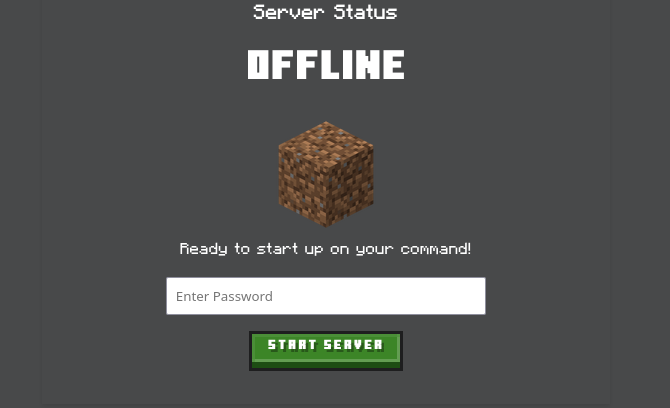](https://postimg.cc/sBLbrTBz) + +To start, the server. Users can navigate to the website and trigger the flask app to run a bash script that handles SSH-ing into the relevant machine. + +```bash +# Example start.sh +#!/bin/bash +ssh -o StrictHostKeyChecking=no yukais6@circinus-30.ics.uci.edu << 'EOF' +cd /home/yukais6/java-neural-net +tmux new-session -d -s server +tmux send-keys -t server'./tunnel &' C-m +tmux send-keys -t server 'jdk-21.0.5/bin/java -Xmx1024M -Xms1024M -jar server.jar nogui' C-m +exit +EOF +``` + +```bash +# Example stop.sh +ssh -o StrictHostKeyChecking=no yukais6@circinus-33.ics.uci.edu << 'EOF' +tmux kill-session -t supervised-cluster +exit +EOF +``` +We can run a second thread within the flask-app to check when the server should restart. (aka calling stop.sh then start.sh) + +Using Minecraft's built in RCON API (you need to port forward the RCON port found in `server.properties` file), we can run commands from within Minecraft and parse +various information. + +```python +def get_player_count(host, password, port): + with MCRcon(host, password, port=port) as mcr: + response = mcr.command("list") + print(response) + match = re.search(r"There are (\d+) of a max of \d+ players online", response) + if match: + return int(match.group(1)) + else: + print("Error: Could not parse player count from response.") + return None +``` + +Similarly, we can also use this API to make announcements which is helpful for announcing when the server is about to restart: + +```python +def announce_to_server(message: str, host: str, password:str,port: str): + with MCRcon(host, password, port) as mcr: + resp = mcr.command("say " + message) + return resp +``` + +With this we have solved the problem of "being nice". We only run the server on demand, while also managing the nice-ness value of the server accordingly. + +--- + +So if you have access to some form of computing and are paying for Realms or managed hosting. Why not consider self-hosting. |