
diff options
| author | Pinapelz <yukais@pinapelz.com> | 2023-09-13 01:59:40 -0700 |
|---|---|---|
| committer | Pinapelz <yukais@pinapelz.com> | 2023-09-13 01:59:40 -0700 |
| commit | 0f6ba209e0602f12755a63f87715d87e630d92ae (patch) | |
| tree | 16bdcd9c8507e26b861d9b81599d4a1087b1cd75 | |
| parent | 52d6c7f229b846b98e58b99e02c663dd1a71d4dc (diff) | |
post: YouTube live timestamping initial posting
| -rw-r--r-- | src/content/blog/youtube-live-timestamping.md | 137 |
1 files changed, 137 insertions, 0 deletions
diff --git a/src/content/blog/youtube-live-timestamping.md b/src/content/blog/youtube-live-timestamping.md new file mode 100644 index 0000000..8c29ca9 --- /dev/null +++ b/src/content/blog/youtube-live-timestamping.md @@ -0,0 +1,137 @@ +--- +title: 'YouTube Live Timestamping Tools' +description: 'My process for timestamping YouTube Live streams' +pubDate: 'Sep 13 2023' +heroImage: 'https://files.pinapelz.com/firefox_SaQtAu7nL4.png' +--- +## Introduction to Timestamping +If you've ever watched the VOD of a YouTube livestream (especially within the VTuber community) and scrolled to the comments, chances are you've seen timestamps in the comment section. YouTube livestreams have the unique ability to transition from a live event into a traditional video. With streams often turning into videos that exceed several hours, it can be difficult for viewers to return to the VOD to find a certain moment again. + +While clips do solve this feature, the process for creating a clip is rather cluttered and slow as it requires viewers to stop watching the content to segment a portion of the stream. Not to mention the deletion of the VOD or the streamer turning this feature off would make the creation and preservation of clips difficult. + +Timestamping is one solution in which involves viewers create a collection of "stamps" in the comment section of a video which refer to key moments such that viewers can find identifiying moments later. + +Despite how prevelant the practice is, information regarding how timestampers operate is actually sparse (at least among the VTuber community). + +No, wizardry isn't how timestamps for a 3 hour stream seemingly magically appear 1 minute after stream. I hope to at least document some information I know pretaining to how liv timestamps are generated (mainly within the VTuber community). + +## Live Timestamping +I should first specify that this is "live timestamping". While you could wait until the stream has concluded and then manually write down key moments... + +- You'd have to re-watch content you've already seen (assuming you watched parts/the entirety of the stream) + + +- YouTube takes time to processes the VOD. While you can access the video as soon as the stream is finished, you'll experience A LOT of buffering making the viewing experience nearly unbearable + +The solutions mentioned here are generated LIVE as the stream is happening. Which solves both of these issues. + +--- + +## Korotagger, PurinTagger, or whatever dog VTuber they've named it this time +The most common method I've seen circulating is to use the Discord bot Korotagger. You'll likely have seen it in many VTuber fan community discords. + +This is actually quite a good solution if you have a group of people who would like to timestamp together. The system itself allows for multiple people to simultaneously contribute to adding timestamps and also a simple export feature at the end. + +<figure style="text-align: center;"> + <img src="https://files.pinapelz.com/Screenshot_20230912_220530.png" alt="Korotagger example usage"> + <figcaption>Example usage of Korotagger in Phase Connect Discord</figcaption> +</figure> + + +Example Export: +``` +*From Phase Connect Discord Jelly Stream Tagging* +Tags +https://www.youtube.com/watch?v=uLx1byi05kg June 29, 2023 7:54 PM 42 tags (1.6/min) +01:58 Jelly promised so it is going through +03:16 20 min eta till end of reading +03:32 tongue swollen +04:27 Doctor said it was good (No cutting) +05:13 A week for anesthesia to wear out, and only pulling +05:47 Morning & kept tooth +06:15 Desk banging +06:57 Im not cute... (She is cute) +... +``` + +Although its hard to find, the bot is documented [here](https://563563.xyz/korotagger/) so I won't get into the details of how to use it or set it up. + +**As of writing this, the bot cannot be added to servers due to a lack of verification (I think its because the bot is in over 100 servers and has not been verified yet)** + +[The bot however is open source](https://github.com/Yarn/korotagger) so you can self-host if you're interest in using it. + +<a href="https://github.com/Yarn/korotagger" ><img src="https://img.shields.io/badge/GitHub-100000?style=for-the-badge&logo=github&logoColor=white"/></a> + +However, I still find this solution in many ways clunky. + +- Without a UI, there's always the risks of having timestamps be incorrectly offset (since you're technically going from client to Discord to Korotagger) + +- Adjustments take time to type out which could break timestampers from their "flow". Potentially difficult to work with even after exporting them + +- Must have Discord open and ready to go + +## An Alternative Using Javascript +One day I stumbled upon a [Reddit post](https://www.reddit.com/r/VirtualYoutubers/comments/ifzqe7/i_made_a_live_timestamp_tool/) about a Javascript tool that can be used to live timestamp streams. + +Whats interesting here is that calculating the timestamp of a video isn't actually limited to when the stream is finished, you can retrieve it at any point in time. + +```javascript +var time = Math.max(0, Math.floor(document.querySelector("video").currentTime)); +``` +Turns out that regardless of whether [DVR](https://support.google.com/youtube/answer/9296823?hl=en) is enabled or not, the elapsed time of a given video is still available client side. + +I've worked with this tool a bit and have made some modifications that I think makes it more usable for live timestamping. You can find more information over on the [GitHub Gist](https://gist.github.com/pinapelz/a7f16ef130a41cfee77f23be76f2cc0e) page. +<details> + <summary><b>ytlivestamper.js</b></summary> + <style> + @import url('https://cdn.rawgit.com/lonekorean/gist-syntax-themes/d49b91b3/stylesheets/idle-fingers.css'); + @import url('https://fonts.googleapis.com/css?family=Open+Sans'); + body .gist .gist-file { + border-color: #555 #555 #444 + } + body .gist .gist-data { + border-color: #555 + } + body .gist .gist-meta { + color: #ffffff; + background: #373737; + } + body .gist .gist-meta a { + color: #ffffff + } + body .gist .gist-data .pl-s .pl-s1 { + color: #a5c261 + } + </style> +<script src="https://gist.github.com/pinapelz/a7f16ef130a41cfee77f23be76f2cc0e.js?file=ytlivestamper.js"></script> +</details> + +[Here's a minified/packed version that you can either setup as a bookmarklet or paste into the console.](https://gist.githubusercontent.com/pinapelz/a7f16ef130a41cfee77f23be76f2cc0e/raw/c7b9a0c4afc7c07bfae218e01d21829ba8ad0655/ytlivestamper-minified,.js) + +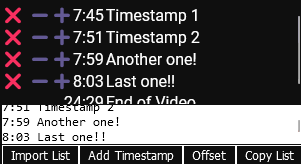 + +You could also directly copy the script into TamperMonkey and use it as a userscript (so in short its quite flexible), + +### Workflow +In addition to this tool, I also use a Userscript called [YTBetter](https://greasyfork.org/en/scripts/459535-ytbetter) to force DVR to be enabled on all YouTube videos. + +As I mentioned previously, if a YouTube livestream ends, the VOD will become practically unwatchable for a period of time since its still processing. This also means that if you miss a timestamp, it'll take a while before you can go back and add it back in. Similarly, enabling this features means that you can pause stream and catch up later (by watching on 2x speed). + +### Export +After exporting the timestamps you can actually "style" them a little. + +Some people enjoy segmenting the streams into sections, sometimes using special characters for additional spice +``` +00:30 Section 1 +├01:00 Some timestamp +├01:30 Another timestamp +└02:00 Another timestamp +02:30 Section 2 +├03:00 Some timestamp +├03:30 Another timestamp +└04:00 Another timestamp +``` +Additionally, YouTube comments also support 3 simple formatting options: **bold** (`**bold**`), *italics* (`_italics_`), and ~~strikethrough~~ (`-strikethrough-`). You can use these to make timestamps stand out a little more. + +## Conclusion +Well in conclusion I hope this sheds some light on 2 potential ways to timestamp YouTube livestreams. If you choose to timestamp, I hope you enjoy the process and thank you for the extra effort you put in to make the VODs more enjoyable for everyone. |